
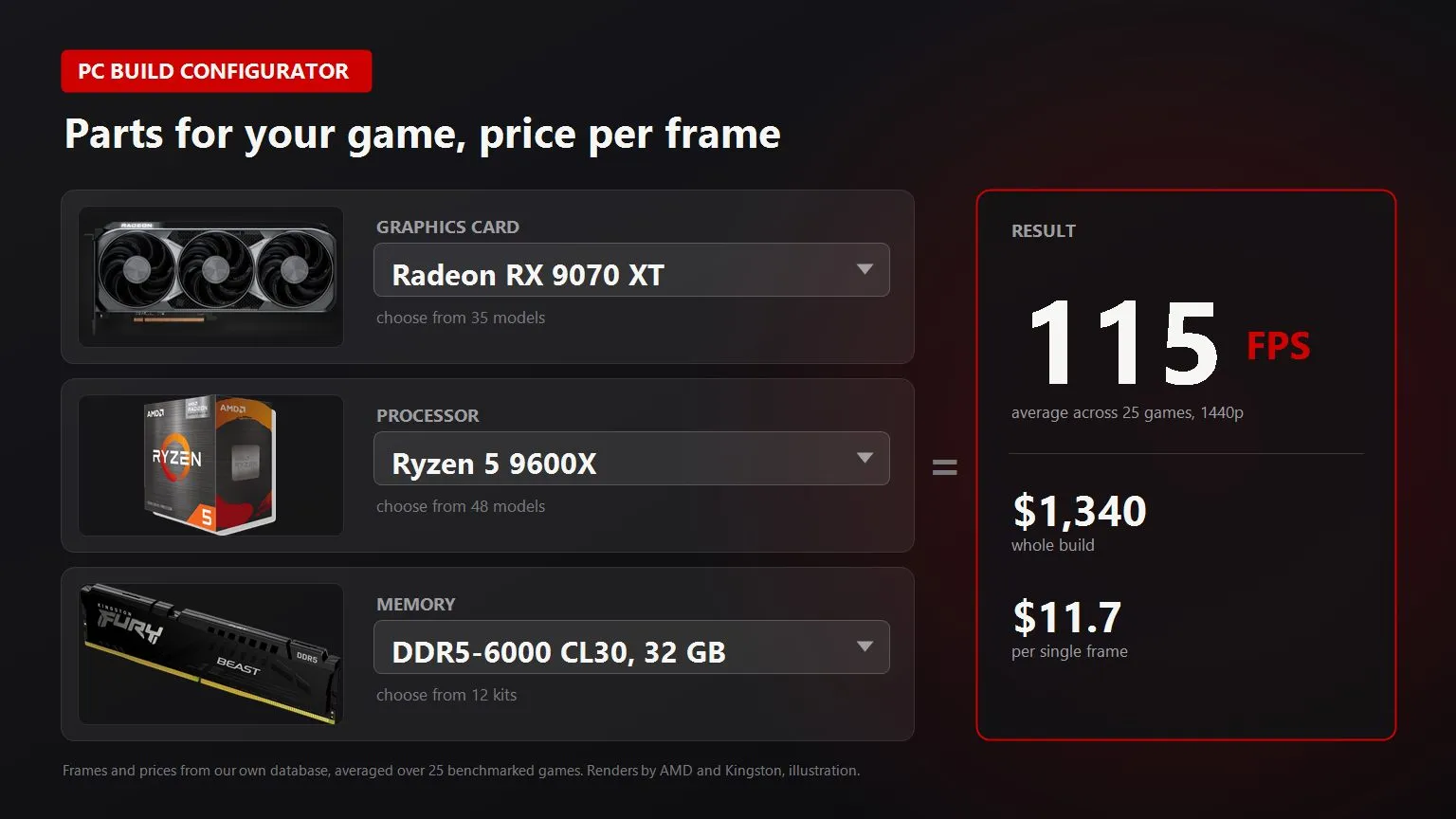
The hard part of building a PC for one game is knowing when paying more stops buying anything. A card that costs two hundred dollars more gives you eight frames. Or forty. Or none at all, because the processor is holding everything back, and you find that out after the money is gone.
The tool above works that out for you. Below I go through how to pick a PC build for a game by hand, the order I use myself, and the places where people lose money most often.
How to pick a PC build for a specific game
The order is the opposite of what everyone is used to. Most people start from a budget and ask what a thousand dollars buys. That tells you what you can get, not what for.
Start from three things you already know about yourself.
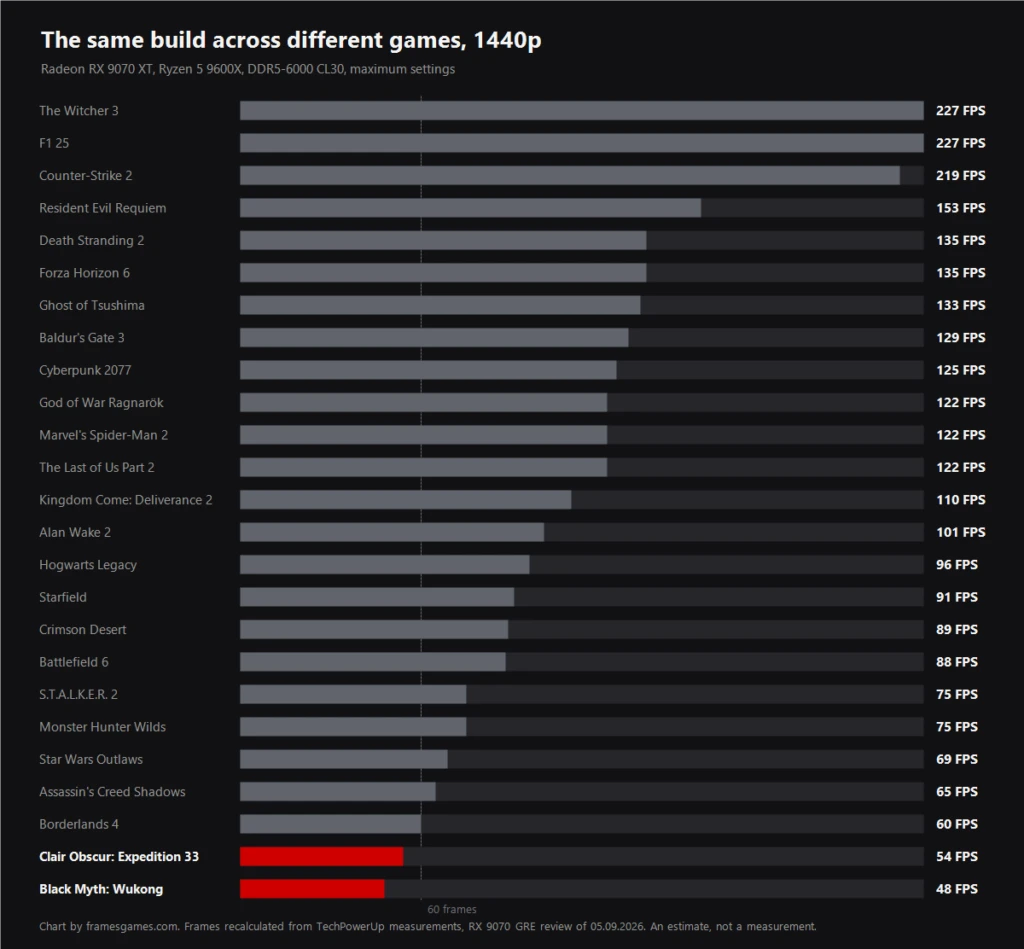
- The game you actually play the most. One game, not a list of ten. Their demands differ absurdly: S.T.A.L.K.E.R. 2 and Counter-Strike 2 ask for such different hardware that averaging them is meaningless.
- The resolution of your monitor. The one on your desk, not the one you might buy someday. The gap between 1080p and 4K in required graphics power is bigger than the gap between generations.
- How many frames you need. Sixty is comfort, a hundred and twenty is for competitive shooters, a hundred and forty four only makes sense if your monitor runs that fast.
From there the "Pick one for my game" tab finds the cheapest build that holds those frames. It also shows the next step up, so you can see what it costs per single added frame.
What limits your frames, the graphics card or the processor
Frames are capped twice. The graphics card sets how much it can draw. The processor sets a ceiling you will not pass no matter which card you buy. The result is the lower of the two, and that is why two builds at the same price can land far apart.
Here is a live example from our base. A Radeon RX 9070 XT with a Ryzen 5 5600 at 1440p averages a hundred and five frames. In The Witcher 3 that is a hundred and sixty eight while the card had headroom up to two hundred and thirty four: the processor holds it. In Battlefield 6 it is the other way round, eighty eight frames against a processor ceiling of two hundred and thirty five: here the card ran out.
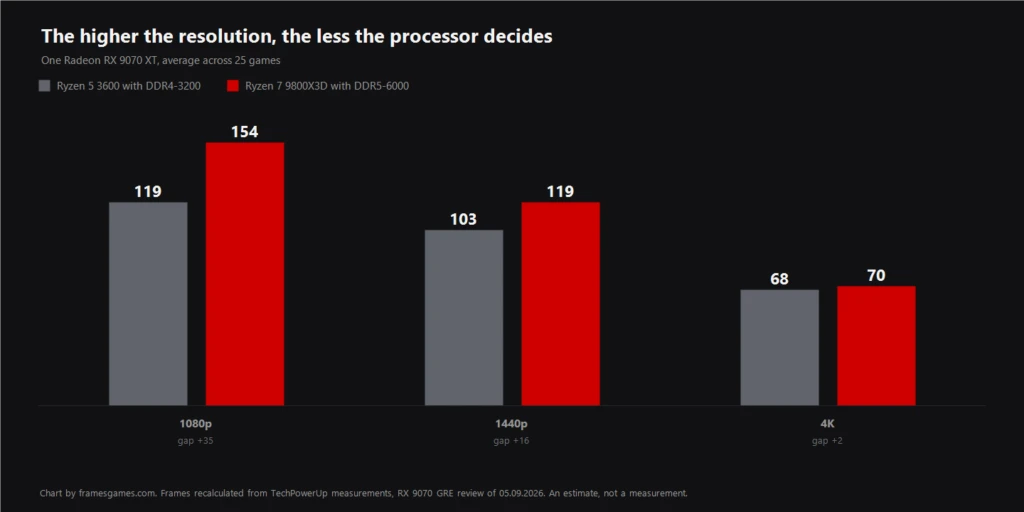
The rule that falls out of this is simple. At 4K the graphics card is almost always to blame, at 1080p it is usually the processor, and 1440p sits in between where it depends on the game. The "Limited by" column on the first tab answers this per game, and it is more useful than the average FPS.
Price per frame and where overpaying starts
Price per frame is the one plain measure of whether your money is going somewhere sensible. Divide the build total by the average FPS. On its own the number says little. What matters is the cost of each next frame you add.
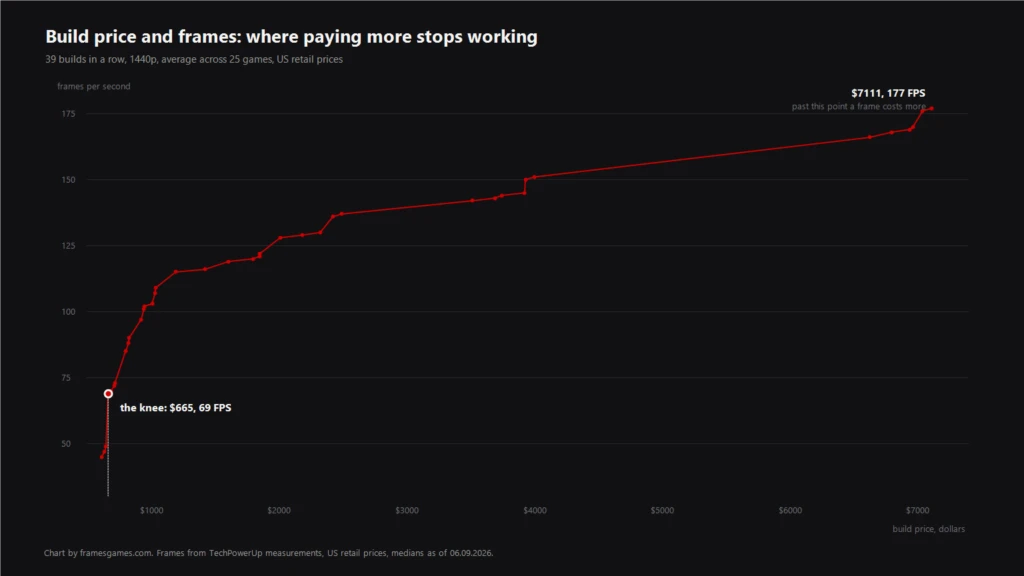
Watch what happens in Cyberpunk 2077 at 1440p with US prices. Climbing from a Radeon RX 7600 up to an RX 9070 XT at around a thousand dollars, every added frame costs between one and thirteen dollars. A fair price for the gain.
The next step, an RTX 5080, costs two hundred and seventy three dollars per frame. Twenty times more than the step before it.
And right after that, swapping in a Ryzen 5 5600 adds fifteen frames at two dollars each. The money you were about to hand over for a card is four times more useful in the processor at that point. The chart on the second tab marks this turn, and it sits in a different place for every game.
Memory is the cheapest gain in the whole build
Memory moves the processor ceiling, not the frames your graphics card can push. Everything else follows from that: at 1080p the kit is visible, at 4K it barely matters.
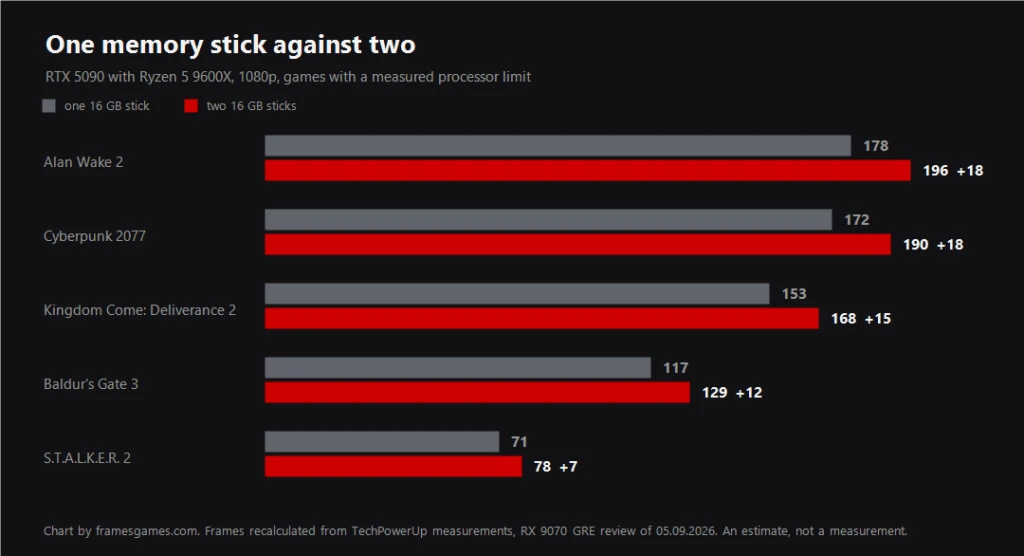
The common mistake here is not speed or timings, it is the number of sticks. One stick instead of two costs about a tenth of your frames, and on 3D V-Cache chips the loss is three times smaller. In our base an RTX 5090 with a Ryzen 5 9600X at 1080p drops nine frames from a single stick, and the price per frame goes up rather than down. You saved two hundred dollars and made every frame more expensive.
Capacity is a separate story. Sixteen gigabytes is already thin for heavy games, but it shows up as stutter and frame drops rather than in the average. That is why capacity raises a warning in the tool instead of adjusting the number: a fake adjustment would be worse than saying it in words.
Five mistakes that make a build slower and more expensive
- An expensive card with a cheap processor. The classic one. With the cheapest processor an RTX 5080, a 4090 and a 5090 all deliver the same frames in Cyberpunk at 1440p, because the card is not the limit. Paying for the two bigger models buys exactly nothing there.
- One memory stick instead of two. Covered above. A second stick is nearly always the cheapest way to add frames.
- Eight gigabytes of video memory at 4K. In Borderlands 4 an RTX 5060 Ti with eight gigabytes gives seven frames at 4K, and the same card with sixteen gives eighteen. That is not a percentage, that is the line between unplayable and playable on low.
- Building for a monitor you do not own. Buying 4K hardware while playing at 1080p means paying for headroom that kicks in years later, by which time the same parts cost half as much.
- The wrong type of memory. AM4 takes DDR4 only, AM5 takes DDR5 only, LGA1700 takes either and that is a property of the motherboard. The tool simply does not offer those pairs.
Where the numbers come from and how much to trust them
We do not run our own test bench and will not pretend otherwise. Frames are derived from TechPowerUp measurements with a published method: you can see the bench, the preset and the scene. Prices are collected from shops in your country and the collection date sits right under the table.
A ~ next to a number means that card was not in the measurement for that game, so its frames are scaled from the nearest card by average FPS. When a part has no price, the total is marked incomplete instead of being rounded into something tidy.
These are estimates, not promises. If you see eighty eight frames, expect roughly eighty eight: settings, driver version and the exact scene will each move it a few percent either way.
Common questions about picking a build
How do I pick a PC build for a specific game
Name the game, your monitor resolution and the frames you want on the "Pick one for my game" tab. The tool shows the cheapest build that holds those frames and the point where paying more stops adding them.
What matters more for gaming, the processor or the graphics card
It depends on resolution. At 4K the graphics card almost always decides, at 1080p it is usually the processor. At 1440p it varies by game, and the "Limited by" column shows it title by title.
How much RAM does gaming need in 2026
Thirty two gigabytes in two sticks. Sixteen is already thin for heavy games, and a single stick instead of two costs about a tenth of your frames.
Is eight gigabytes of video memory enough
At 1080p usually yes, at 4K no. In Borderlands 4 the difference between eight and sixteen gigabytes on the same card is seven frames against eighteen at 4K.
What is price per frame and why does it matter
The build total divided by the average FPS. On its own it means little, but the cost of each next added frame shows immediately where a build stops being sensible.
Sources
Graphics card frames and per game results: TechPowerUp, Sapphire RX 9070 GRE Pulse review. Processor ceilings: TechPowerUp, Ryzen 7 5800X3D 10th Anniversary review, measured at 720p with an RTX 5090. Memory scaling: TechSpot, DDR5-8000 versus DDR5-6000 CL26, and the Ryzen 5000 Memory Performance Guide. Single stick losses: Tom's Hardware, geomean across thirteen games at 1080p. Prices: amazon.com, alternate.nl and market.yandex.ru, median of up to eight offers with outliers removed.