The question is simple: what should you buy so that S.T.A.L.K.E.R. 2 runs properly at 2560x1440 or 3840x2160 after Update 2.0. In August 2026 the answer is decided less by frame rates than by price tags, and those are currently skewed enough to make the choice almost obvious.
What the game itself asks for, according to the developer
Start with what can be checked at the source. These are the official requirements from the game page on Steam, no paraphrasing.
| Minimum | Recommended | |
|---|---|---|
| Target | 1080p, 30 fps, Low preset | 1440p, 60 fps, High preset |
| Processor | Core i7-7700K or Ryzen 5 1600X | Core i7-11700 or Ryzen 7 5800X |
| Memory | 16 GB, dual channel required | 32 GB, dual channel required |
| Graphics | GTX 1060 6 GB, RX 580 8 GB or Arc A750 | RTX 3070 Ti, RTX 4070 or RX 6800 XT |
| Storage | 160 GB, SSD only | 160 GB, SSD only |
What matters here is not only the table but what is missing from it. GSC publishes no 4K requirements at all. The top official target is 1440p at sixty frames. When a developer will not name a 4K configuration, that is an answer in itself.
What Update 2.0 changed
The GSC patch notes list the move to Unreal Engine 5.5.4, reworked lighting, shadows, reflections, landscape and foliage, plus over five hundred fixes. Performance is not mentioned once, yet players noticed it immediately.
Third party measurements agree on one point, and it is the interesting one: the gain depends on how many living characters are in the area. TweakTown reports over thirty percent in Rostok, where there is a crowd, and eight percent in Zalissya, where there is nobody. DSOGaming, citing runs by MxBenchmarkPC on a Core i7-14700F with an RTX 4080, reports around ten extra frames in quiet areas and around twenty where the population is dense.
That leads to a practical conclusion worth more than any headline percentage. What was relieved is the CPU side of the engine, not the graphics side. The loud numbers therefore appear where the game used to be CPU bound: at low resolution and in busy locations. At 4K, where the load sits on the graphics card, the update changes very little.
We went through what the update did to the game itself in our piece on the Zone before and after 2.0.
Which card handles 2K, and which one handles 4K
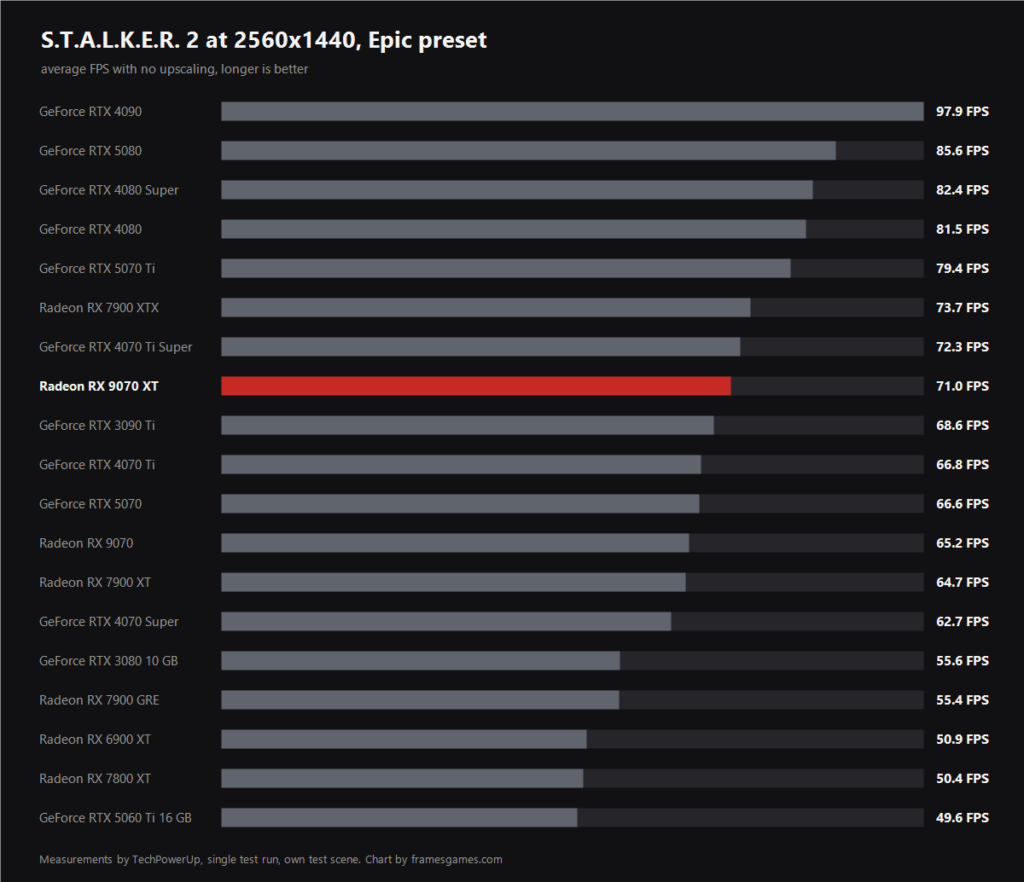
This is data from TechPowerUp, an outlet that tests in house and publishes its methodology: own test scene, Epic preset, no upscaling, one consistent run.
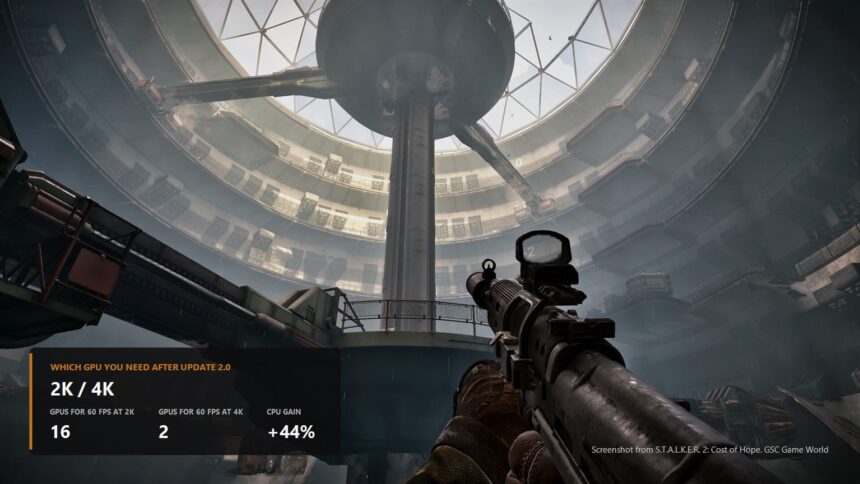
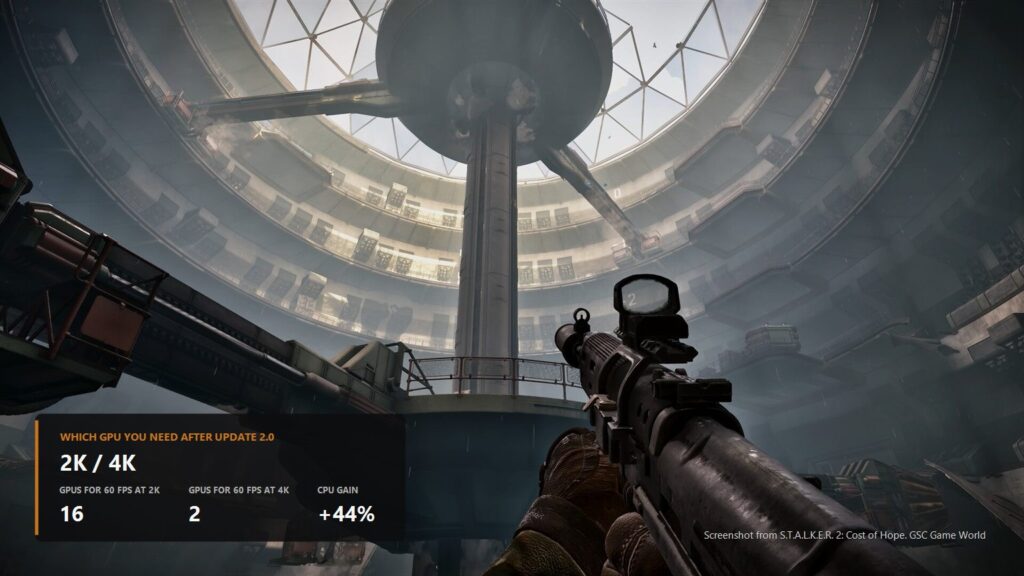
At 2560x1440 the Radeon RX 9070 XT delivers 71 frames and lands right between the GeForce RTX 4070 Ti Super and the RTX 3090 Ti. It is ahead of the RTX 5070, which manages 66.6, and behind the RTX 5070 Ti at 79.4. The sixty frame mark is cleared by everything down to the RTX 4070 Super. The RTX 5060 Ti 16 GB closes the chart at 49.6.
| Graphics card | 3840x2160, average FPS |
|---|---|
| GeForce RTX 4090 | 61.7 |
| GeForce RTX 4080 Super | 50.5 |
| GeForce RTX 4080 | 49.5 |
| Radeon RX 7900 XTX | 45.7 |
| GeForce RTX 3090 Ti | 44.1 |
| GeForce RTX 4070 Ti Super | 43.5 |
| GeForce RTX 4070 Ti | 39.6 |
| Radeon RX 7900 XT | 39.1 |
| GeForce RTX 3080 10 GB | 34.5 |
| Radeon RX 7800 XT | 29.9 |
And 4K confirms what we said above about the missing official requirements. Exactly one card in the entire list clears sixty frames, the RTX 4090 with its 61.7. The next one down, the RTX 4080 Super, manages 50.5, a fifth behind. This is not a case where paying more gets you the result you wanted, it is a case where native 4K simply is not in the budget.
Prices: this is where it is decided
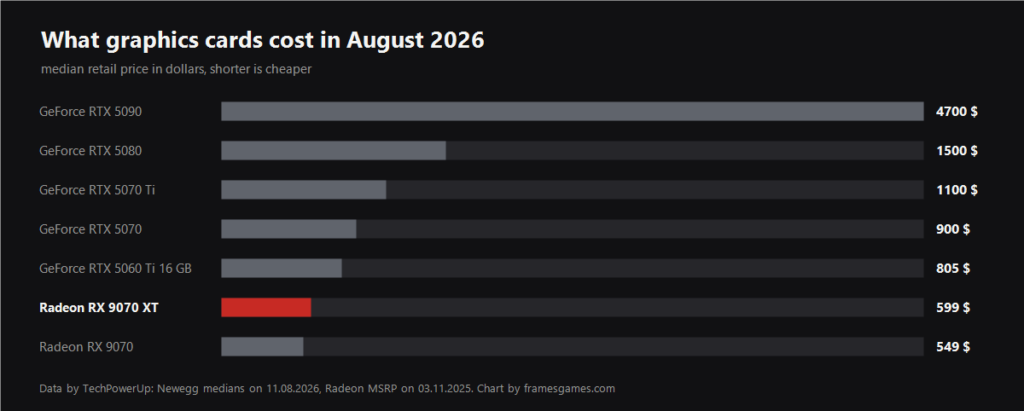
Now for the part performance reviews rarely mention. In August 2026 GeForce RTX 50 cards sell well above their suggested prices in retail, while the Radeon RX 9070 XT sells at exactly its own.
| Graphics card | Median price, August 2026 | What is happening to it |
|---|---|---|
| Radeon RX 9070 XT | 599 dollars | this is the AMD suggested price |
| Radeon RX 9070 | 549 dollars | also at the suggested price |
| GeForce RTX 5070 | 900 dollars | up 36 percent in a month |
| GeForce RTX 5070 Ti | 1100 dollars | unchanged over the month |
| GeForce RTX 5080 | 1500 dollars | up 3 percent |
| GeForce RTX 5090 | 4700 dollars | up 9 percent |
The difference is not cosmetic. One RTX 5080 currently costs as much as two and a half Radeon RX 9070 XT cards. The RTX 5070 costs three hundred dollars more than the 9070 XT while sitting a class below it. And the flagship RTX 5090 has drifted to 4700 dollars, close to eight times the price.
What one frame costs
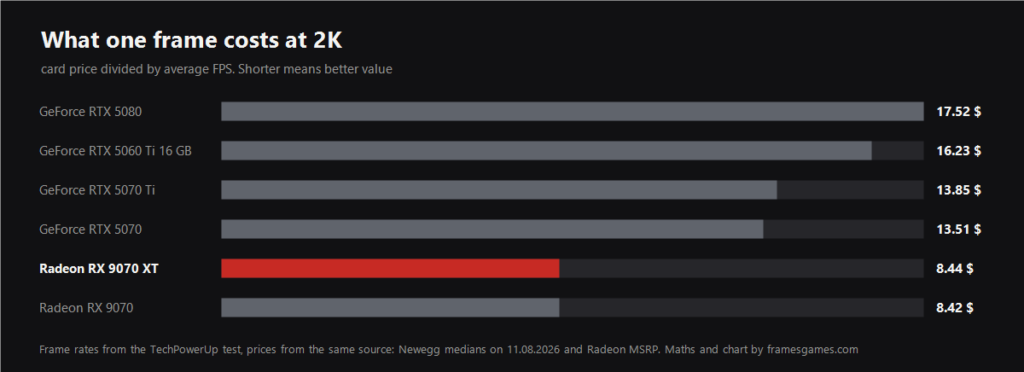
Combine the two tables above into the single number that actually answers the sensible money question: how many dollars you pay for each frame per second. The maths is simple, card price divided by its average FPS at 2560x1440.
| Graphics card | Average FPS at 2K | Price | Price per frame |
|---|---|---|---|
| Radeon RX 9070 | 65.2 | 549 $ | 8.42 $ |
| Radeon RX 9070 XT | 71.0 | 599 $ | 8.44 $ |
| GeForce RTX 5070 | 66.6 | 900 $ | 13.51 $ |
| GeForce RTX 5070 Ti | 79.4 | 1100 $ | 13.85 $ |
| GeForce RTX 5060 Ti 16 GB | 49.6 | 805 $ | 16.23 $ |
| GeForce RTX 5080 | 85.6 | 1500 $ | 17.52 $ |
The gap is not a matter of percent, it is a matter of multiples. Both Radeons sit around 8.4 dollars per frame, every GeForce lands between 13.5 and 17.5. Put plainly: the RTX 5070 costs 60 percent more for the same frame, the RTX 5070 Ti 64 percent more, the RTX 5060 Ti 93 percent more, and the RTX 5080 exactly twice as much.
The RTX 5060 Ti deserves a separate look. A card at 805 dollars delivers 49.6 frames, which is less than the Radeon RX 9070 at 549. That is the worst combination in the set apart from the flagship.
Why the Radeon RX 9070 XT is the sensible pick right now
Put it all together for this particular game.
Price. It is the only card in its class you can actually buy at the official price instead of a third above it. Everything from NVIDIA in the same class costs twice as much or more.
Memory. It has 16 GB. The game needs about eight at 2K and around eleven at 4K, so the headroom is real rather than marketing. Twelve gigabyte cards are already tight at 4K, and eight gigabyte cards run out there.
Upscaling. S.T.A.L.K.E.R. 2 is on the official AMD list, and the RX 9000 series gets machine learning FSR 4. In this game it is switched on through the driver rather than in the game settings. How to do that is in our piece on FSR 4 and the full list of games. For 4K this is the decisive part: the game renders at roughly 1440p, which is exactly the resolution the developer publishes requirements for.
One honest caveat, because leaving it out would be dishonest. At native 4K on maximum settings the 9070 XT does not deliver sixty frames, and neither does almost anything else on the market apart from flagships costing thousands. Its strength is different: it gets the game to comfortable frame rates with an upscaler and for 599 dollars.
How to get the most without buying anything
Turn on an upscaler. The game has TSR, DLSS, FSR and XeSS. At 4K this is not optional. Owners of cards where FSR 4 is unavailable still have OptiScaler.
Fit 32 GB of system memory. That is not our invention, it is the official GSC requirement for 1440p. The game will start on sixteen gigabytes, but that is the configuration for 1080p on low settings.
Check the processor before the graphics card. Since the update relieved the CPU side, an older system may have stopped being the bottleneck. The official recommendation is a Core i7-11700 or Ryzen 7 5800X.
Do not forget the SSD. The requirements list it as mandatory rather than desirable, and it is the one item you cannot work around with settings.
Our impressions of the game itself are in the review, and we covered the recent add-on in the news about the Cost of Hope release.
Sources
- S.T.A.L.K.E.R. 2 on Steam, official system requirements
- Update 2.0 patch notes in the game Steam news feed
- TechPowerUp, STALKER 2 performance benchmark, 35 GPUs tested
- TechPowerUp, median RTX 50 prices in August 2026
- TechPowerUp, Radeon RX 9070 and RX 9070 XT reach MSRP
- TweakTown, performance gains in patch 2.0
- DSOGaming, patch 2.0 benchmarks
- AMD, official list of games with FSR support