• TRENDING
  • Warframe
  • Game News
  • How-to
  • Games
  • Hardware News
  • CONTACT US
FramesGames
EN
  • ENEnglish
  • NLNederlands
  • Hardware
    • PC Builds
    • PC build calculator
  • Games
    • Reviews
  • How-to
  • News
    • Game News
    • Hardware News
  • Bookmarks
Reading: What to play on a laptop RTX 4060
Share
FramesGamesFramesGames
Font ResizerAa
  • Adventure
Поиск
  • Hardware
    • PC Builds
    • PC build calculator
  • Games
    • Reviews
  • How-to
  • News
    • Game News
    • Hardware News
  • Bookmarks
Have an existing account? Sign In
Follow US

Home / How-to / What to play on a laptop RTX 4060

How-to

What to play on a laptop RTX 4060

Last updated: September 1, 2026 9:15 am
David Freeman
Share
6 Min Read
SHARE

Let me start with what the laptop box does not tell you. The laptop RTX 4060 and the desktop RTX 4060 are different graphics cards sharing a name. In the TechPowerUp database the desktop one is nineteen percent faster. Someone buys a laptop, reads a familiar name and assumes they got the card their friend has in a tower. They did not.

Содержание
  • The second most common card in the world
  • What that is in desktop terms
  • Everything in the Steam top runs
  • Where eight gigabytes do get in the way
  • What to switch on
  • When to replace it

The good news: even so this is a solid card, and nothing in the Steam top gives it trouble.

The second most common card in the world
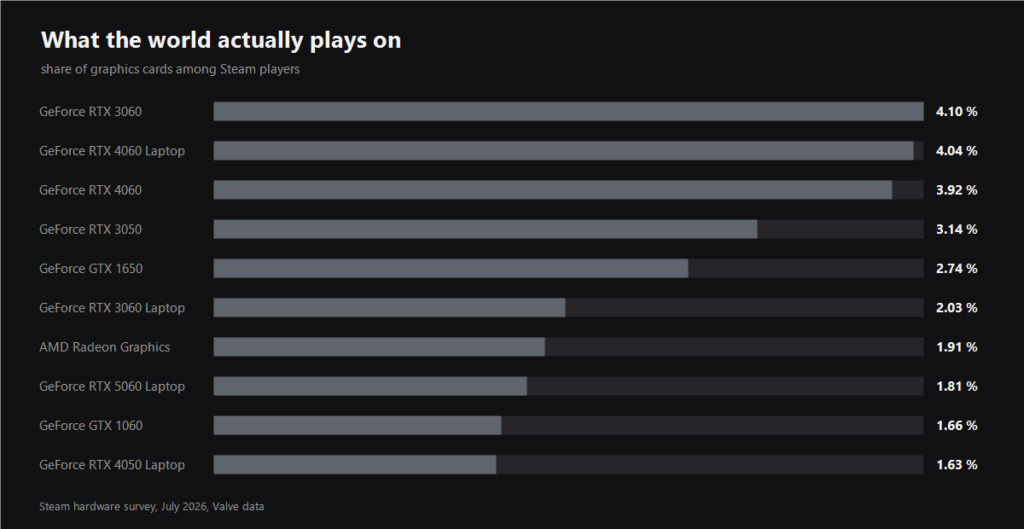
Chart of graphics card share among Steam players
FramesGames chart built on the Steam hardware survey

4.04 percent of all Steam machines. Only the desktop RTX 3060 is above it. Laptop cards together account for around twelve percent, which is more than the entire desktop RTX 50 line.

And yet reviews aimed at laptops barely exist: everyone writes about desktop cards and leaves the laptop owner to work out which parts apply. Hence this article.

What that is in desktop terms
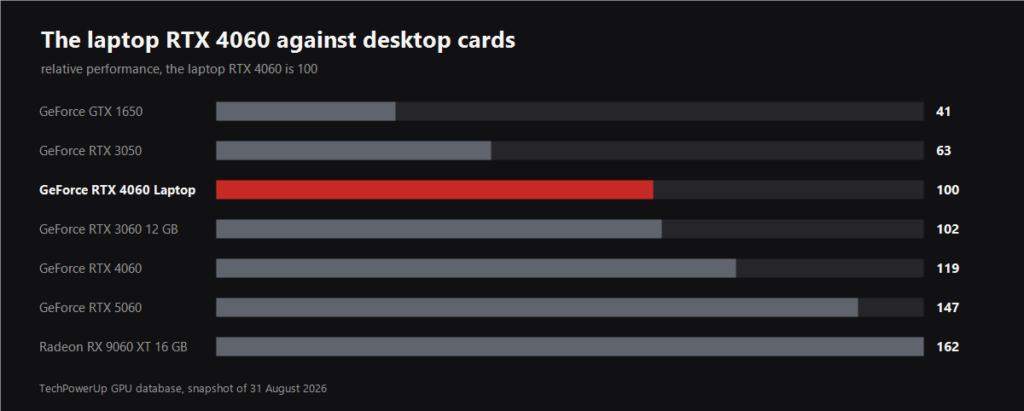
Chart comparing the laptop RTX 4060 with desktop cards
FramesGames chart built on the TechPowerUp database

Take your card as one hundred and the picture looks like this. The desktop RTX 3060 is 102, which is practically the same thing. The desktop RTX 4060 is 119. The RTX 5060 is 147 and the 16 GB RX 9060 XT is 162.

Put plainly, your gaming laptop is roughly a desktop with an RTX 3060 in it. That is a fine level for 1080p and a workable one for 1440p as long as you are not chasing ultra.

  • 8 GB of memory on a 128 bit bus. The same amount as the desktop version, and the main limit in recent games with heavy textures.
  • The power limit is set by the laptop maker. Two machines with the same RTX 4060 sticker can differ noticeably, because a thin chassis simply does not let the card eat as much as it could.
  • DLSS works. Unlike budget cards of earlier generations, everything is here, frame generation included.

Everything in the Steam top runs
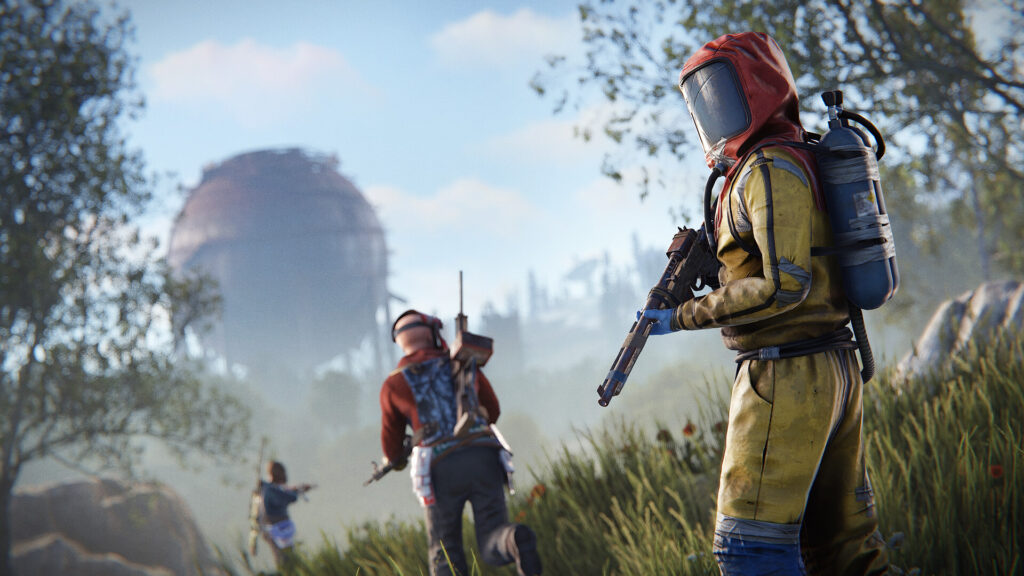
Rust screenshot
Rust screenshot. Facepunch Studios

I checked the official requirements of the fourteen most played Steam games as of 31 August 2026. The laptop RTX 4060 does not run into the minimum in a single one, and in most it sits above the recommended spec.

The heaviest entries on that list are Rust with a GTX 1060 minimum and Palworld with a GTX 1660 minimum. Your card is several times faster than both. Counter-Strike 2, Apex, PUBG, Delta Force and War Thunder run with plenty of headroom, and the question there is not whether they run but how many frames you want on that 144 Hz panel.

Read next

Best graphics card under 500 euro: what a frame costs in Europe
DLSS 5: what is known, when it lands, and what you can turn on today

Where eight gigabytes do get in the way

Project Zomboid screenshot
Project Zomboid screenshot. The Indie Stone

The problem is not chip speed, it is memory. In 2025 and 2026 releases eight gigabytes runs out at ultra textures, and you notice it not in the average frame rate but in the stutter: the game streams textures across the bus and the image trips over itself.

The fix is boring and reliable: set textures to high instead of ultra. The difference is barely visible, and the memory stops running out. Second on the list is ray tracing, which on a laptop card is better left off or at minimum, because it eats both frames and that same memory.

What to switch on

DLSS in quality mode. On a laptop it pays off more than on a desktop, because besides frames it buys you temperature: the card runs cooler, the fans stay quieter and the battery lasts longer.

Turn frame generation on only where you already have sixty base frames. If a game runs at forty, generation will show you seventy on the counter while the controls stay as sluggish as they were at forty.

When to replace it

A laptop is not a tower, you cannot swap the graphics card. So the question becomes different: when is it time to replace the whole machine or build a desktop next to it.

My answer is this. While you play the online games from the Steam top, there is nothing to replace, this card covers them for years. If recent single player games at high settings keep pulling at you, building a desktop with a 16 GB RX 9060 XT is cheaper than swapping the laptop: in our own under 500 euro guide that card costs 455, and a gaming laptop of the same class starts at very different money.

Sources

Graphics card share: Steam hardware survey, July 2026, Valve data.

Game list: Steam most played chart, 31 August 2026, requirements taken from the games' own store pages.

Comparison with desktop cards and specifications: TechPowerUp GPU database, snapshot of 31 August 2026.

Lossless Scaling in 2026: what it fixes, who needs it, and the big lsfg-vk 2.0 update
FSR 4.1.1b on older AMD and NVIDIA cards: what OptiScaler really gives you
DLSS 5 and a weak PC: what your card actually runs
Resizable BAR: Turn It On or Not, and What It Actually Gives You
What to play on a GTX 1650 in 2026
Share This Article
Facebook Email Print
ByDavid Freeman
Follow:
David Freeman is the pen name behind FramesGames. Specs come from the manufacturer, test numbers only from benchmarks with a published method, and the charts are ours, with the source printed on the image.
Leave a Comment Leave a Comment

Leave a Reply Cancel reply

Your email address will not be published. Required fields are marked *

- Advertisement -
Ad imageAd image

Trending Stories

Hardware News

Best CPU for Onimusha: 31 processors tested, and one Ryzen 9 falls apart

September 9, 2026
Hardware News

Windows 11 memory integrity turns on in October and can cost you FPS: how to check

September 9, 2026
Hardware News

DLSS 5 and frame generation on RTX 30 and 40: what the DLSS Unlocked mod really does

September 9, 2026
Hardware News

GPU sales grew against the season, and AMD gained seven points

September 8, 2026
Game News

Game Pass caps cloud gaming: 15 hours a month on Ultimate

September 8, 2026
Hardware News

AMD hits a record 46.5 percent of processors in the Steam survey

September 8, 2026

You Might Also Like

Best Steam Deck games cover EN
How-to

The Best Steam Deck Games: What Actually Holds a Charge and Plays on the Move

September 2, 2026
DLSS guide cover EN
How-to

DLSS in Almost Any Game: Turn It On, Update It, Add It Where There Is None

August 31, 2026
Best Warframes in 2026: which to build first
Warframe

Best Warframes in 2026: which ones to build first

August 31, 2026
Unique weapons in S.T.A.L.K.E.R. 2: every gun and where to find it
How-to

Unique weapons in S.T.A.L.K.E.R. 2: all 59 and where to find them

August 30, 2026

Follow US on Social Media

Telegram

© 2026 FramesGames. All rights reserved.

FramesGames

Information

  • Contact
  • About
  • Editorial standards
  • Privacy Policy
  • Disclaimer
  • Cookie Policy (EU)
Manage Consent
To provide the best experiences, we use technologies like cookies to store and/or access device information. Consenting to these technologies will allow us to process data such as browsing behavior or unique IDs on this site. Not consenting or withdrawing consent, may adversely affect certain features and functions.
Functional Always active
The technical storage or access is strictly necessary for the legitimate purpose of enabling the use of a specific service explicitly requested by the subscriber or user, or for the sole purpose of carrying out the transmission of a communication over an electronic communications network.
Preferences
The technical storage or access is necessary for the legitimate purpose of storing preferences that are not requested by the subscriber or user.
Statistics
The technical storage or access that is used exclusively for statistical purposes. The technical storage or access that is used exclusively for anonymous statistical purposes. Without a subpoena, voluntary compliance on the part of your Internet Service Provider, or additional records from a third party, information stored or retrieved for this purpose alone cannot usually be used to identify you.
Marketing
The technical storage or access is required to create user profiles to send advertising, or to track the user on a website or across several websites for similar marketing purposes.
  • Manage options
  • Manage services
  • Manage {vendor_count} vendors
  • Read more about these purposes
View preferences
  • {title}
  • {title}
  • {title}
Welcome Back!

Sign in to your account

Username or Email Address
Password

Lost your password?