Sometime in October a Windows update is going to switch on a security feature called memory integrity on a lot of PCs that never had it. On a modern processor you will not notice. On an older one, it can quietly cost you frames.
That is the whole story, and the reason to read on is that it takes about thirty seconds to find out which of those two you are.
What memory integrity is, without the jargon
Windows can run a small piece of itself inside a walled off area created by the processor's virtualisation. Memory integrity lives in that walled off area and checks every driver before letting it touch the kernel. If a driver has been tampered with, or is simply too old to prove it is what it says, it does not get in.
Microsoft's name for it in the settings is Memory integrity, sitting under Core isolation. The acronyms you will see elsewhere are VBS and HVCI, and they mean the same thing.
It is genuinely good security. It is also extra work on every driver call, and extra work has to come out of something.
Who this actually reaches
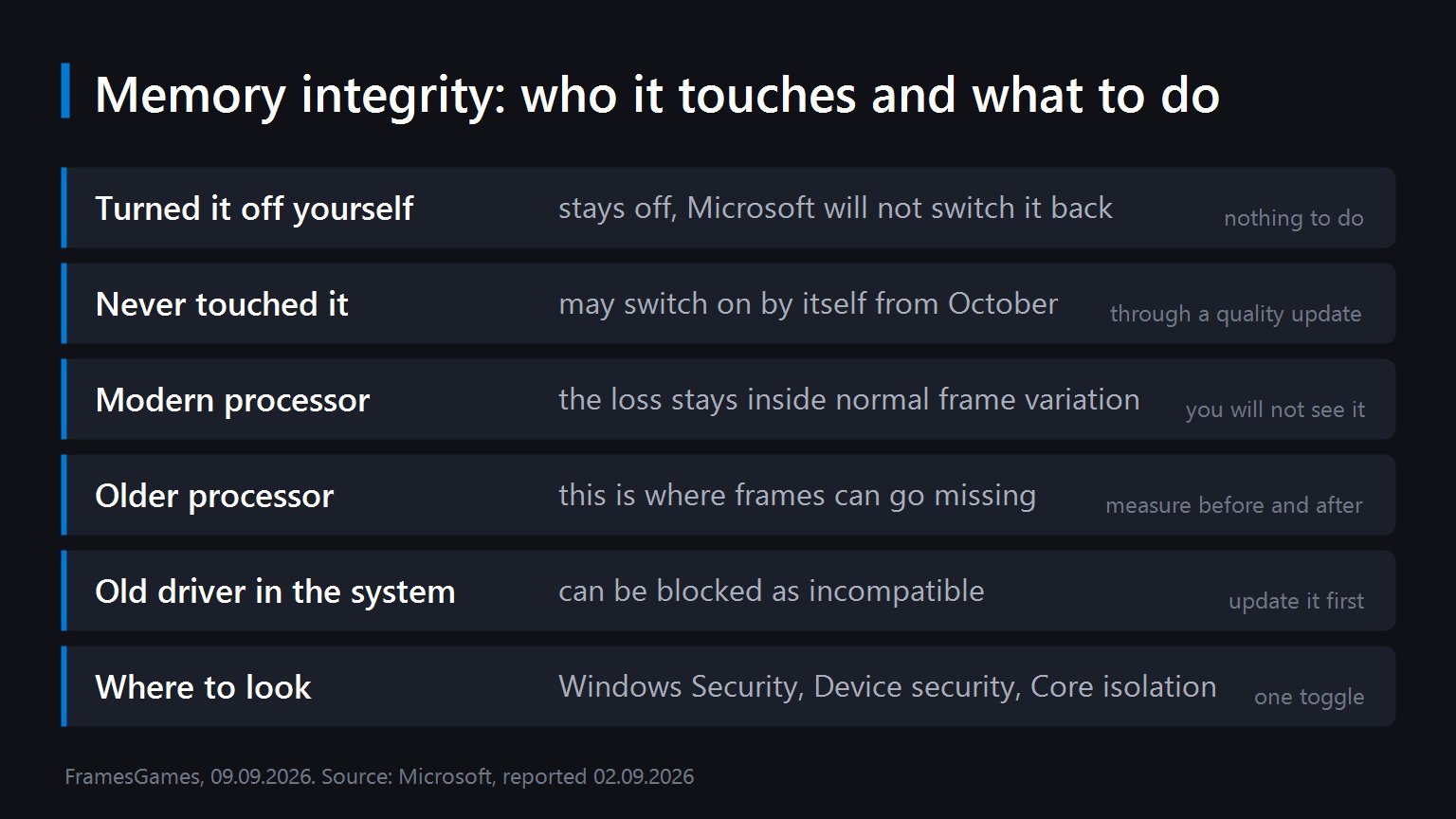
- You turned it off on purpose. Then nothing happens. Microsoft says it will not switch the feature back on for people who disabled it themselves or through policy. If you did it years ago and forgot, you are still covered.
- You have never opened that settings page. This is the group. From October, eligible machines get it enabled through a normal quality update, with no dialogue box asking first.
- Your PC is not eligible. Microsoft says it checks hardware, compatibility and performance before flipping the switch. Not every machine will be picked.
On the performance question Microsoft's position is that modern processors will stay inside the normal variation you would see between two runs of the same benchmark. That is a reasonable claim and it matches what this feature has cost on current hardware. The caveat is the one they also acknowledge: on older processors the check has less headroom to hide in, and that is where a frame rate drop becomes visible.

How to check yours, and what to do about it

Open Windows Security, go to Device security, then Core isolation. Memory integrity is the toggle there. Whatever it says now is what you have today, before October changes anything.
Now the useful part, and it is worth doing this week rather than in November when you are trying to work out why a game feels different.
- Write down what your frame rate is now. Pick one game, one scene, one set of settings. Any counter will do. Without that number you will have nothing to compare against later, and you will end up guessing.
- Update your drivers before October. Memory integrity blocks drivers it cannot verify, and old ones are the usual culprits. Something ancient from a capture card or a mouse utility is a more likely problem than your graphics driver.
- If it switches on and something breaks, you can switch it back. The toggle is not one way. Windows may need a restart to apply it either direction.
Should you turn it off for frames
Our answer is no by default, and it is not a moral position. It is that a few percent is a bad trade against kernel level protection, and a few percent is the realistic figure on anything recent.
The exception is a genuinely old processor where you measured a real difference and the game in question sits right on the edge of playable. That is a specific situation with a number attached to it, and it is a fair reason to switch something off. Deciding in advance that a security feature is stealing your frames, without having measured, is how people end up with a less safe machine and the same frame rate.
If you are on hardware old enough that a few percent matters, our list of what still runs well on a GTX 1650 is a more productive place to spend the evening.
Sources
The plan to enable memory integrity by default on eligible Windows 11 devices from October 2026 through quality updates, the statement that Microsoft checks hardware, compatibility and performance before enabling it, the assurance that devices where the feature was deliberately disabled by the user or by policy will not have it re-enabled, the description of the protection as VBS and HVCI guarding the kernel against tampered or compromised drivers, and the note that older processors may see a gaming performance impact while modern ones stay within normal frame rate variation all come from Microsoft's own announcement, reported on 2 September 2026. The location of the setting under Windows Security, Device security and Core isolation is the standard Windows 11 interface. The advice to record your frame rate first, to update drivers before October, and our position on whether to switch the feature off are ours.