There is a seven dollar program on Steam that does something none of the big upscalers will do for you: it works on games that have never heard of it. No DLSS support needed, no FSR, no patch from the developer. It grabs the picture out of the window and doubles the frame rate.
- The problem Lossless Scaling solves
- What it costs, and why nobody puts this in the ad
- Who needs it and who should not buy it
- The awkward bit: the app has been silent for 14 months
- Where the development actually went: lsfg-vk 2.0
- What is missing, and what will break
- The part that will annoy some people
- So is it worth seven dollars
Lossless Scaling has 37,744 reviews and a Very Positive rating, and it also has not had an update since July 2025. That sounds like a dead project until you look at where the work actually went, because on 5 September its Linux half shipped a version 2.0 that beats the Windows original on memory.
Here is the whole picture: what problem this thing solves, who genuinely needs it, who will regret buying it, and what the new release changes.
The problem Lossless Scaling solves
Think about the games that annoy you at 30 frames. An emulator that will never run faster because the original hardware was 30. A Japanese port with a hard cap and no patch coming. A ten year old strategy game that stutters on a modern machine for reasons nobody will ever fix. A handheld doing its best on a seven inch screen.
Every one of those has the same shape: the game will not go faster, and nobody is coming to help. DLSS cannot touch them because DLSS has to be built into the game. FSR the same. OptiScaler needs the game to already have an upscaler to swap out.
Lossless Scaling does not ask the game for anything. It takes the finished picture from the window, the same picture your screen was about to show, and builds extra frames between the ones the game drew. The game never finds out.
That is the whole idea, and the price of it is the next section.
What it costs, and why nobody puts this in the ad
To draw a frame that sits between two others, you need both of them. Which means the program has to hold a finished frame back while it works out what goes in the middle.
Your picture gets smoother. The gap between moving the mouse and the screen reacting gets longer. Both at once, always, and not because of a bug. This is true of NVIDIA's frame generation too, and of AMD's, and of anything that will ever be invented, because you cannot show someone a frame you have not built yet.
So the honest way to describe frame generation is not "more performance". It is "the same responsiveness, a much smoother picture". In a strategy game or an emulator that is a gift. In a competitive shooter it is self sabotage, and no setting fixes it.
Who needs it and who should not buy it
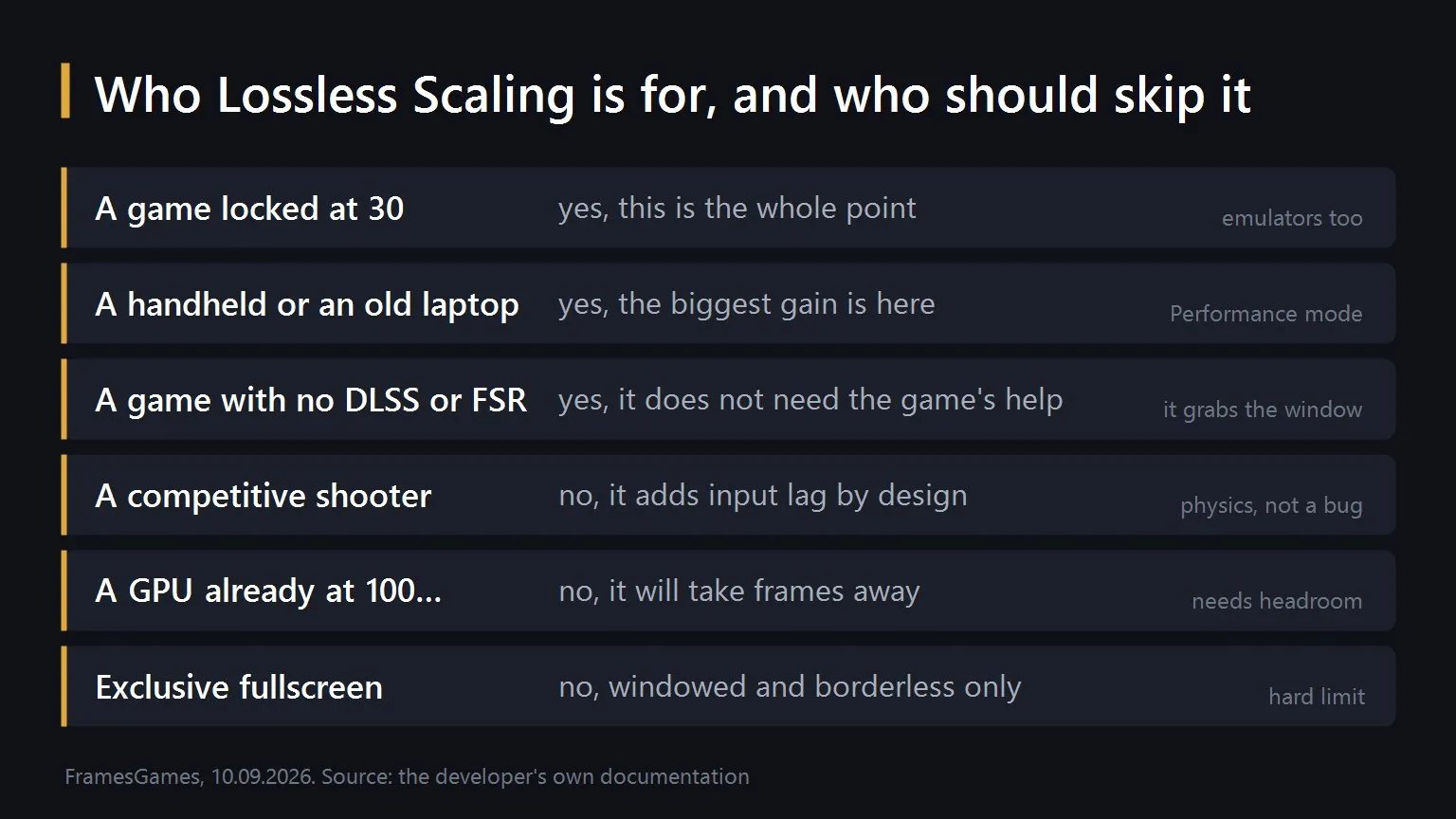
Two of these deserve spelling out because people get them wrong and then leave a bad review.
Your graphics card has to have something left. The program runs its own model on the same GPU that is running the game. If the card is already pinned, it will take the frames it needs out of the game's own budget and you will end up slower and blurrier than you started. This is the single most common reason someone says it does not work.
Windowed or borderless only. Exclusive fullscreen is not supported and there is no clever workaround short of pushing output to a second display. If your game only runs in exclusive fullscreen, stop here.
The setup, the modes, the ten scaling algorithms and the settings we recommend on a handheld are all in our full guide to the program. This article is about the state of it today.
The awkward bit: the app has been silent for 14 months
Worth saying plainly, because a lot of coverage does not. The last update the developer announced was the Performance Mode Hotfix on 14 July 2025. Before that, LSFG 3.1 on 11 June 2025. Since then, nothing on the Steam page and nothing on the project's own news page.
The program still costs 6.99 dollars, still sells, still sits at Very Positive with 34,139 positive reviews against 3,605 negative. It works. It is simply not moving.
Whether that bothers you depends on what you are buying. A tool that already does the job does not need monthly updates. But if you are buying on the promise of what it will become, that promise has been quiet for over a year, and you should know that before you pay.
Where the development actually went: lsfg-vk 2.0
Lossless Scaling is Windows only. Its frame generation runs on Linux through a separate community project, a Vulkan layer called lsfg-vk, and that is where all the movement has been.
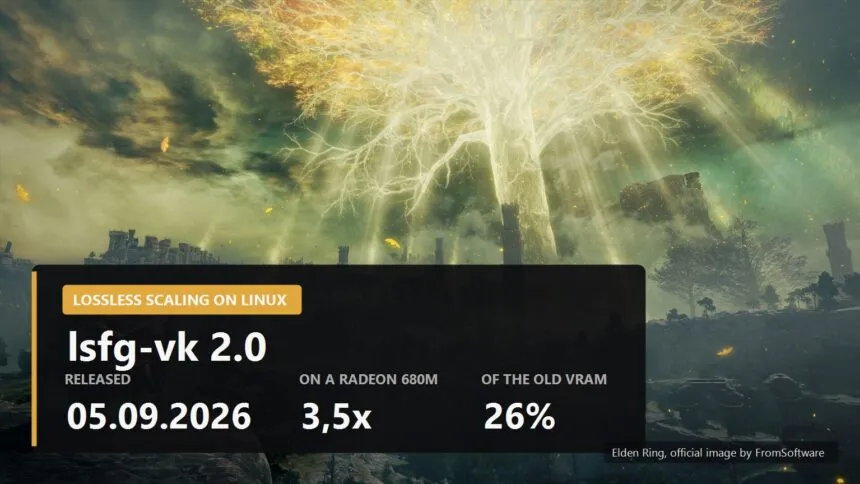
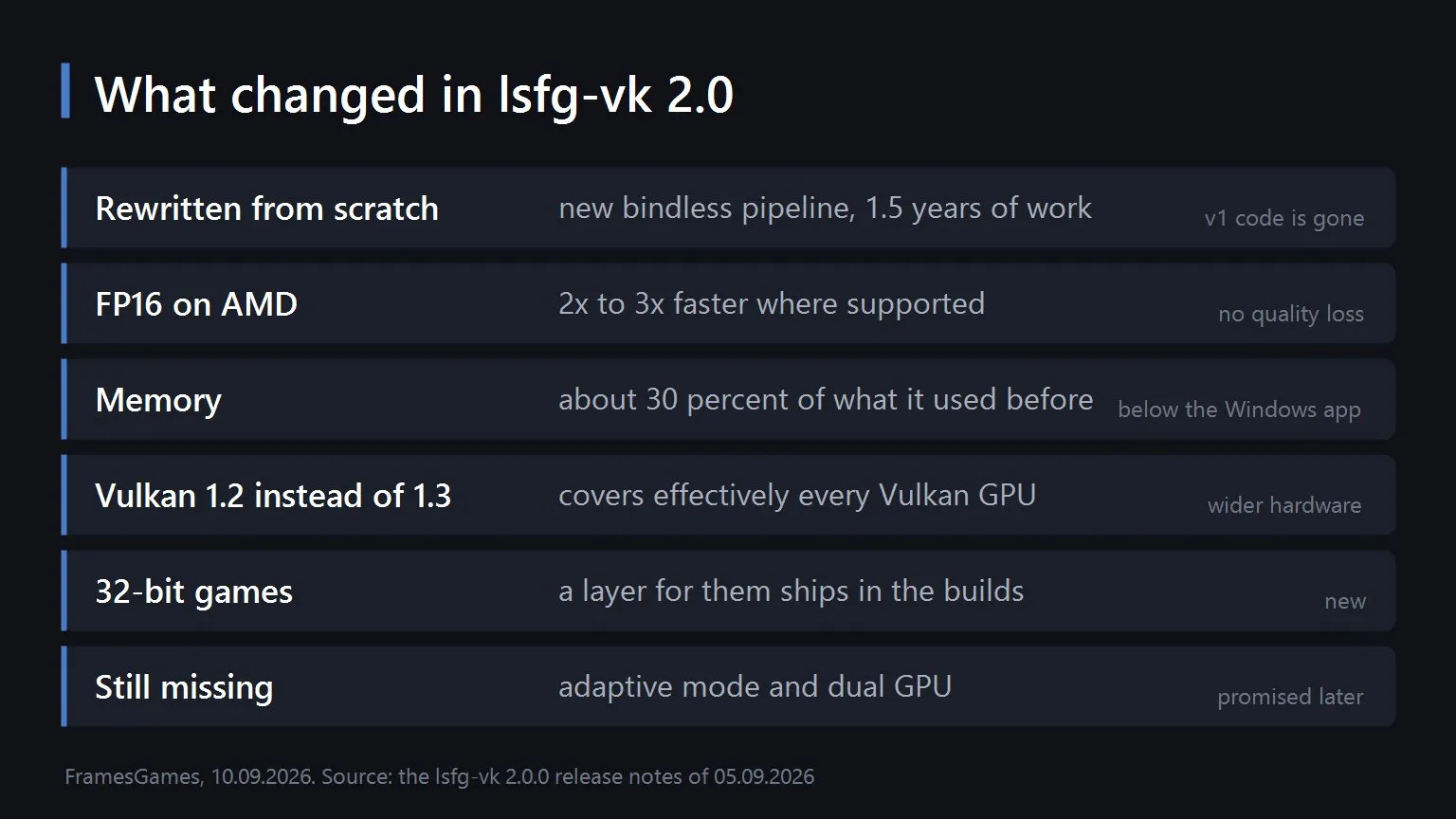
Version 2.0 landed on 5 September 2026, after roughly a year and a half of rewriting. Not a patch, a new program that happens to do the same job.
The measured results are the interesting part, and they are the developer's own numbers rather than ours.
| Machine | Mode | Performance against version 1 | Video memory used |
|---|---|---|---|
| Desktop, RTX 5080 | 4x at 2560x1440 | about 34 percent faster | about 51 percent of before |
| Laptop, Radeon 680M | 2x at 1280x800 | about 3.5 times faster | about 26 percent of before |
| Steam Deck | reported by users | about 3 to 4 times faster | not stated |
Look at the shape of that. The desktop card with plenty of power gains a third. The integrated laptop chip gains three and a half times. That is not a coincidence, it is the FP16 acceleration doing its work on hardware that had the least to spare, which is exactly the hardware this whole category exists for.
Two more changes matter more than they sound.
- Vulkan 1.2 instead of 1.3. Lowering the requirement means practically every Vulkan capable card is now in range, which quietly adds years of old hardware to the supported list.
- The interface went from 70 MB to a few kilobytes. The old one was built on GTK and Rust, the new one is Qt6. On a handheld with limited storage and a desktop that is already KDE, both halves of that are welcome.
There is also a command line tool now that benchmarks your GPU's frame generation, validates your config and checks for leftover files from the old version. That last one exists for a reason, which brings us to the catch.
What is missing, and what will break
Upgrading is not an upgrade. You have to uninstall version 1 first, and the configuration file format is not compatible between the two. Anyone who set this up on a Steam Deck last year has to do it again.
Two features are not there yet. Adaptive frame generation and dual GPU support are both listed by the project as being worked on for future releases. If either of those is why you use the program, version 2 is not ready for you.
You still have to own Lossless Scaling. The Vulkan layer is free but it is useless on its own, because it needs the library out of the paid Windows program. Nothing about that has changed.
The part that will annoy some people
On 27 August the project left GitHub for its own servers, with a mirror on Codeberg, and the developer's stated reasons were the declining quality of the service and AI features nobody asked for.
The licence changed at the same time, from GPLv3 to Creative Commons BY-NC-ND 4.0. That is worth understanding rather than skimming. The old licence was an open source one: anyone could fork, modify and redistribute. The new one is not an open source licence at all. You may read the code and use it, but not commercially and not in modified form. The developer says the point is to stop AI generated forks and people passing the work off as their own.
The git history was reset too, so the version 1 source is simply gone from the repository.
We are not going to pretend to be neutral about this: it is the author's work and the reasoning is understandable. But calling the project open source after this would be wrong, and if you build anything on top of it, the terms you agreed to last year are not the terms you have now.
So is it worth seven dollars
If you have a handheld, an old laptop, an emulator collection or a shelf of games stuck at 30 frames, yes, and it is not close. There is nothing else that works on games which do not cooperate, and on Linux it just got two to three times faster on exactly the hardware that needed it.
If you play competitive shooters, or your graphics card is already flat out, or your games only run in exclusive fullscreen, save your money. It will not do what you want and no setting will change that.
And if you are on Windows waiting for the next version of the app itself, set your expectations by the calendar rather than the roadmap. Fourteen months is a long silence.
Sources
The price of 6.99 dollars, the release date of 28 December 2018, the Windows only platform list and the review figures of 37,744 total with 34,139 positive and 3,605 negative at a Very Positive rating come from the Lossless Scaling store page and review data on Steam, read on 9 September 2026. The list of updates ending with the Performance Mode Hotfix on 14 July 2025, preceded by LSFG 3.1 on 11 June 2025 and Adaptive Frame Generation on 8 March 2025, comes from the news page on the developer's own site and matches the announcement history on the Steam page. The description of lsfg-vk as a Vulkan layer carrying Lossless Scaling frame generation to Linux, the note that adaptive frame generation and dual GPU support are still being worked on for future releases, and the requirement to own Lossless Scaling for the library come from the lsfg-vk project site. The version 2.0.0 release date of 5 September 2026, the rewritten bindless pipeline, the FP16 acceleration described as two to three times faster on compatible systems without quality loss, the memory use of about 30 percent of before, the drop from Vulkan 1.3 to 1.2, the process identification by Linux binary, Windows executable or Steam App ID, the new command line tool with benchmarking, validation and healthcheck, the move from GTK and Rust to Qt6 with the size falling from 70 MB to a few kilobytes, the 32-bit game layer, the requirement to uninstall version 1 first with an incompatible configuration format, and the measured figures for the RTX 5080, the Radeon 680M and the reported Steam Deck results all come from the lsfg-vk 2.0.0 release notes. The move from GitHub to self hosted infrastructure with a Codeberg mirror on 27 August 2026, the stated reasons of declining service quality and unwanted AI features, the licence change from GPLv3 to CC BY-NC-ND 4.0, the reset of the git history and the stated goal of preventing AI generated forks come from the project's own blog post about the change. The explanation of why frame generation adds latency, the reading of what the performance figures mean, and the buying advice are ours.