• Popular
  • PS4 games on PC
  • FSR 4 games
  • Bloodborne on PC
  • Switch games on PC
  • OptiScaler guide
  • CONTACT US
FramesGames FramesGames
EN
  • ENEnglish
  • NLNederlands
  • Games
    • S.T.A.L.K.E.R.
    • GTA 6
    • The Witcher
    • Warframe
    • Hunt: Showdown
    • Creators and characters
    • Free games
  • Hardware
    • PC Builds
    • PC build calculator
    • DLSS and FSR
  • Guides
    • Recomp games
  • Reviews
  • News
    • Game News
    • Hardware News
Reading: DLSS Swapper 1.2.7 updates DLSS, FSR and XeSS in every game at once, no more one by one
Share
FramesGamesFramesGames
Font ResizerAa
  • S.T.A.L.K.E.R.
  • DLSS 5
  • GTA 6
  • Free games
Search
  • Games
    • S.T.A.L.K.E.R.
    • GTA 6
    • The Witcher
    • Warframe
    • Hunt: Showdown
    • Creators and characters
    • Free games
  • Hardware
    • PC Builds
    • PC build calculator
    • DLSS and FSR
  • Guides
    • Recomp games
  • Reviews
  • News
    • Game News
    • Hardware News
Have an existing account? Sign In
Follow US

Home / News / Hardware News / DLSS and FSR / DLSS Swapper 1.2.7 updates DLSS, FSR and XeSS in every game at once, no more one by one

DLSS and FSR

DLSS Swapper 1.2.7 updates DLSS, FSR and XeSS in every game at once, no more one by one

Dave Freeman
Dave Freeman
Share
9 Min Read
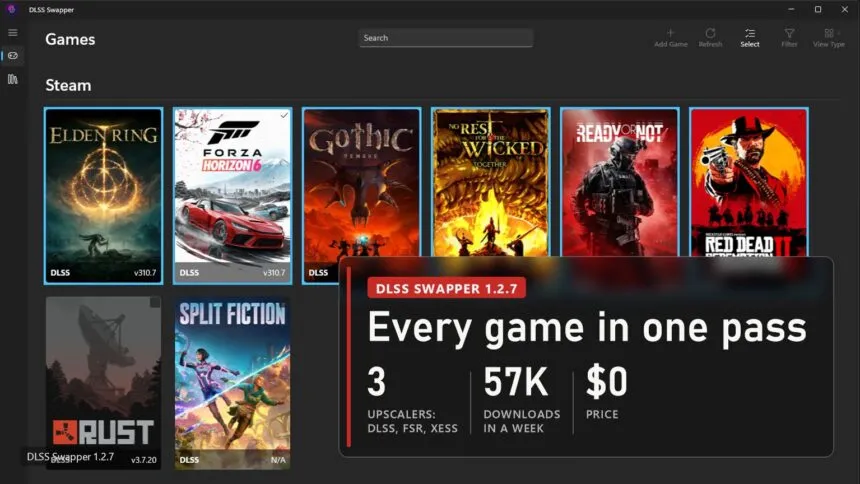
DLSS Swapper 1.2.7 games page in selection mode with six games ticked, plate: 3 upscalers DLSS, FSR, XeSS, 57K downloads in a week, free
DLSS Swapper 1.2.7
SHARE

DLSS Swapper 1.2.7 came out on 18 October, and it finally does the thing users have been asking for since September 2023: you tick a dozen games, pick a DLSS, FSR or XeSS version once, and the app swaps the files in all of them in a single pass. Until now every game had to be opened separately, and after every new DLSS release that turned into twenty minutes of clicking. In its first week the new version was downloaded 56,662 times.

Contents
  • What changed: one window for the whole library
  • How to update DLSS in every game at once
  • What the report shows and what can go wrong
  • Preset C for frame generation and the other fixes

If you have never used it: DLSS Swapper is a free open-source tool that finds your installed games and replaces the upscaler libraries inside them, so a game that shipped with an old DLSS gets a new one without waiting for a patch. How that works and when it is worth doing is covered in our guide to DLSS in almost any game. Here it is only about what changed.

What changed: one window for the whole library
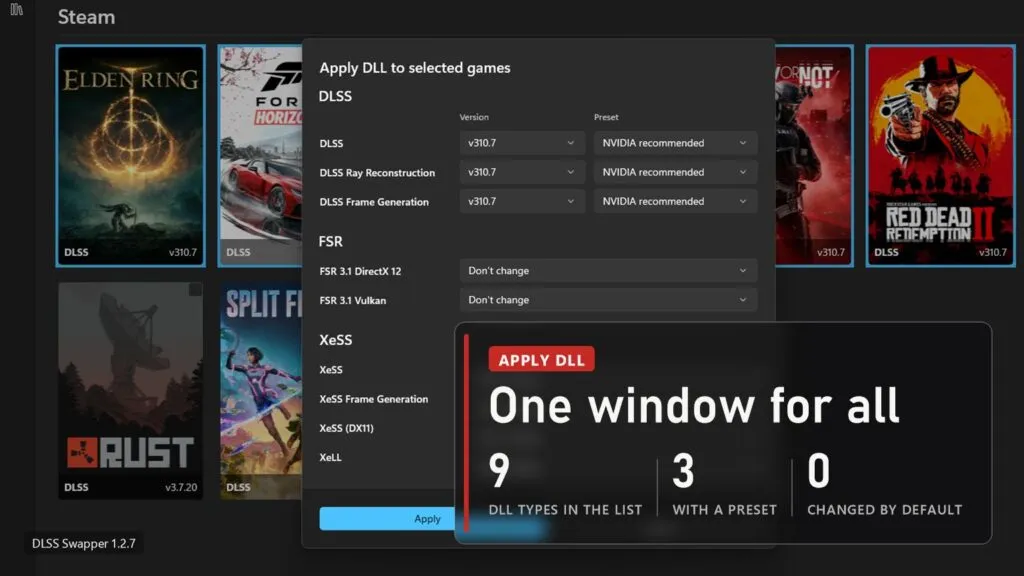
DLSS Swapper 1.2.7 Apply DLL window with version and preset dropdowns for DLSS, FSR 3.1 and XeSS, plate: 9 DLL types in the list, 3 with a preset, 0 changed by default
DLSS Swapper 1.2.7

The feature is called bulk swap. It was written by an outside contributor, RafaelHGOliveira, and the author of the app merged it on 17 October. A Select button now sits in the toolbar of the games page. Press it and the game covers become checkboxes, with a bar at the bottom: how many are selected, Select all, Apply DLL, Clear and Done.

Apply DLL opens the window you see above. In it:

  • Every DLL type gets its own row with a version dropdown: DLSS, Ray Reconstruction and Frame Generation, FSR 3.1 for DirectX 12 and Vulkan, XeSS, XeSS Frame Generation, XeSS for DX11 and XeLL.
  • The three DLSS rows also have a preset dropdown. In the developer's screenshot it is set to "NVIDIA recommended", but a specific preset can be picked too.
  • Every row defaults to "Don't change". If you only want to update DLSS, FSR and XeSS stay untouched.
  • The list only offers versions you have already downloaded into the app. Get the new DLSS in the library section first, then go to bulk swap.

The window does not check up front which game ships which library. It finds out while applying, and whatever did not fit ends up in the report. That is the right call: otherwise picking two games, one with XeSS and one without, would quietly hide half the options.

How to update DLSS in every game at once
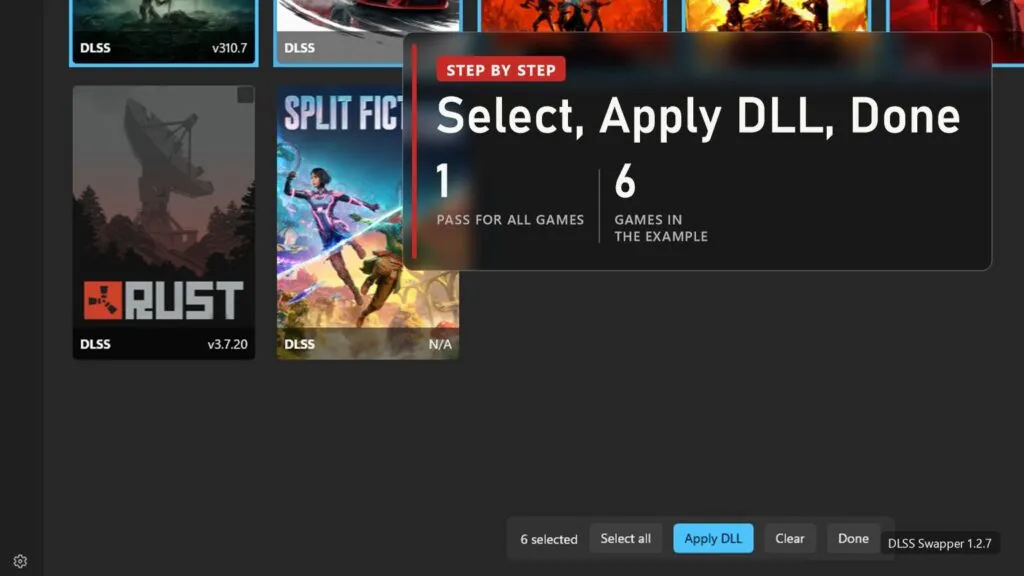
DLSS Swapper selection mode with the bottom bar showing 6 selected, Select all, Apply DLL, Clear and Done, plate: one pass for all games, 6 games in the example
DLSS Swapper 1.2.7
  • Update the app to 1.2.7. Older versions did not show the update prompt at all, that bug is also fixed in this release, so check the version in the About section yourself.
  • Download the DLSS version you want in the DLL library inside the app. In the developer's screenshot it is v310.7.
  • On the games page press Select and tick the games. Select all grabs the whole list, but I would not do that, see the next section for why.
  • Press Apply DLL, set the version only in the rows you need and leave the rest on "Don't change".
  • Apply, read the report, then Done to leave selection mode.

The app works through your Steam, GOG, Epic Games, Ubisoft Connect, Xbox app and Battle.net libraries, and games installed elsewhere can be added by hand with Add Game. It needs 64-bit Windows 10 version 20H1 or newer. Any graphics card will do, FSR and XeSS do not need a GeForce.

What the report shows and what can go wrong
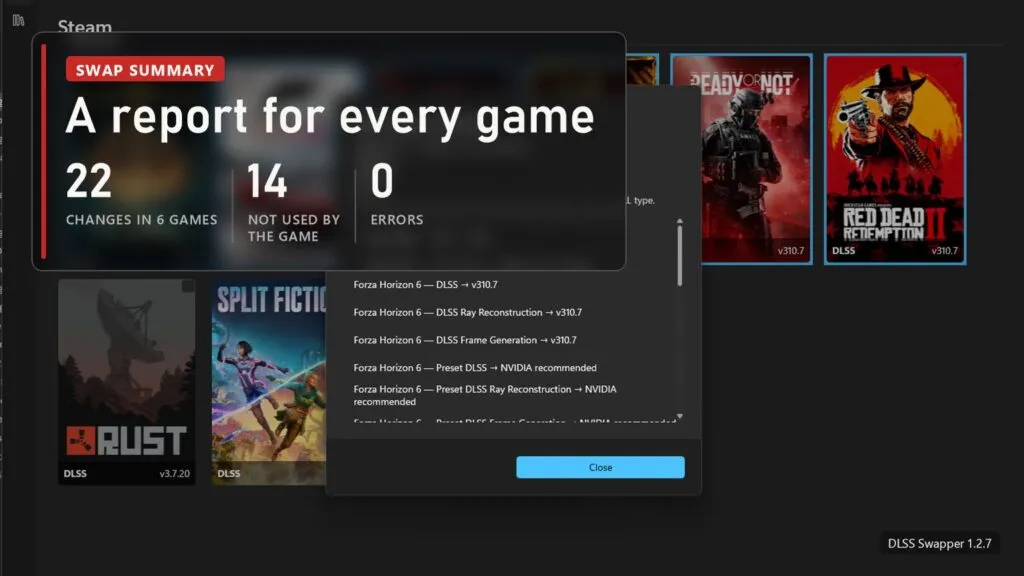
DLSS Swapper batch swap summary listing every change per game, plate: 22 changes in 6 games, 14 not used by the game, 0 errors
DLSS Swapper 1.2.7

The swap runs game by game behind a progress bar, then shows a summary. It splits results three ways: swapped, skipped and errors. Changes that did not apply because the game simply has no such library are counted on a separate line so they do not bury the important ones. In the developer's example there were 22 changes across six games, 14 entries did not fit, and zero errors. If some folders need administrator rights, you get one message asking to relaunch the app as admin rather than a pop-up for every game.

Now the less pleasant part. The README says plainly that the app does not guarantee better image quality, more frames or a game without crashes, and that after a swap a game may refuse to start until you restore the original file. The original is kept by the app itself. Going by the pull request description, though, there is no bulk "restore original" button: rolling back is still done game by game. Swap 30 games in one click, find out the next day that three of them stopped launching, and you will be fixing those three by hand.

And online games. Anti-cheat systems watch which files the game loads, and a swapped DLL is a replaced game file, signed or not. I would leave competitive shooters out of the selection entirely. In the developer's own screenshot Rust is in the list but was not selected, and I would do exactly the same. The full breakdown of which method risks a ban and which does not is in the guide.

Preset C for frame generation and the other fixes
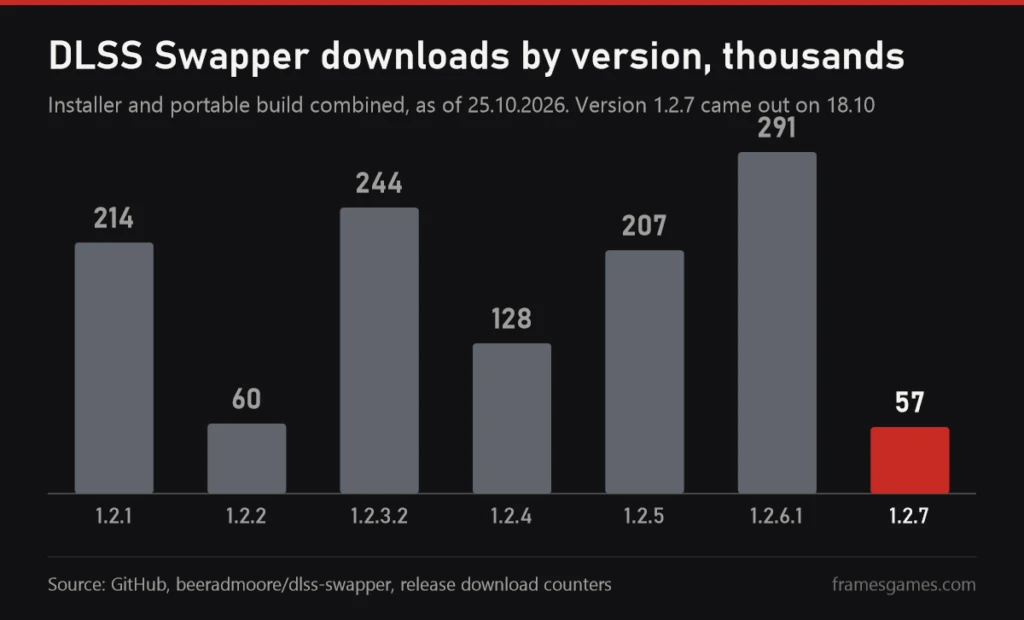
Column chart of DLSS Swapper downloads by version in thousands: 1.2.1 214, 1.2.2 60, 1.2.3.2 244, 1.2.4 128, 1.2.5 207, 1.2.6.1 291, 1.2.7 57 in its first week
DLSS Swapper downloads, GitHub data as of 25 October 2026

Bulk swap is not the only change in 1.2.7:

  • Frame Generation preset C. NVIDIA added it to the NVIDIA app beta on 13 October, and a feature request for DLSS Swapper appeared the same day. The faster frame generation mode on RTX 40 and 50 with a slight loss in quality is covered in our news from 13 October.
  • The game library no longer stops loading. The bug that left the list half-empty is fixed, and a full scan finishes faster.
  • A crash while scanning Steam is gone.
  • The update prompt works again, and there is now a banner about new versions.
  • A Hebrew translation was added and the Simplified Chinese one updated.

The chart shows how many times each version has been downloaded from GitHub. 1.2.7 has had one week and 1.2.6.1 has had two months, so this is not a popularity contest, just a sense of scale: across all releases the count is past 2.9 million, and the project has 7,932 stars.

Download it only from the releases page on GitHub or via winget with winget install --id=beeradmoore.dlss-swapper -e. The README warns about sites pretending to be DLSS Swapper, and given that the app writes files into your game folders, a copy from a random mirror is the last thing you want. There are two builds, an installer and a portable zip. In the first week they split roughly two to one, 38,600 against 18,004.
Read also

DLSS guide cover EN
DLSS in Almost Any Game: Turn It On, Update It, Add It Where There Is None
DLSS 5 is now twice as fast, Hogwarts Legacy gets it November 5 and RTX 40 still waits

Sources

DLSS Swapper v1.2.7.0 release on GitHub, 18.10.2026: list of changes and download counters. Pull request #913: how bulk swap works, the report, the limitations, and the screenshots used in this article. Pull request #961 and issue #960: Frame Generation preset C. The project README: supported libraries, system requirements, warnings, official download sources.

RTX Remix 1.6 hands DLSS 5 to modders, and Radeon cards get 20% faster in it too
FSR 4.1.2 Lite: AMD's Smaller FSR 4 Model for Handhelds, and It Already Runs on Intel Arc
AMD Driver 26.10.1 Brings FSR 4.1 to RX 6000, Cards It Was Never Built For
All of DLSS on Radeon: mod 0.8.0 adds upscaling, Ray Reconstruction and frame gen
OptiScaler v10 isn't out yet: frame generation in Vulkan, and why fake sites are a risk
TAGGED:PC
SOURCES:GitHub: DLSS Swapper v1.2.7.0
Share This Article
Facebook Email Print
Dave Freeman
ByDave Freeman
Follow:
Dave Freeman is the pen name behind FramesGames. Specs come from the manufacturer, test numbers only from benchmarks with a published method, and the charts are ours, with the source printed on the image.
Leave a Comment Leave a Comment

Leave a Reply Cancel reply

Your email address will not be published. Required fields are marked *

- Advertisement -
Ad imageAd image

Trending Stories

Hunters fight a monster in the desert in Monster Hunter Generations Ultimate with a plate: recomp games on PC, 140 games, 9 consoles, 7549 stars for Majora's Mask
Recomp games

Recomp Games on PC: 140 Console Games That Run Without an Emulator

October 29, 2026
Two raptors by a hangar in The Lost World: Jurassic Park PC port with a plate: 1997 Sega arcade, 1,636 functions recompiled to C++, true 21:9
PC Ports

Sega's 1997 The Lost World Arcade Runs Natively on PC, With Ray-Traced Shadows and DLAA

October 27, 2026
Binoculars in a stalker's hands in S.T.A.L.K.E.R. 2 with an update 2.1 plate: 164 items in the notes, 16 PS5 fixes, 7 quests unblocked
S.T.A.L.K.E.R.

Stalker 2 Update 2.1 Pushes A-Life Further Out and Unblocks Seven Stuck Quests

October 27, 2026
Sam Fisher with night vision goggles and a pistol in Splinter Cell: Pandora Tomorrow key art
How-to

Splinter Cell secrets: a dead sci-fi game, Clancy's one rule and a remake five years in

October 26, 2026
Pinhead in the red Labyrinth in Clive Barker's Hellraiser: Revival with a plate: our score 7.5, 10 for series fans, $39.99 on Steam
Reviews

Hellraiser: Revival Review: Wooden Shooting, but the Best Hellraiser in 30 Years

October 25, 2026
Gordon Freeman in the Half-Life 2 key art with the Half-Life secrets plaque
How-to

Half-Life secrets: the first game was scrapped, and Left 4 Dead killed Episode Three

October 25, 2026

You Might Also Like

DLSS 5 mod reaches Intel Arc on Windows: one-click setup, no DirectX 12, no FPS yet
DLSS and FSR

DLSS 5 mod reaches Intel Arc on Windows: one-click setup, no DirectX 12, no FPS yet

October 9, 2026
DLSS 5 in 1991's Duke Nukem and Fallout 3: 50 games tested, 10 fps on a laptop RTX 5090
DLSS and FSR

DLSS 5 in 1991's Duke Nukem and Fallout 3: 50 games tested, 10 fps on a laptop RTX 5090

October 6, 2026
DLSS 5 on Radeon RX 6000: DLSS-NR on AMD 0.6.0 adds RDNA 2
DLSS and FSR

DLSS 5 on Radeon RX 6000: DLSS-NR on AMD 0.6.0 adds RDNA 2

October 3, 2026
DLSS 5 without NVIDIA's DLLs: Borderless Gaming targets 30 fps on an RTX 3090
DLSS and FSR

DLSS 5 without NVIDIA's DLLs: Borderless Gaming targets 30 fps on an RTX 3090

September 30, 2026

Follow US on Social Media

Telegram

© 2026 FramesGames. All rights reserved.

FramesGames

Information

  • Contact
  • About
  • Editorial standards
  • Privacy Policy
  • Disclaimer
  • Cookie Policy (EU)
Manage Consent
To provide the best experiences, we use technologies like cookies to store and/or access device information. Consenting to these technologies will allow us to process data such as browsing behavior or unique IDs on this site. Not consenting or withdrawing consent, may adversely affect certain features and functions.
Functional Always active
The technical storage or access is strictly necessary for the legitimate purpose of enabling the use of a specific service explicitly requested by the subscriber or user, or for the sole purpose of carrying out the transmission of a communication over an electronic communications network.
Preferences
The technical storage or access is necessary for the legitimate purpose of storing preferences that are not requested by the subscriber or user.
Statistics
The technical storage or access that is used exclusively for statistical purposes. The technical storage or access that is used exclusively for anonymous statistical purposes. Without a subpoena, voluntary compliance on the part of your Internet Service Provider, or additional records from a third party, information stored or retrieved for this purpose alone cannot usually be used to identify you.
Marketing
The technical storage or access is required to create user profiles to send advertising, or to track the user on a website or across several websites for similar marketing purposes.
  • Manage options
  • Manage services
  • Manage {vendor_count} vendors
  • Read more about these purposes
View preferences
  • {title}
  • {title}
  • {title}
Welcome Back!

Sign in to your account

Username or Email Address
Password

Lost your password?