Most Radeon owners know the situation. A new game ships with exactly one upscaler, it is DLSS, and DLSS does not run on your card. Or there is FSR, but version 2.1, the kind that smears everything the moment you turn the camera. The studio is not going to update it, because the game is three years old and nobody works on it any more.
- The problem it solves
- What it supports
- What the swap actually costs you
- Why this matters more than it looks
- Which version is current: 0.9.4 and the upcoming v10
- How to install it
- How to update OptiScaler to a newer version
- How to remove OptiScaler
- The quick way
- By hand, the complete list
- How to switch it off without deleting anything
- The game will not start after you removed it
- The "dll not found" error, and what it actually means
- After a game update
- Two warnings that matter more than anything else here
- Where the project lives
- A personal note
OptiScaler solves this bluntly and effectively. It sits between the game and the upscaler and swaps one for the other. The game thinks it is rendering through DLSS. What it actually gets is FSR 4.
The problem it solves
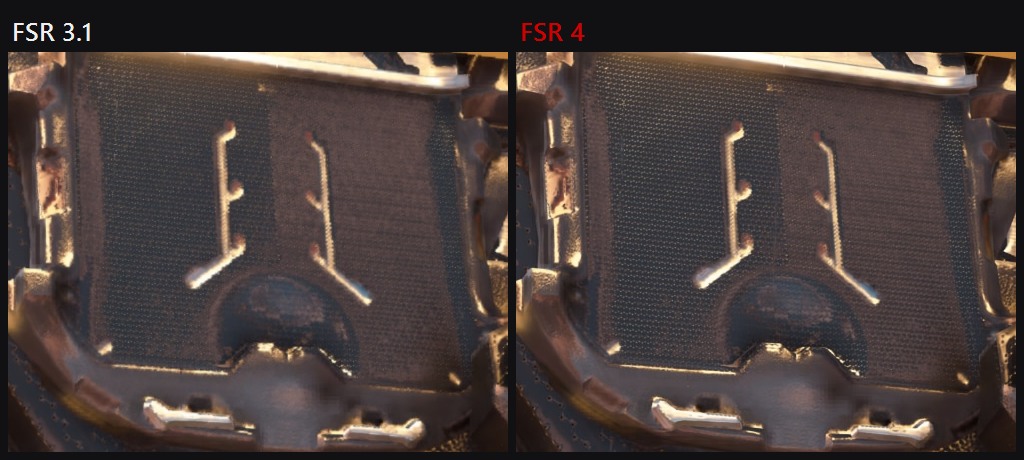
The upscaler in a game is nailed down during development. The studio picks one, usually the one it was paid to integrate or the one that was easiest to bolt on. After that your graphics card is either in that decision or it is not.
OptiScaler intercepts the calls the game makes to its upscaler and reroutes them. From there you decide what actually reconstructs the frame.
- The game only has DLSS and your card is AMD. You switch to FSR 4 and get decent image quality instead of a locked menu item.
- The game ships an ancient FSR 2. Swap it for FSR 4 or XeSS and the smearing in motion goes away.
- The game has no frame generation at all. OptiFG can add it where the developers never included it.
- You want to tune things. Sharpening, presets, ratios, dynamic resolution overrides, all of it is exposed.
What it supports
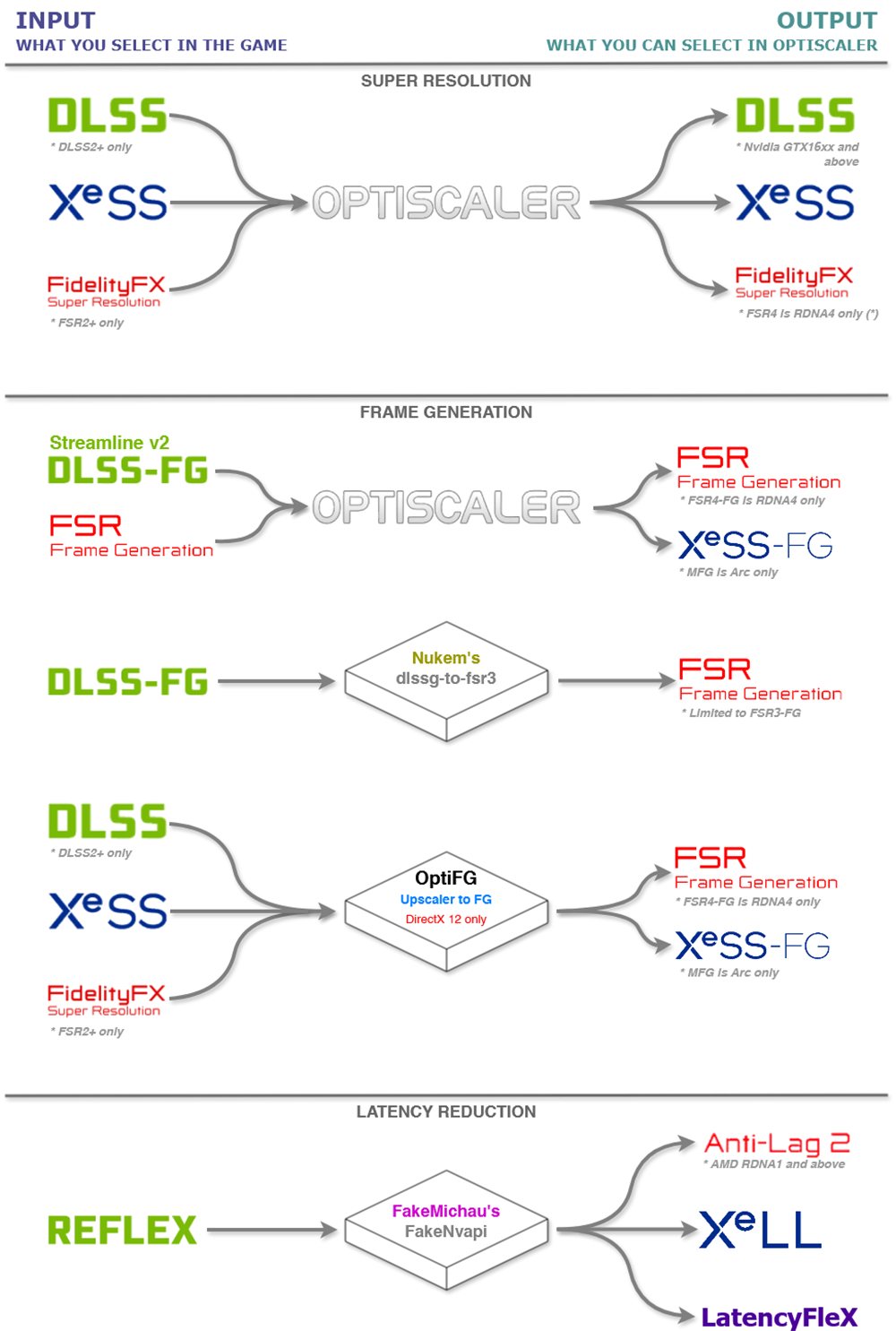
The list depends on what the game is built on.
- DirectX 12. XeSS, FSR 2.1.2 and 2.2.1, FSR 3.X, FSR 4.X, DLSS.
- DirectX 11. FSR 2.2.1, FSR 3.1.2, DLSS, XeSS 2.X on Intel Arc cards, plus DX12 upscalers through the D3D11on12 bridge.
- Vulkan. FSR 4.X, FSR 2.1.2 and 2.2.1, FSR 3.1, DLSS, XeSS 2.x.
- Frame generation. FSR3-FG, XeFG and FSR4-FG, still experimental and DirectX 12 only.
One thing to keep in mind: FSR 4 on the output side used to need an AMD card. At first that meant Radeon RX 9000 on RDNA 4 only, then in July 2026 AMD opened FSR 4.1 upscaling to the RX 7000 series, and the RX 6000 series is promised for early 2027. That rule has since loosened. FSR 4.1.1 added an INT8 model, and OptiScaler can force it onto RDNA 3 laptops, Intel Arc and even GeForce, with the catch that unsupported cards fall back to FSR 3 without saying so. Card by card, with the settings and the check, in FSR 4.1.1b on older AMD and NVIDIA cards.
What the swap actually costs you
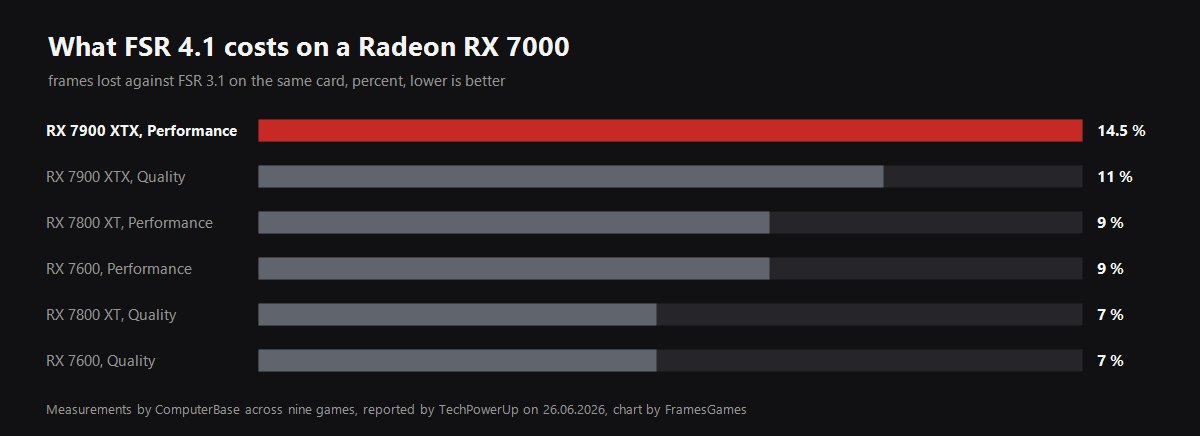
Nothing here is free, and the guide would be dishonest without this part. FSR 4 reconstructs the frame with a neural model, and that model has to run somewhere. On the cards it was written for that cost is already priced in. On older Radeons it is not.
| Your card | FSR 4.1 status | Cost against FSR 3.1 on the same card |
|---|---|---|
| RX 9000, RDNA 4 | native since launch | the reference point, nothing to give up |
| RX 7900 XTX | opened in July 2026 | 11 percent in Quality, 14.5 in Performance |
| RX 7800 XT | opened in July 2026 | 7 percent in Quality, 9 in Performance |
| RX 7600 | opened in July 2026 | 7 percent in Quality, 9 in Performance |
| RX 6000, RDNA 2 | promised for early 2027 | unknown, and there is a reason to expect worse |
The reason is in the silicon. RDNA 4 runs the model in FP8 on its second generation AI accelerators. RDNA 3 has to do the same work in INT8, and AMD has said it aimed for equal image quality across generations, which is exactly why the older cards pay for it in frames. RX 6000 has no AI accelerators at all, so the work would fall on the stream processors.
Read it as a trade rather than a loss. You are giving up single digit percentages on an RX 7800 XT and getting an upscaler that does not smear in motion. If those frames matter, drop one quality step: FSR 4.1 in Performance mode on an RX 7900 XTX still outruns FSR 3.1 in Quality, and it looks better while doing it.
Why this matters more than it looks
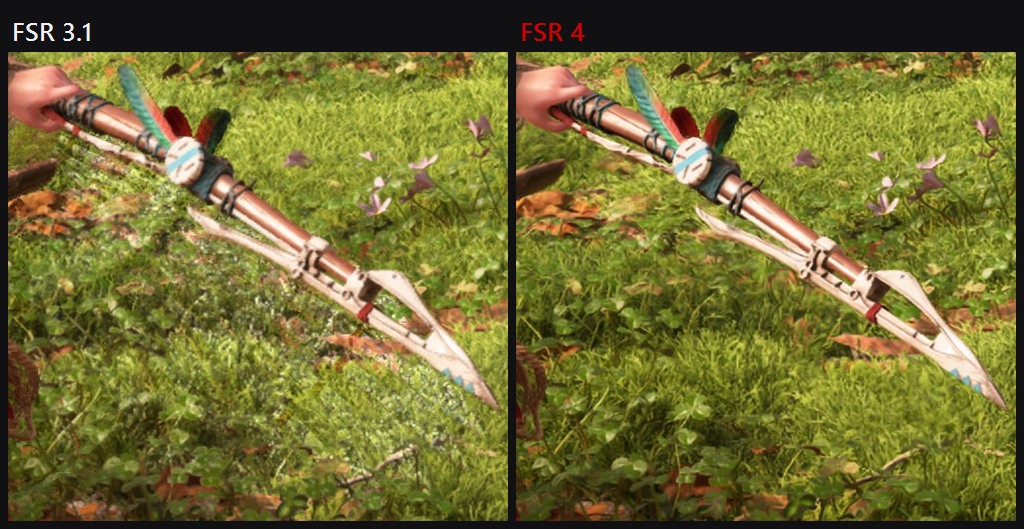
Swapping upscalers existed before OptiScaler. It just looked different.
The builds that actually worked lived on Patreon, access cost money, updates arrived whenever the author felt like it, and nobody ever saw the source. You paid for a DLL you then dropped into your game folder, and you took it on trust. When the author lost interest the thing simply stopped being updated, and support for new FSR versions died with it.
The project is blunt about this. OptiScaler is free, it lives on GitHub under the GPL-3.0 licence, and the authors call any demand for money a scam.
The difference is not only the price. Open source means anyone can look at what is being injected into your rendering pipeline, not just the person you sent money to. For a mod that hooks into the graphics stack, that is the whole point.
Which version is current: 0.9.4 and the upcoming v10
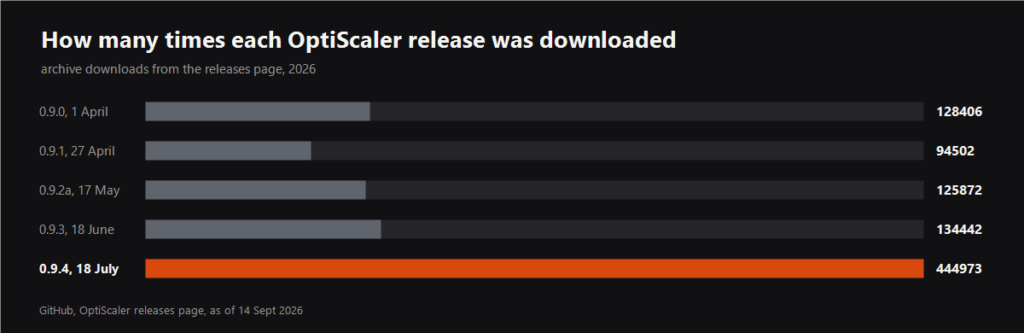
As of 14 September 2026 the latest stable release is OptiScaler 0.9.4, out since 18 July. That is the one to install unless you want to deal with nightly builds. Its archive has been downloaded 444,973 times, more than all the other 2026 releases put together, and the project is close to 11,000 stars on GitHub.
- What is in the archive. A signed OptiScaler 0.9.4 build, Fakenvapi 1.4.1, Nukem's dlssg_to_fsr3 0.130, FidelityFX SDK 2.3 with FSR 4.1.1 and FSR-FG 4.0.1, and XeSS SDK 3.0.1. Nothing else needs downloading.
- The main change in 0.9.4. Proper support for FSR 4.1.1, which added an INT8 model. Officially AMD only allows it on desktop RDNA 3, meaning Radeon RX 7000.
- On unsupported cards. RDNA 3 and 3.5 laptops, GeForce and Intel Arc can be forced with Fsr4ForceEnableInt8=true in OptiScaler.ini. Leave the Fsr4Update option alone: on those cards it silently falls back to FSR 3.
- How to check it really is FSR 4. Turn on the watermark, in the overlay or with Fsr4EnableWatermark=true. It shows FSR4, FSR4-i8 or FSR3, and it is the most reliable way to catch a silent fallback.
- RX 6000 owners on Windows. The developers recommend staying on FSR 4.0.2c INT8 for now, which is not in the archive. The reason is a compiler regression in AMD drivers that causes ghosting.
- Linux. You need a recent Proton with the latest VKD3D commits, plus Mesa 25.2 or newer and a Wine prefix set to Windows 11 for FSR4-FG.
In parallel the team is preparing OptiScaler v10. Nightly 10.0.0-pre1 builds come out daily in a separate OptiScaler-nightly repository, and the latest one at the time of this update is dated 14 September. The work-in-progress changelog is long, and some of it will change how installation works.
- A separate folder. All bundled files, upscalers, frame generation and OptiPatcher, move into an OptiScaler subfolder. The mod will no longer overwrite game files, and only OptiScaler itself, its config and the setup scripts stay in the root.
- Fakenvapi built in. A separate fakenvapi.dll will no longer be needed.
- Frame generation in DirectX 11. OptiFG only for now, with a performance cost from the DX12 interop.
- DLSSG as an output. Real DLSS Frame Generation still needs an RTX 40 or newer. Older Streamline 1 games such as The Witcher 3 and A Plague Tale: Requiem get experimental support for their DLSSG.
- A new way to force FSR 4 INT8. The 0.9.4 option is replaced by Fsr4ForceModel=2, and RX 6000 owners can drop in a custom amdxc64.dll to try FSR 4.1.1 without rolling back their driver.
- Small things that help. XeLL on non-Intel cards, a magnifier for pixel peeping, and a new overlay input system that should fix the mouse in stubborn games.
Nightly builds are the bleeding edge and they are allowed to break. For normal play install 0.9.4. We will come back to v10 once it ships as stable: the new folder layout will also change the removal file list below.
How to install it
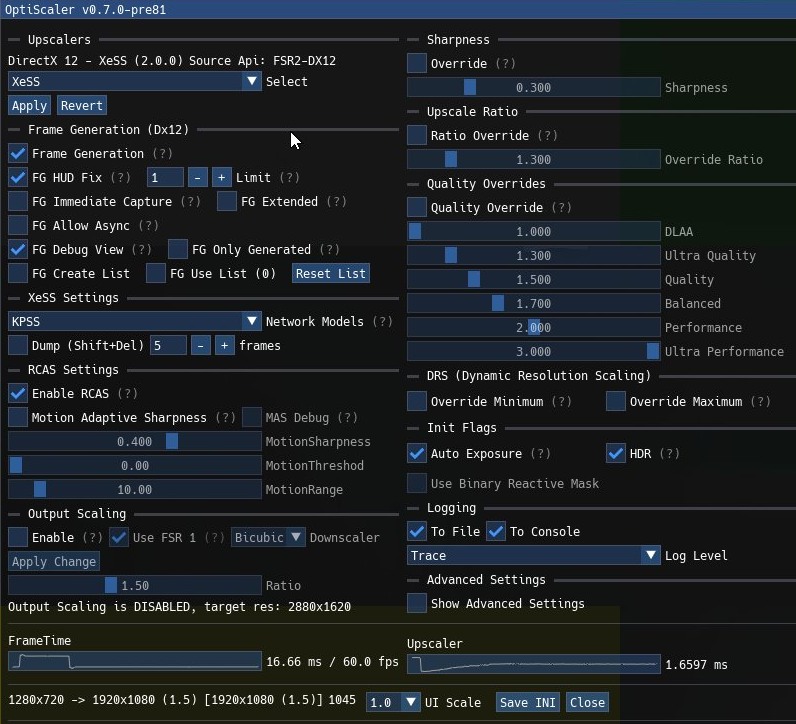
This is not a mod manager job. You copy files into the game folder by hand. It sounds worse than it is: the whole thing takes about three minutes.
Option one, the script
- Download the latest stable build from the releases page on GitHub. No other source.
- Find the folder with the game executable. Not the install root, the folder where the exe actually sits. On Unreal Engine games the path usually looks like
Game\Binaries\Win64. - Extract everything from the archive into that folder.
- Run the setup script from the archive. It asks which graphics card you have, Nvidia, AMD or Intel, and renames the DLL for you.
- The script asks whether to use DLSS inputs. On AMD and Intel cards, say yes. It may offer to download OptiPatcher as well, accept that too.
- Done. If a renamed DLL and a file called
OptiScaler.inihave appeared in the folder, the install worked.
Option two, by hand
One step differs: you rename OptiScaler.dll yourself. Pick a name from the list the game will definitely load:
dxgi.dll, winmm.dll, d3d12.dll, dbghelp.dll, version.dll, wininet.dll, winhttp.dll or OptiScaler.asi.
Where to start. The authors suggest dxgi.dll, which works for most games. If nothing happens, try the next name on the list. Leave OptiScaler.ini alone, it has to keep that exact name.
One special case: the game supports FSR 2 or 3 only and has no DLSS at all. Then you also need nvngx_dlss.dll, taken from TechPowerUp or the Streamline SDK repository, placed alongside it and with the copy renamed to nvngx.dll.
Controls in the game
- Insert. Opens the settings panel on top of the game. If the panel flickers and disappears, try Alt plus Insert, that fixes it on some keyboard layouts.
- Page Up. Shows the performance counter. Page Down cycles through its modes.
- End. Turns frame generation on and off.
How to update OptiScaler to a newer version
Do not install a new version over the old one. The developers describe two methods, and both take a couple of minutes.
- The safe way. Run Remove OptiScaler.bat in the game folder and press Y. It removes all OptiScaler files, including Fakenvapi, the Nukem mod and OptiPatcher, but leaves the upscaler libraries. Then download the new version and install it as usual.
- The quick way. Download the new version, rename OptiScaler.dll to the name it uses in that game, for example dxgi.dll, and replace the old file with it.
Checking is easy: open the overlay with Insert, and the version number is in the window title.
How to remove OptiScaler
Rolling back takes about a minute, and that is the strongest argument for trying OptiScaler at all. The catch is that the installer puts more than one file into the game folder, so deleting the renamed DLL and walking away is not always enough. Below is the full list, straight from the project's own uninstallation page, plus the two errors people actually hit afterwards.
The quick way
The release archive ships with Remove OptiScaler.bat. Run it from the same folder you installed into and it undoes the setup script's work. If you installed with setup_windows.bat, this is all you need.
By hand, the complete list
If you installed manually, or the batch file is gone, delete these from the folder with the game executable.
- The renamed OptiScaler DLL. It is whichever name you chose at install time:
dxgi.dll,winmm.dll,d3d12.dll,dbghelp.dll,version.dll,wininet.dllorwinhttp.dll. Older builds usednvngx.dll. If you do not remember which one, sort the folder by date and look at what appeared the day you installed. OptiScaler.ini, and if they are there,fakenvapi.ini,fakenvapi.dll,nvapi64.dlland thedlssg_to_fsr3files.- The folders
D3D12_OptiscalerandLicenses. These are the ones everybody forgets. - Legacy registry files. If you ever ran
EnableSignatureOverride.reg, runDisableSignatureOverride.regfirst, then delete both. - Restore the game's own files. If the game shipped a
libxess.dlland you backed it up before installing, delete the new one and put your backup back. Same for the FSR files. If you never made a backup, or the file was not there originally, leave it alone.
How to switch it off without deleting anything
You do not have to uninstall to test whether OptiScaler is the thing causing a problem. Rename the proxy DLL, for example from dxgi.dll to dxgi.dll.off, and launch the game. Windows loads DLLs by exact filename, so with the name changed the game simply does not see it and runs as it did before. Rename it back and OptiScaler is on again, with your settings untouched.
This is the first thing to try when a game starts crashing and you are not sure who is at fault. Two minutes of renaming answers the question that hours of reading forum threads will not.
The game will not start after you removed it
Nine times out of ten this is the backup step above. During installation OptiScaler can replace the game's upscaler libraries, and if you then delete the replacement without restoring the original, the game is left looking for a file that is no longer there.
- Verify the game files. In Steam it is Properties, Installed Files, Verify integrity. In the Epic launcher it is the three dots, Manage, Verify. The store re-downloads whatever is missing, and this fixes it without you having to know which file it was.
- Check that you deleted the right DLL. If you removed
d3d12.dllfrom a game that actually shipped its ownd3d12.dll, verification will restore it. - Look in the folder for leftovers. An
OptiScaler.inion its own is harmless, but theD3D12_Optiscalerfolder left next to a deleted DLL is a sign the removal was half done.
The "dll not found" error, and what it actually means
The message usually reads along the lines of "The code execution cannot proceed because dxgi.dll was not found" or names nvngx.dll, libxess.dll or nvapi64.dll. It is Windows saying that something asked for a library by name and the file is not where it was expected. There are only a few reasons for that, and they are quick to walk through.
- The files went into the wrong folder. Everything has to sit next to the game executable, not in the install root. On Unreal Engine games that is usually
Game\Binaries\Win64. This is the single most common installation mistake, and it produces exactly this error. - Your antivirus ate it. A renamed DLL that appears next to a game executable is textbook suspicious behaviour, and Defender quarantines it quietly. Check the protection history, and if the file is there, restore it and add the game folder to exclusions.
- A half-finished removal. If the name in the error is the proxy DLL you deleted, something in the folder is still pointing at it. Verify the game files.
- A missing original. If the error names
libxess.dlland you have no backup, verification in Steam or Epic brings the file back. - The DLL name does not suit the game.
dxgi.dllis the usual choice, but not every game loads it. If OptiScaler simply never appears in a game, try another name from the list above rather than reinstalling from scratch.
After a game update
Patches overwrite files in the executable folder, so a game that has just updated can quietly stop loading OptiScaler, or start crashing on launch. The fix is the same either way: remove it with the list above, let the game update finish, then install again on top of the clean folder. Do not layer a new version over an old one.
Two warnings that matter more than anything else here
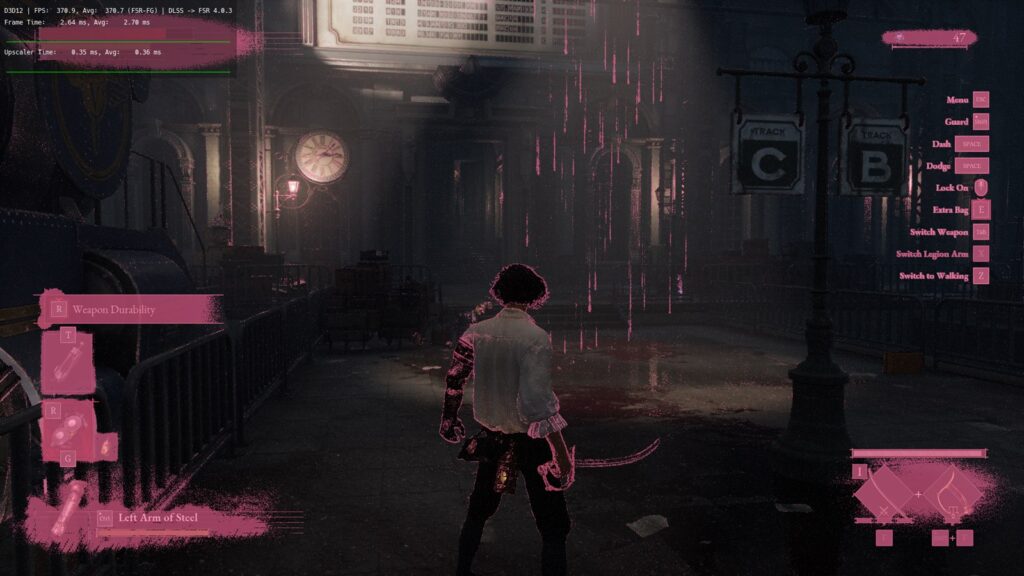
- Do not put this in online games. Anti-cheat sees library injection and reacts the only way it knows, with a ban. The authors put this in the first line of the project description, and they mean it.
- The project has no website of its own. None. There is GitHub, there is Discord, there is a NexusMods page. Everything else a search for optiscaler turns up, including polished sites with a download button, has nothing to do with the developers.
Read that second one twice. A mod that goes into your game folder and loads with the game is a perfect wrapper for anything at all. Downloading that from a random website is not worth the curiosity.
Where the project lives
- GitHub. github.com/optiscaler/OptiScaler. Source, releases and a wiki with per game compatibility tables.
- Discord. The official server. The fastest place to find out why a particular game refuses to pick the mod up.
- NexusMods. The third legitimate source of builds.
The wiki keeps a separate list of games with FSR 4 confirmed working. Worth a look before you start: some titles need a non standard filename or an extra step.
A personal note
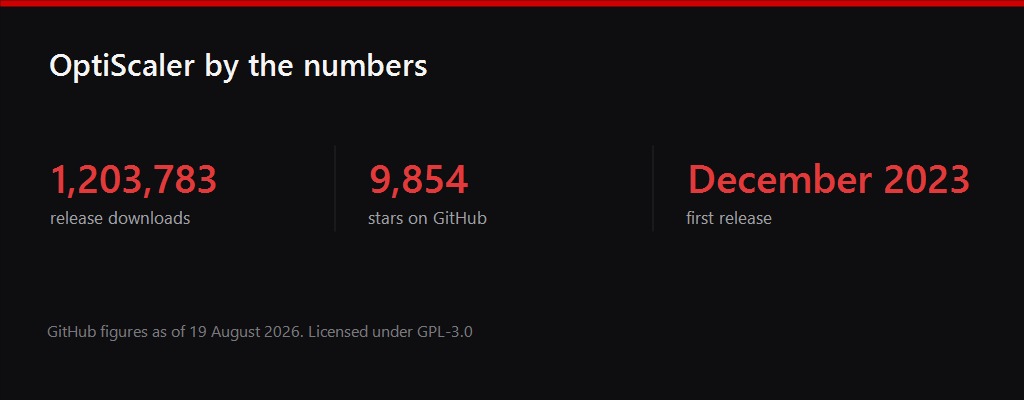
Free mods usually come with enthusiasm and an abandoned repository six months later. This one is different. The project keeps moving, FSR 4 support landed faster than some studios shipped official patches, and the neighbouring pieces like Nukem's dlssg-to-fsr3 and FakeNvapi were simply folded in, so nobody has to assemble a stack of four mods any more.
The result is a slightly odd and very welcome situation: the community hands a Radeon owner what neither the game publisher nor the GPU vendor will. For free, with the source open, after several years of paid wrappers of unclear quality.
So thanks to the team and to everyone sending patches. May the project last, may the list of supported games keep growing, and may the authors keep the energy for it. If it helped you, there are support buttons on the GitHub page, and that is the most direct way to say thank you.
Before you install OptiScaler, check whether your game is on the official list: FSR 4 may switch on without any of this. The list and the requirements are in FSR 4 and Redstone: every supported game.