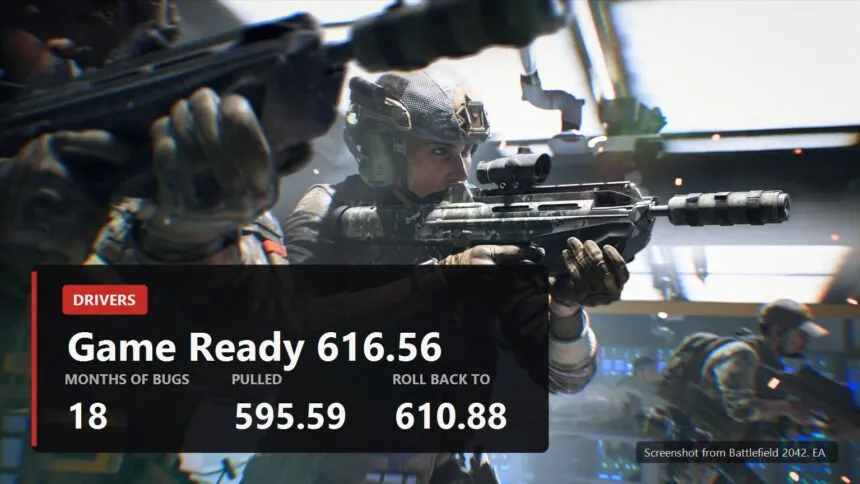
Game Ready 616.56 landed on 26 August, and by 1 September it had collected complaints about flickering monitors, brief black screens and shifted colours. GTX 16, RTX 30, RTX 40 and RTX 50 are all affected, which is very nearly the whole installed base. NVIDIA has acknowledged the problem and says a fix is coming, without a date.
On its own that is unremarkable, drivers break for everyone. The problem is that this is not a one-off, it is eighteen months running. And something else is happening alongside it: AMD, whose drivers were a punchline for fifteen years, has caught up noticeably. In 2026 the line "NVIDIA just has better drivers" is getting hard to hold.
What is going on at NVIDIA
The starting point is January 2025, the RTX 5090 launch and the 572 driver branch that brought 50 series support and DLSS 4. Black screens, blue screens and crashes started with it, and not only on the new cards.
- The first wave. Roughly four months produced six Game Ready drivers and four hotfixes, and the stability complaints were still there at the end of that run. Ten releases chasing one set of bugs.
- 576.02. Closed forty bugs in one go, black screens and crashes in demanding games on RTX 50 and RTX 40 among them. Forty fixes in a single driver is not a boast, it is a tally of what had piled up.
- 595.59, February 2026. Released on the 26th and pulled the same day. A fan control bug had RTX 30, 40 and 50 cards seeing or spinning only one fan. NVIDIA told people to roll back to 591.86, and only 595.71 on 2 March actually fixed it.
- 616.56, right now. Flickering, brief black screens and colour shifts, most often in browsers and during video playback.
The latest one has an unexpected workaround that also explains the bug's nature. The flickering mostly shows up at eight bits per channel output. Switching the same monitor to ten bits makes it stop. You do that in the NVIDIA app, System section, Monitors tab. If that does not help, or the monitor cannot do ten bit, rolling back to 610.88 does.
GamersNexus summed up the whole stretch without much diplomacy, calling it the worst launch they had seen from NVIDIA. Blunt, but the arithmetic does not move: ten releases in a row against the same symptoms.
What is going on at AMD
A caveat right away, otherwise this turns into a pamphlet. AMD breaks things too, and visibly.
The recent Adrenalin 26.6.2 arrived with a driver timeout in RoadCraft on RX 7000 cards, a crash in Battlefield 6 paired with a Ryzen AI 9 HX 370, and a purple screen with the HP Reverb G2 on RX 6000 in SteamVR. Plus a separate mess for Windows 10: a day after release AMD confirmed that installing it leaves the card with a yellow exclamation mark in Device Manager.
The difference is not that AMD became flawless. The difference is in the character of the breakage. AMD's failures are specific games and specific hardware combinations, the sort of trouble you get around by turning one feature off or waiting for the next build. What has been breaking at NVIDIA for eighteen months is the stuff that should never break: getting an image to a monitor and spinning the fans.
On a clean Windows 11 with an RX 9000 card and no legacy software in the system, driver crashes have become rare. Fifteen years ago you could not have written that sentence about a Radeon.
The hardware scheduler, and why you cannot simply turn it off
Now the part that makes NVIDIA's driver trouble land harder than it otherwise would.
Hardware-accelerated GPU scheduling is a Windows feature. Normally the processor arranges the queue of work for the graphics card; with the scheduler on, Windows hands part of that job to the card itself, which has a dedicated block for it. The gain is usually not in frame rate but in how evenly frames arrive, and in input lag.
For years this was a hobbyist setting: turn it on, measure, keep it or drop it. Not any more.
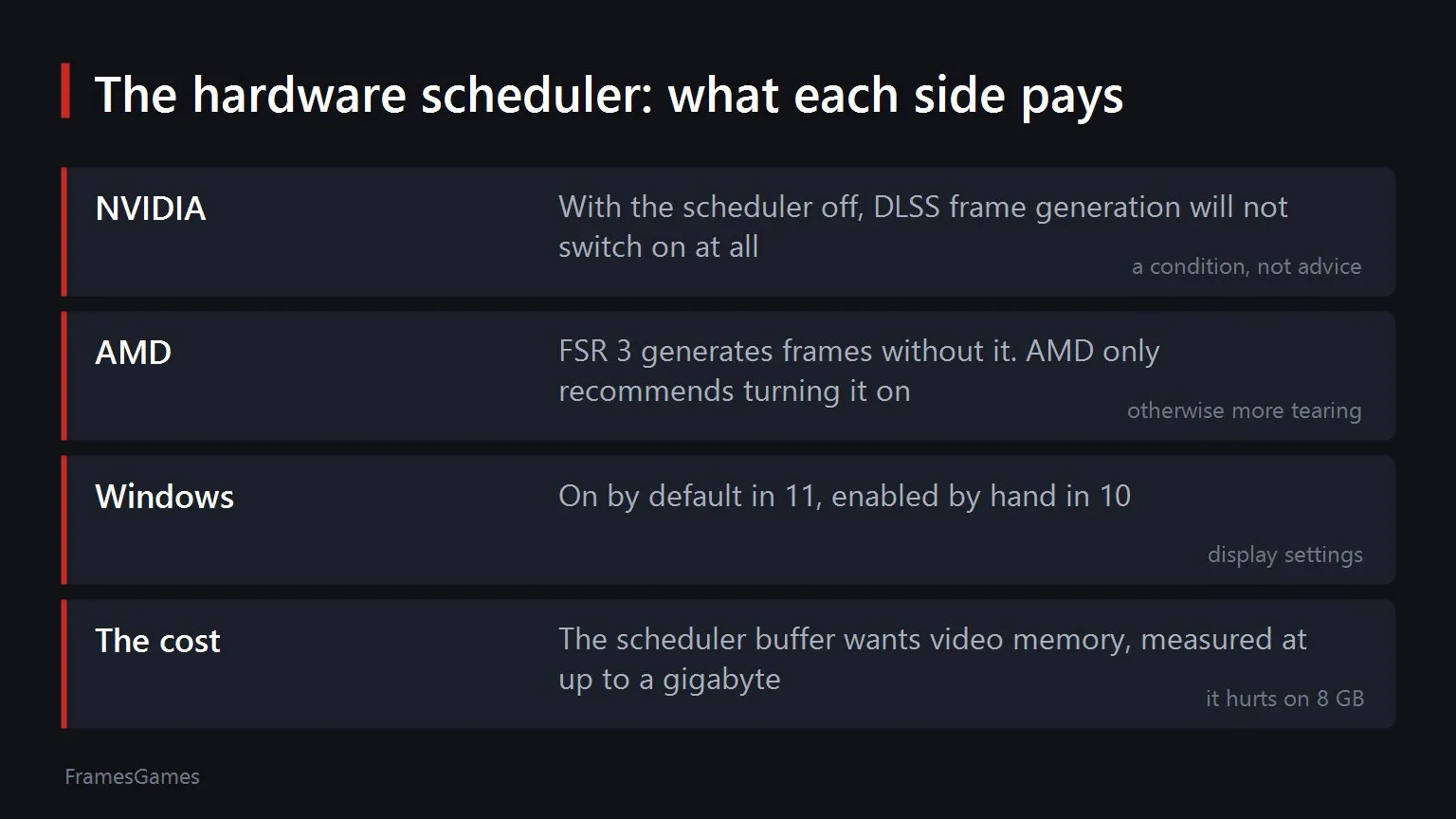
- On NVIDIA it is a hard requirement for frame generation. With the scheduler off, DLSS Frame Generation simply will not switch on. That is not advice, it is a condition, and it is written into CD Projekt Red's own support pages for Cyberpunk 2077 and The Witcher 3.
- AMD has no such requirement. FSR 3 generates frames with the scheduler off. AMD recommends turning it on, warning that without it you may see more tearing, but that is a recommendation, not a lock.
- Windows 11 has it on by default, Windows 10 needs it enabled by hand in the display settings.
Which leaves GeForce owners in an awkward spot. The classic advice for odd stutter and crashes is "try turning off hardware scheduling". The advice works. But turning it off costs you frame generation, and on plenty of cards frame generation is the reason the game runs at a playable rate at all. A Radeon owner does not face that fork.
What the scheduler costs

One more detail that rarely gets mentioned: the scheduler needs room in video memory for its own buffer. Measurements put that as high as a gigabyte.
On a sixteen gigabyte card that is noise. On an eight gigabyte card in a modern game already scraping the memory ceiling, a gigabyte is the difference between "runs" and "hitches on textures". Which is exactly why the advice to disable the scheduler is still around: on weaker cards it genuinely helps sometimes, and not by magic, by freed memory.
The practical read is simple. With 12 gigabytes or more, leave the scheduler on and stop thinking about it. With eight, try both in your game and watch memory rather than the average frame rate. And remember the price: on a GeForce, scheduler off means frame generation off.
What to do about all this
- Monitor flickering after 616.56. Switch the output to ten bits per channel in the NVIDIA app. If that fails, roll back to 610.88.
- Do not update on the day a driver lands. The 595.59 story, pulled within hours, makes the case for waiting better than any advice can. Give it a couple of days and read the threads.
- Keep the last working version to hand. Rolling back has already saved this story twice: 591.86 in February and 610.88 now.
- Do not switch graphics card over drivers. Both vendors break things, the only question is what.
And the conclusion from this whole stretch is this. For years NVIDIA sold not just performance but peace of mind: install it and forget it. Eighteen months of black screens, a driver pulled inside a day and now flickering monitors have eaten into that. While Radeon was behind on features you could look past this sort of thing. The gap has narrowed, and the driver conversation has stopped being comfortable for one side.
Sources
The 616.56 problems, the affected series, the link to eight bit output, NVIDIA's acknowledgement and the rollback to 610.88: reporting by VideoCardz, Wccftech and The FPS Review on 31 August and 1 September 2026, plus the driver's own feedback thread on the NVIDIA forums. The withdrawal of driver 595.59 on 26 February 2026, the fan bug on RTX 30, 40 and 50, the advice to roll back to 591.86 and the fix in 595.71 on 2 March: Tom's Hardware, VideoCardz, Guru3D and Neowin. The 572 branch, the black screen wave from January 2025, six Game Ready drivers and four hotfixes in four months, forty fixes in 576.02 and the GamersNexus assessment: Tom's Hardware. The Adrenalin 26.6.2 bugs in RoadCraft, Battlefield 6 and SteamVR, and AMD's confirmation of the yellow flag in Device Manager on Windows 10: driver coverage. The hardware scheduler being mandatory for DLSS Frame Generation is documented in CD Projekt Red's support pages for Cyberpunk 2077 and The Witcher 3. The absence of that requirement for FSR 3 and AMD's recommendation to enable it: AMD materials. Video memory used by the scheduler's buffer, up to a gigabyte: measurements by XDA.