This is the complete guide to DLSS 5: which graphics cards run it officially and through mods, which games have it, how many frames it costs, how to turn it on, what enthusiasts have done with it on AMD and Intel, and where the facts end and the rumours start. It is a living page: we update it every time a new game, driver or important mod lands, and the dated change log sits at the very end of the page.
- How to run DLSS 5 on your graphics card, step by step
- Radeon RX 9000 and RX 7000: AMDNR Launcher
- Games without their own upscaler: PLAY ANYWHERE and ReShade
- Radeon RX 6000
- The author's mod alone: DLSS-NR on AMD without the launcher
- Intel Arc
- GeForce RTX 20, 30 and 40
- GeForce RTX 50
- If it does not work
- The short answer: will DLSS 5 run on your graphics card
- What DLSS 5 is, and how it differs from DLSS 4.5
- Timeline: from the reveal to mods on Radeon
- Games with DLSS 5: two out, more promised
- How many frames DLSS 5 costs: measurements across the RTX 50 range
- How to turn on DLSS 5 officially
- DLSS 5 myths doing the rounds
- DLSS 5 on RTX 40, 30 and 20: official status and mods
- DLSS 5 Swapper: gone from GitHub since 18 October
- DLSS 5 Autopilot: picks the method itself and can lower the cost
- Running it before the upscaler: how to halve the cost
- DLSS5-Patcher and OptiScaler with DLSS NR
- DLSS Unlocked and FP16 builds for RTX 20 and 30
- A second graphics card for DLSS 5
- DLSS5-NR for Borderless Gaming: no NVIDIA library
- DLSS 5 on AMD graphics cards: a mod, a rumour and AMD's own path
- Intel, consoles and the cloud
- Why people are angry about DLSS 5
- What to avoid
- Where things stand on 8 November 2026
- Update log
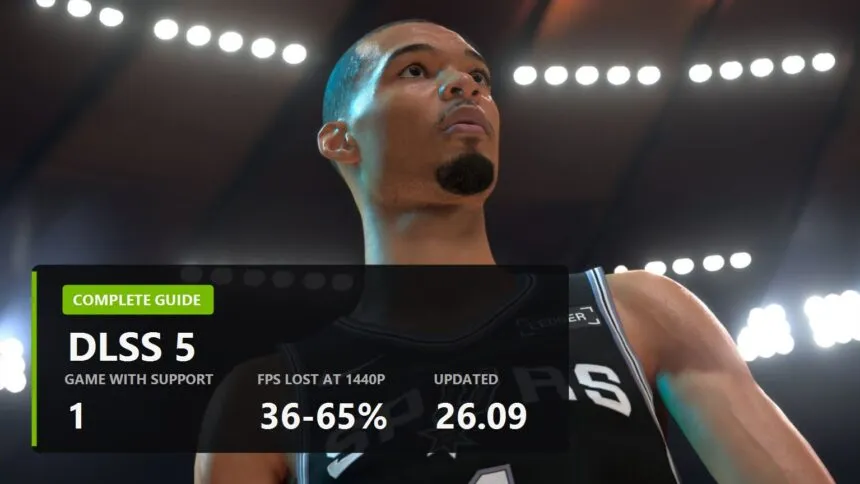
The short version as of 8 November 2026. Officially, DLSS 5 is in two games, NBA 2K27 and Hogwarts Legacy, and only on RTX 50 cards. At 1440p it costs between 36 and 65 percent of your frame rate depending on the card. Everything else, from RTX 20 to Radeon and Intel integrated graphics, runs through mods built on a leaked library, and that is worth understanding before you install anything.
How to run DLSS 5 on your graphics card, step by step
Find your card first, then follow only that subsection:
- Radeon RX 9000 or RX 7000, game with FSR, XeSS or DLSS in its settings: AMDNR Launcher, one-click install.
- Radeon RX 9000, game without its own upscaler (Mafia III, most games from before 2020): PLAY ANYWHERE in the same launcher, or ReShade.
- Radeon RX 6000: HIP SDK 7.2 first, then AMDNR, NeuralHub or OpenNR.
- Intel Arc: NR-Setup on Windows.
- GeForce RTX 20, 30, 40: DLSS 5 Autopilot.
- GeForce RTX 50: nothing to install, it is a setting in the game.
One rule for every mod here: no games with anti-cheat. The mod drops its own library into the game folder, and to Easy Anti-Cheat or BattlEye that looks like tampering. The ban lands on your account, not on the modder's.
Radeon RX 9000 and RX 7000: AMDNR Launcher
The easiest route on Radeon right now. The launcher by 3zwr1 finds your games, installs an OptiScaler build with DLSS NR, picks the neural runtime for your card and can take it all out again. The runtimes and their weights come in its own downloads, so there is no NVIDIA library to hunt for. Current version on 8 November: Alpha 0.3.5.8 R17 of 8 November; the launcher updates itself first, then your games. Step-by-step setup, common errors and the comparison with OptiScaler are in our AMDNR Launcher guide.
What you need: Windows 10 or 11 (64-bit), AMD Software: Adrenalin Edition 26.9.1 or newer, and about 2 GB of spare video memory at roughly 1080p render resolution. The game has to run on DirectX 12, DirectX 11 or Vulkan and offer an upscaler of its own: FSR 2 or later, XeSS or DLSS. RX 9000 and RX 7000 owners do not need the AMD HIP SDK or developer mode; the driver already has what it takes.
- Update the driver. Check the version in AMD Software: 26.9.1 or newer. With an older driver AMDNR will not start the network.
- Download the launcher. Get
AMDNR-Launcher.exeonly from the project's GitHub releases page, under Assets of the latest release. There are already plenty of lookalike "DLSS 5 for AMD" sites. The certificate is self-signed, so Windows SmartScreen warns on first launch: click "More info", then "Run anyway". The release notes list the file's SHA256 if you want to check it. - Find the game. The launcher reads Steam, Epic, Xbox, Ubisoft Connect, EA, GOG, Rockstar, Battle.net and Amazon Games libraries. If a game is missing, add its folder by hand; if it picked the wrong executable, point it at the right one with CHOOSE GAME .EXE.
- Press INSTALL on the game's page. The launcher downloads the build (about 600 MB), picks the file name the mod loads under (usually
dxgi.dll) and checks the result with its Doctor. If the page shows PLAY ANYWHERE instead of INSTALL, the game has no upscaler of its own: go to the next subsection. - Start the game with PLAY or the usual way and switch on an upscaler in its graphics settings: FSR, XeSS, or DLSS if the game lists it. Any quality mode will do. With no upscaler running, the network never hooks in, and that is the most common reason for "nothing changed".
- Pick a runtime. On first launch the mod asks which neural runtime to use, lmxxf or danielblnc (answer with 1, 2 or Enter). On RX 9000 I would start with lmxxf: since 0.3.5.3 it is the default, it is faster and its picture sits closer to NVIDIA's. If you see a dark trail behind moving characters, try danielblnc. You can switch later in the menu, it applies after a restart. Since 0.3.5.7 the launcher also offers a third runtime for RX 9000 as a separate component, Mochizuki; in R17 it runs inside the game process, which according to the author lifted it from 13 to more than 28 network runs per second.
- Press Insert for the menu and open the Neural tab. Home turns DLSS 5 on and off in the game, handy for comparing.
How to tell it works. Under the runtime name on the Neural tab there is a line like Running - 1920x1080 at 100% - NR 62/s - model 62/s - 15.3 ms. Running and a non-zero NR mean the network is working; the last number is how many milliseconds it takes from every frame. If it reads NR 0/s, an orange line below gives the reason, often with a button that fixes it.
If the frame rate is too low. The Preset buttons (Quality, Balanced, Performance) set the network resolution to 100, 85 and 70 percent. Under Performance there is Fast mode: the network runs one size step lower, about 29 percent less time by the author's measurement, with fine detail a touch softer. Model interleave runs the model every other frame and gives the biggest gain. When you are done, press Save Settings at the bottom of the menu, or everything resets on the next launch.
What to expect on the RX 9070 XT and RX 9070. According to the author, Cyberpunk 2077 at 1440p with FSR Quality ran at 64 fps on an RX 9070 XT in version 0.3.5.2, and the network itself takes about 14 ms per frame at 1080p. The plain RX 9070 has 56 compute units against the XT's 64. I could not find measurements on it, so expect a noticeably lower number. Nobody has tested AMDNR independently yet.
Games without their own upscaler: PLAY ANYWHERE and ReShade
Mafia III, the older Assassin's Creed games, most things from before 2020 know neither FSR 2 nor DLSS, and a normal AMDNR install turns them down. There are two ways in.
PLAY ANYWHERE, RX 9000 only. A preview mode: the launcher starts the game and captures its window, the network works on the finished picture, and nothing is written into the game folder.
- Set the game to windowed or borderless. The capture cannot see exclusive fullscreen.
- Use a 1920x1080 window or smaller. At 1080p the network sees every pixel; a bigger window is first shrunk to its limit and then scaled back up.
- Cap the game at 60-90 fps with its own limiter: every frame the capture shows is another run of the network.
- Press PLAY ANYWHERE on the game's page. The first time, the launcher downloads the capture program, about 100 MB, then starts the game.
- Insert opens the menu inside the capture, with an Anywhere tab: network size (Auto, 720, 900, 1080) and frame rate. New values take effect at the next launch.
A captured window has no depth buffer and no motion vectors, so the program has to guess the motion. Fast scenes can flicker or judder; network size 720 and a frame cap help. It is a workaround, and the picture is worse than in a game with a native upscaler.
OpenNR (until 19 October called dlss5-neural-amd), RX 6000 to 9000. zmodelerlover's project now has two routes, and its installer picks one per game: an OpenNR build of OptiScaler (recommended), which runs the network inside the game's DLSS, FSR or XeSS, or on the finished frame when there is no upscaler, in DirectX 9 to 12, Vulkan and OpenGL games; and a ReShade add-on for emulators, DirectX 8 and whatever the first route does not take. The runtime is chosen per game: danielblnc (RX 6000 to 9000), lmxxf (RX 9060 and 9070) or mochizuki (RX 9000; older cards experimental). Install it with OpenNR Installer: one .exe that finds your games, picks the renderer, downloads and checks every file and can take it all out again. In the game, Insert opens the OptiScaler route's menu (Neural tab) and Home opens ReShade (Add-ons tab, OpenNR). The renderer guess is usually right, not always: a wrong pick installs fine and then does nothing. Check the game's PCGamingWiki page first; each game card links to it.
Radeon RX 6000
First install AMD HIP SDK 7.2 from AMD's site: RX 6000 drivers only carry HIP 6.4, and without the SDK the log says HIP: amdhip64_7.dll failed to load. After that there are three routes, all on danielblnc's runtime: AMDNR from the top of this section (its own lmxxf runtime reaches RX 6000 only in 0.3.6), danielblnc's NeuralHub 0.8.0 from the next subsection (only neural rendering on RX 6000 for now; the author lists RDNA 2 as in testing) and OpenNR from the subsection above. Nobody has published RX 6000 frame rates yet.
The author's mod alone: DLSS-NR on AMD without the launcher
Since 0.8.0 of 17 October danielblnc's project comes as NeuralHub, a manager in the style of the AMDNR launcher, and it ports all of DLSS: neural rendering, upscaling, Ray Reconstruction and frame generation on RX 9000 and RX 7000, neural rendering only on RX 6000 for now. You need Windows 11, Adrenalin 26.1.1 or newer, a DirectX 12 game with DLSS, FSR or XeSS, and your own nvngx_dlssnr.dll 310.8.0.0 or later (nvngx_dlss.dll, nvngx_dlssd.dll and nvngx_dlssg.dll are optional, for the other features). Run NeuralHub_v0.8.0_setup.exe from the project's releases, import the library, let it scan your games and install the loader in the ones you want. In the game, switch on DLSS, FSR or XeSS and press End for the overlay. The author reports 90-100 fps at 1080p on an RX 9070 XT with the full model. Do not install this next to AMDNR: AMDNR already runs danielblnc's runtime, and two mods in one folder load the game twice.
Intel Arc
dlss-nr-on-intel runs DLSS 5 neural rendering on Intel Arc under Windows and Linux. Version 0.0.5 of 6 November supports Battlemage cards (Xe2: the integrated Arc 140V, B570, B580) and, experimentally since 0.0.4, the older Alchemist A-series. You need 64-bit Windows 10 or 11, your own nvngx_dlssnr.dll (310.9.16 carries both networks, A and B; 310.8 only A) and the Visual C++ x64 Redistributable. Python is no longer needed: since 0.0.4 it ships inside the archive.
- Extract the ZIP into a folder of its own, for example
C:\dlss-nr. When updating, first press Remove NR for each game in the old version's setup. - Run
NR-Setup.exe, choose the DLL, the game's.exeand its API (Vulkan, DirectX 8-11 or DirectX 12) and press Install NR. - DirectX 12 games work through XeSS. If the game has its own XeSS, pick XeSS as the upscaler in its settings. If it has none, install OptiScaler, set it to XeSS, and NR's setup finds OptiScaler's XeSS (since 0.0.5).
- Start the game the usual way, not as administrator. Home turns NR on and off, Insert opens the in-game panel: network A or B, render scale, effect strength, profiles and a frame counter.
- Try the hogwarts profile (0.0.5). It copies the look NVIDIA chose for the official DLSS 5 update of Hogwarts Legacy: half the tone change of standard, a little less added detail and softer faces and skin. It works in any game, so compare the two in the panel.
What to expect: on the integrated Arc 140V the author gets 25-26 NR frames per second in Hogwarts Legacy at 1280x720, and 51-52 on screen with the game's frame generation. An Arc A770 owner reported about 22 fps in Star Wars Battlefront II and 21-22 in Euro Truck Simulator 2 at 1920x1080 with network B and render scale 0.4, and 17-18 in Alien: Isolation (version 0.0.3.1, before the 0.0.4 speed-up of up to 19 percent). At full render scale the same card drops to about 6 fps. Games with anti-cheat refuse NR, so stay with single-player and offline. Problems go to the project's issues together with the file that Save report writes.
GeForce RTX 20, 30 and 40
Use DLSS 5 Autopilot, version 2.1.0 of 2 November. It scans your library, picks one of nine install routes for DirectX 8 to 12, Vulkan and OpenGL, games without DLSS of their own included, installs the library build that matches your card and, after you play, reads the logs to tell you whether it worked. Start at a 75 percent work area: the author says that costs about half of 100. On RTX 20 and 30 it uses community FP16 builds; at 100 percent they take about half your frame rate by the author's estimate, and Tom's Hardware saw single-digit frame rates in most games on Ampere. On driver 616.64 and newer some routes crash in a good number of games: the tool works around that where it can, and rolling back to 616.56 is the other fix. DLSS 5 Swapper, which we used to recommend here, disappeared from GitHub on 18 October. More on Autopilot below, in the section on RTX 40, 30 and 20.
GeForce RTX 50
Driver 616.64 or newer and a game with official DLSS 5: NBA 2K27 (DLSS Neural Rendering under Video Settings) or, since 5 November, Hogwarts Legacy (off by default; switch it on in the graphics settings or with Shift+Alt+B). No mods needed. The details are in "How to turn on DLSS 5 officially" below. In other games RTX 50 owners use Autopilot too.
If it does not work
- The game crashes right after launch. Press REPAIR / UPDATE in the launcher, and its Doctor will tell you what is wrong. By hand, try another file name instead of
dxgi.dll:winmm.dll,version.dll,dbghelp.dll,winhttp.dll, one at a time. Resident Evil Requiem crashes after 15-60 seconds without REFramework. - The menu shows NR 0/s. Read the orange line under the runtime. The usual causes: the game's upscaler is off, or an old danielblnc install is still in the folder.
- Laptop or PC with integrated graphics, and NR never starts. The game launched on the integrated GPU. Windows Settings, System, Display, Graphics: add the game's .exe, Options, "High performance", restart the game. The GPU line under Neural, Diagnostics shows which card runs the network.
- Black screen. Update to AMDNR 0.3.5.3: it fixes the black screen with danielblnc 0.6.0, in Black Myth: Wukong and in Resident Evil Requiem.
- The screen flashes and the driver resets (error
887A0005). The card cannot keep up with the network. Lower the network resolution with the Balanced or Performance preset. After eight resets in a row AMDNR switches DLSS 5 off for the rest of the session by itself. - Settings do not stick in a game installed under
C:\Program Files. Since 0.3.5.3 AMDNR saves them to%LOCALAPPDATA%\AMDNR\settings; older versions lost them. - I want it gone. UNINSTALL in the launcher removes everything the mod placed or wrote while the game ran. Without the launcher, delete the mod's files from the game folder, the renamed
dxgi.dllfirst. - Nothing helped. Save report under Neural, Diagnostics, or COLLECT LOGS in the launcher, packs every log into one zip. Take it to the #bug-report channel on the project's Discord.
The short answer: will DLSS 5 run on your graphics card
| Graphics card | Official | Through mods | What to expect |
|---|---|---|---|
| RTX 50, desktop and laptop | yes, since 3 September | yes, including unsupported games | 1080p on any card in the range, 1440p from the RTX 5070, 4K for the RTX 5080 and 5090 |
| RTX 40 | promised, no date | yes | NVIDIA will get to it after tuning RTX 50 |
| RTX 30 and RTX 20 | no, not promised | yes, in FP16 mode | single-digit fps in most games |
| Radeon RX 9000 | no | yes, DLSS-NR on AMD mod; since 0.8.0 also DLSS upscaling, Ray Reconstruction and frame generation | 75 fps in Cyberpunk 2077 at 1080p with FSR 4 Performance, per the author |
| Radeon RX 7000 | no | yes, Reference mode; up to +207% in 0.5.0 and another +25% in 0.8.0, per the author; since 0.8.0 also DLSS upscaling, Ray Reconstruction and frame generation | slower than RX 9000, RDNA 3 has no FP8 |
| Radeon RX 6000 | no | yes, since 0.6.0, needs AMD HIP 7.2 | no numbers yet |
| Intel Arc: integrated 140V, B-series, A-series (experimental) | no | mod dlss-nr-on-intel 0.0.5, Windows and Linux | about 20-26 fps: 720p on the 140V, 1080p at render scale 0.4 on an A770 |
| GTX and RTX 16 | no | no | no Tensor cores |
| Any device | yes, via GeForce NOW Ultimate | cloud RTX 5080, streamed to a Mac, TV or phone |
If you have an RTX 50 card you do not need to install anything beyond a driver and the game. On any other card it comes down to whether you are prepared to deal with mods that carry real risks. Those get their own section further down.
What DLSS 5 is, and how it differs from DLSS 4.5
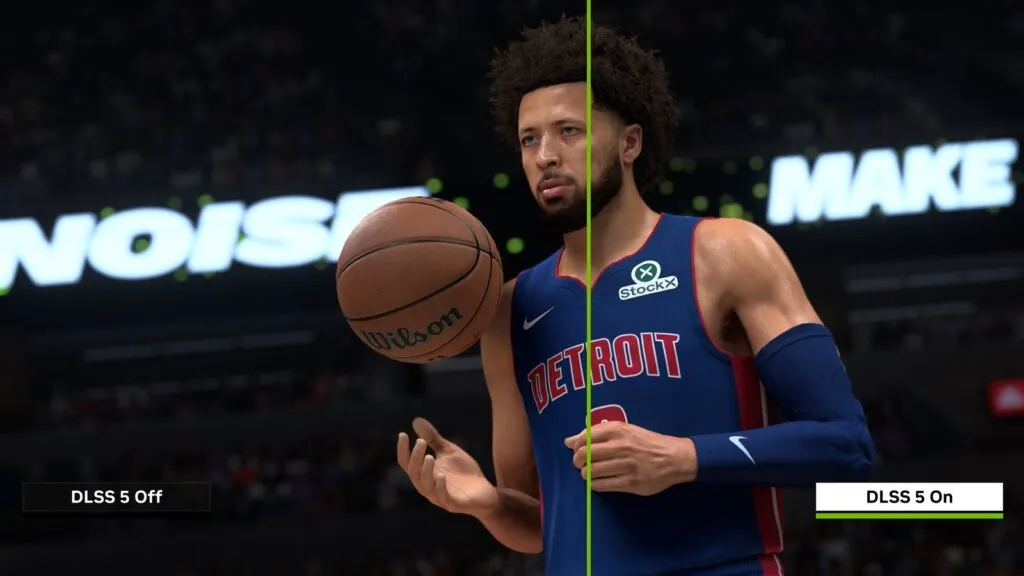
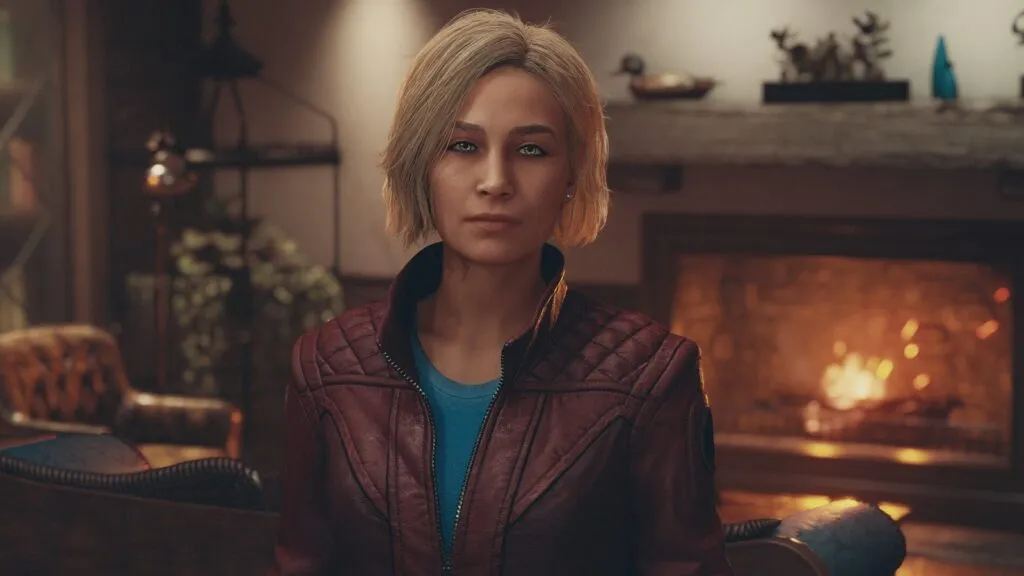
Every earlier DLSS worked on a finished frame: it raised the resolution or generated in-between frames. DLSS 5 steps in earlier. It takes the game's colour, motion vectors and 3D scene data, and a neural network adds lighting and materials on top: light passing through ears, settling on skin and hair. NVIDIA calls it 3D-Guided Neural Rendering and describes the model as a one-step diffusion model, the same family as image generators, except it runs in a single pass and in real time.
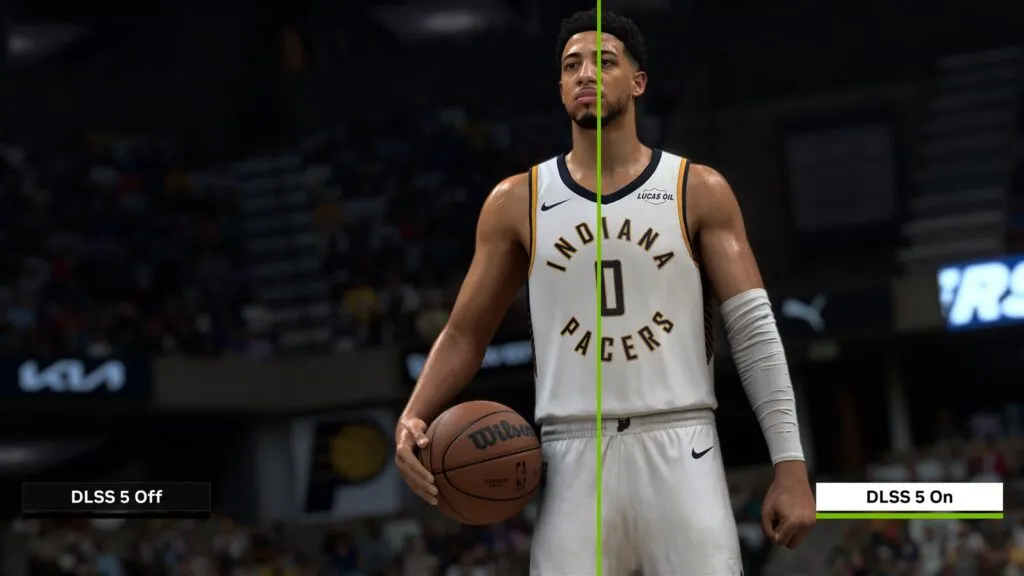
The collage above cuts one scene down the player's face: DLSS 5 off on the left, on on the right. The difference shows in skin, the shadows under the brows and the depth of the face, while the stands and the kit barely change. ComputerBase says the same: a big gain on faces and self-shadowing, and in normal play from a mid distance the difference comes down to slightly better contrast.
 The video loads from YouTube (Google) when you press play. Privacy policy
- DLSS 4.5 is the upscaler, frame generation and Ray Reconstruction. It runs on every RTX card from the 20 series up.
- DLSS 5 is a separate layer on top, the "DLSS Neural Rendering" option in a game's settings. The upscaler and frame generation keep working as before.
- Developers get effect strength sliders (Structure and Tone Intensity), per-object masks and a choice of model. Players get on and off.
Timeline: from the reveal to mods on Radeon
| Date | Event |
|---|---|
| 16.03.2026 | Revealed at GTC. Jensen Huang calls DLSS 5 "the GPT moment for graphics". The demo runs on two RTX 5090s. |
| 21.07.2026 | SIGGRAPH: the model now fits on a single RTX 50 card, three models and per-object masks are shown. |
| 29-30.08.2026 | The nvngx_dlssnr.dll library, version 310.8.0.0, leaks with an early NBA 2K27 build. The modding starts. |
| 01.09.2026 | NVIDIA sets the date and says the model got five times faster in six months. |
| 03.09.2026 | Official launch in NBA 2K27 at 9pm Pacific, which is 04:00 UTC on 4 September. Driver 616.64. The same day NVIDIA promises an RTX 40 port, later. |
| 03-12.09.2026 | The DLSS-NR on AMD mod runs DLSS 5 on a Radeon RX 9070 XT and, by its author's figures, climbs from 10 to 71 fps at 1080p in nine days. |
| 14.09.2026 | DLSS 5 Autopilot: one-click install into any game, with the cost adjustable through model resolution. |
| 16.09.2026 | Rumour: AMD will have its own "neural lighting", probably for RDNA 5. |
| 18.09.2026 | DLSS 5 runs on Intel Arc 140V integrated graphics. |
| 22.09.2026 | Driver 617.14. Nothing in it for DLSS 5; NVIDIA publishes a developer write-up of the DLSS 5 controls. |
| 25.09.2026 | DLSS-NR on AMD 0.4.0, with the author claiming 42 percent over the previous build. |
| 27.09.2026 | DLSS-NR on AMD 0.4.2: Fast and Reference modes, RX 7000 on Reference only. |
| 28.09.2026 | DLSS-NR on AMD 0.4.3: 75 fps in Cyberpunk 2077 at 1080p with FSR 4 Performance, per the author. |
| 29.09.2026 | DLSS-NR on AMD 0.5.0: up to +207 percent network speed on RX 7000 and +5 percent on RX 9000, per the author. |
| 30.09.2026 | Borderless Gaming releases a DLSS5-NR effect that skips NVIDIA's library and is not limited to RTX 50. Wccftech: DLSS 5 in The Witcher 3 Remastered costs the RTX 5090 30 percent of its frames. |
Games with DLSS 5: two out, more promised
 The video loads from YouTube (Google) when you press play. Privacy policy
As of 5 November official DLSS 5 is in two games: NBA 2K27 and Hogwarts Legacy, which got it with the 5 November patch. NVIDIA lists War Thunder (mid-November) and Where Winds Meet (23 November) next. The list the company named back on 16 March looks like this:
| Game | DLSS 5 status |
|---|---|
| NBA 2K27 | live since 3 September, twice as fast model from 16 October |
| AION 2 | promised |
| Assassin's Creed Shadows | promised |
| Black State | promised |
| CINDER CITY | promised |
| Delta Force | promised |
| Hogwarts Legacy | live since 5 November, RTX 50 only, driver 616.64 or newer; ComputerBase: 75.6 FPS without DLSS 5 and 57.2 with it at 4K on an RTX 5090; PCGH, RTX 5070 Ti, 1440p DLSS Quality: about -25% without RT, 54.5 > 53.7 fps with Ultra RT (CPU-bound) |
| Justice | promised |
| NARAKA: BLADEPOINT | promised |
| NTE: Neverness to Everness | promised |
| Phantom Blade Zero | promised |
| Resident Evil Requiem | promised |
| Sea of Remnants | promised |
| Starfield | promised |
| The Elder Scrolls IV: Oblivion Remastered | promised |
| Where Winds Meet | late November 2026 |
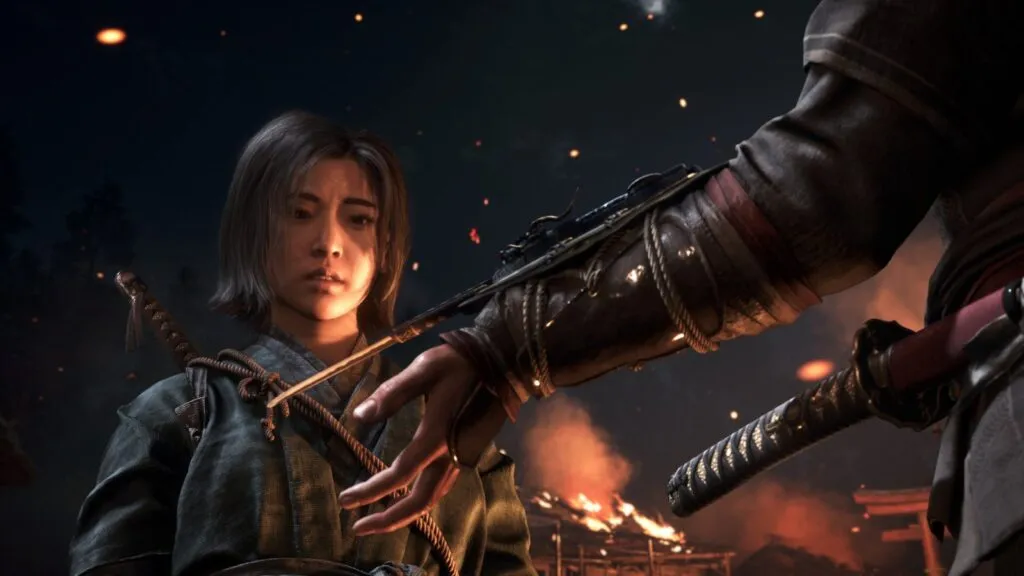
Do not mix this list up with DLSS 4.5. NVIDIA's September news puts Control Resonant, Gears of War: E-Day, the Witcher 3 remaster and others next to NBA 2K27, but those have DLSS 4.5 upscaling and frame generation, not neural rendering. When a second DLSS 5 game ships, it goes straight into the update log at the top.
How many frames DLSS 5 costs: measurements across the RTX 50 range
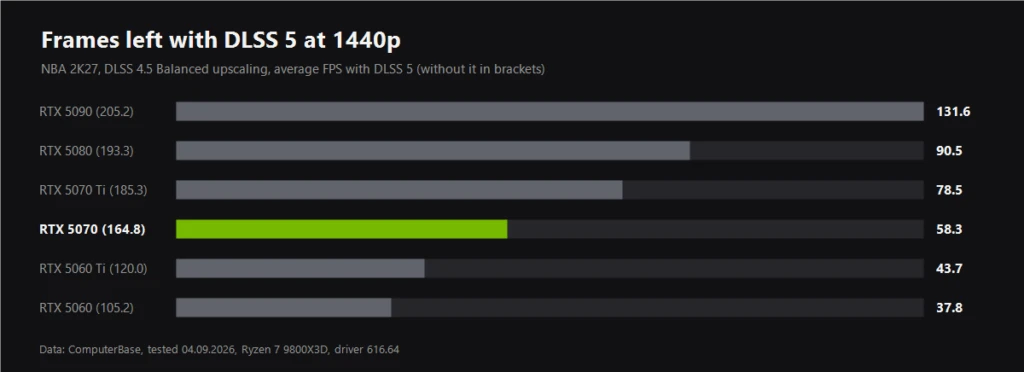
NVIDIA names the price itself: on average across RTX 50 cards and resolutions, DLSS 5 costs 50 to 60 percent of your frame rate. The measurements agree. ComputerBase tested NBA 2K27 with DLSS 4.5 upscaling on Balanced: at 1440p the RTX 5090 loses 36 percent, the RTX 5080 about half, the RTX 5070 almost two thirds. At 4K even the RTX 5090 drops from 179 to 77 fps.
Wccftech measured DLSS 5 in a game that does not support it officially on 29 September. In The Witcher 3 Remastered, with DLSS 5 injected through Lecram's mod, an RTX 5090 at 4K with path tracing and no frame generation ran at 50 fps without DLSS 5 and 35 with it, a 30 percent drop. With 6x frame generation it was 180-183 fps against 245-247. The mod itself puts the network's cost at 8.7 milliseconds per frame at 4K.
Why the price is so high, and why upscaling helps less than usual: the model has a near-fixed cost for every output frame, and it scales with output resolution rather than internal resolution. Digital Foundry measured about 8 milliseconds per frame at 4K on an RTX 5090, half of the entire budget at 60 fps.
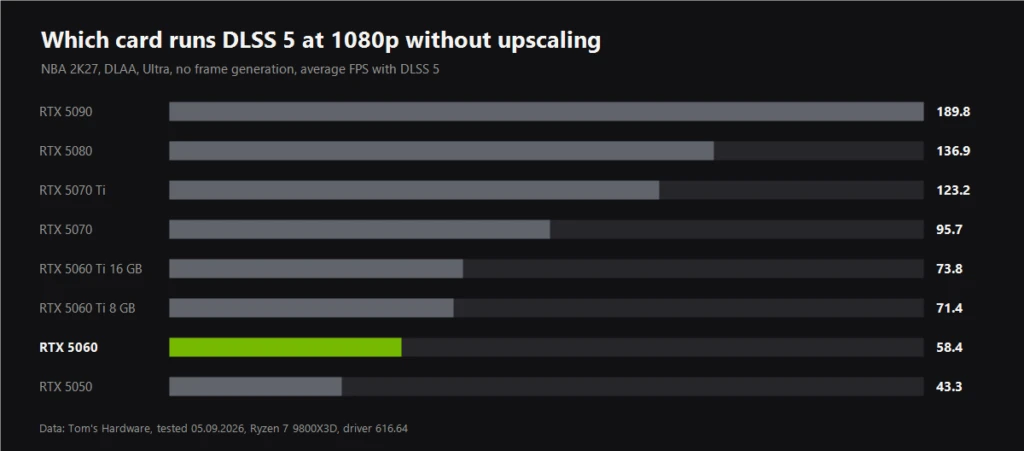
Tom's Hardware ran the whole range at native resolution, with no upscaling and no frame generation. For choosing a card, the picture is simple:
- 1080p is open to everyone. Even the RTX 5060 holds 58 fps, the RTX 5050 43.
- 1440p starts at the RTX 5070. It gets 62 fps, the RTX 5060 Ti 16 GB already drops to 48.
- 4K is for the RTX 5080 and 5090. Without upscaling even they manage 49 and 78 fps, so at 4K upscaling is a must.
- 8 GB of VRAM is a wall. On the RTX 5060 Ti 8 GB, RTX 5060 and RTX 5050 the game warns about low memory at 1440p, and the RTX 5050 collapses to 6 fps.
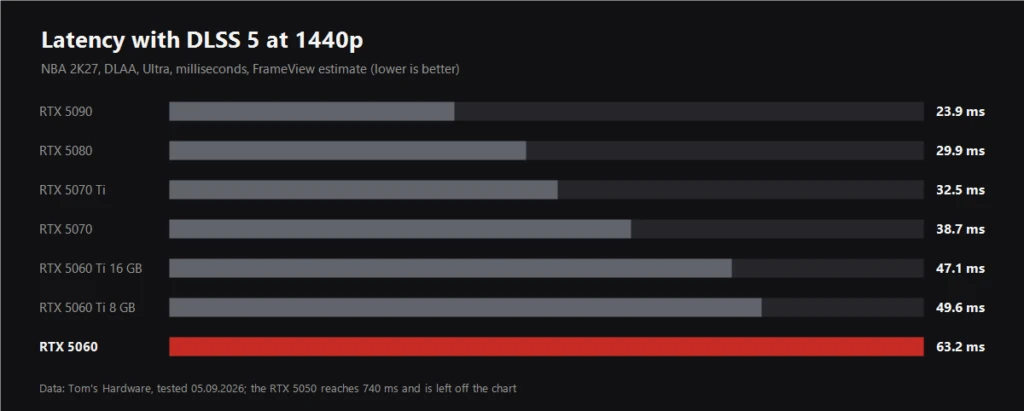
Latency gets less attention than it deserves. With frame generation it rises because frames are slotted in between real ones. DLSS 5 has no such mechanism, but the model itself eats into every frame. On an RTX 5070 at 1440p latency went from 20 to 39 milliseconds, on an RTX 5060 from 34 to 63. Fine for NBA 2K27, not for a shooter.
And on power: Tom's Hardware measured an RTX 5090 Founders Edition drawing 517 W instead of 316 at 1440p with DLSS 5, and sitting at its 575 W ceiling at 4K. An MSI Lightning Z with two power connectors reached 848 W at 4K and came out 20 percent faster. The first measurements are broken down in our piece on the real cost of DLSS 5.
A word on NVIDIA's big numbers, like 370 fps at 4K on an RTX 5090. That is true, but with 6X frame generation and Performance upscaling, so five frames in six are generated and the card is really rendering about 62. If you want to know what your monitor shows, look at 370. If you want to know what the card is drawing, look at 62.
How to turn on DLSS 5 officially
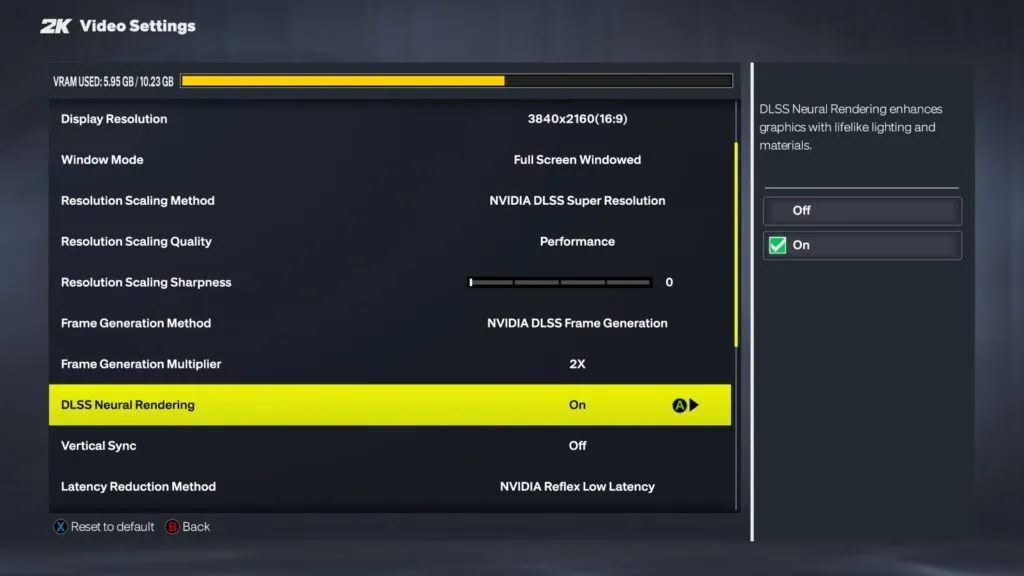
- Step 1. An RTX 50 card, desktop or laptop, or a GeForce NOW Ultimate subscription.
- Step 2. Driver 616.64 or newer. On 616.56 the option does not work, as ComputerBase found.
- Step 3. In NBA 2K27, open Video Settings and switch DLSS Neural Rendering on.
- Step 4. F9 toggles the effect mid-match and in replays, handy for comparing it yourself.
- Step 5. The same menu has a VRAM meter. If it is near the limit, lower the resolution or turn frame generation off.
Hogwarts Legacy, since the 5 November patch: an RTX 50 card and driver 616.64 or newer. DLSS 5 is off by default; turn it on in the graphics settings or with Shift+Alt+B. On an RTX 5090 at 4K ComputerBase measured 75.6 fps without it and 57.2 with it; details in our Hogwarts Legacy test summary.
DLSS 5 has no separate installer and never will, just like every DLSS version before it. You cannot force it into other games through the NVIDIA App either: according to VideoCardz, NVIDIA said plainly there will be no such switch and support depends on developers. How to update ordinary DLSS in any game is covered in our guide to DLSS in almost any game.
DLSS 5 myths doing the rounds
- "Driver 617.14 unlocks DLSS 5 and adds 20 percent". No. NVIDIA's official notes for the 22 September driver do not mention DLSS 5 at all; it shipped for Control Resonant, Gears of War: E-Day and the Witcher 3 remaster.
- "Download the DLSS 5 installer". There is no official installer. Sites offering one are at best repackaging mods and at worst handing out malware under a familiar name.
- "DLSS 5 is already in Hogwarts Legacy, Starfield and Cyberpunk". Only through mods. Officially those games are on the promised list or not on it at all, like Cyberpunk 2077.
- "AMD officially works with DLSS 5". No. On Radeon it runs through an enthusiast's mod, and AMD has said nothing about it. AMD has its own path, covered below.
- "DLSS 5 runs on Switch 2 and PS5". No. In the Mario and Ghost of Yotei clips the picture goes from the console through a capture card into a PC with an RTX card, and the PC's GPU does the work.
DLSS 5 on RTX 40, 30 and 20: official status and mods
NVIDIA's official position on RTX 40, from its statement to Wccftech: the company is tuning performance on RTX 50 first, with model updates expected this autumn, and only then plans to expand support to RTX 40. There is no date. For RTX 30 and RTX 20 there are no plans at all.
Enthusiasts did not wait. Every mod below runs on the same library that leaked with the NBA 2K27 build, and nearly all of them expect you to source that file yourself. We only link to the projects' GitHub pages: lookalike sites have already appeared around them.
DLSS 5 Swapper: gone from GitHub since 18 October
On October 18, 2026 the DLSS 5 Swapper repository and its author's profile disappeared from GitHub, for reasons nobody has explained. There is no official download right now. Do not grab copies from other sites or lookalike "mirrors": names like this are a common cover for malware. On RTX 20-40, DLSS5-Autopilot in the next section still does the job.
By rakanki911, version 2.2.9 from 29 September. It finds games in Steam, Epic, GOG and Xbox, backs them up and installs DLSS 5 in one click. It has several routes: through a game's own DLSS, through OptiScaler, or through ReShade for games with no DLSS at all, including DirectX 8 and 9, OpenGL and emulators such as PCSX2 and RPCS3. RTX 20-40 cards need a modified library the user sources themselves. The author warns that on the official 616.64 driver and newer the modified routes may crash, and that Windows Defender may remove the unsigned files. More in our Swapper article.
DLSS 5 Autopilot: picks the method itself and can lower the cost
By Kizzuwatnaa, version 2.1.0 of 2 November. It scans your library, picks one of nine install routes, launches the game and checks which libraries actually loaded; 2.1.0 added gitc-uplift, a route for every API from Direct3D 9 to 12, Vulkan and OpenGL, 32- and 64-bit. Builds are signed, and it needs an RTX 20 or newer. On driver 616.64 and newer some routes crash in a good number of games; the tool pins an older add-on there, and rolling back to 616.56 is the other fix. The useful part is the work area (model resolution): per the author, at 75 percent the effect costs roughly half as much as at 100, and at 50 percent a quarter. The image gets simpler as you go down.
Running it before the upscaler: how to halve the cost
The community's most important finding. Officially DLSS 5 runs after the upscaler, at full output resolution. The Neural Upstream and OptiScaler-DLSSNR-PreSR mods move the neural pass in front of the upscaler, to internal resolution. User measurements: in Assassin's Creed Shadows on an RTX 4080 at 4K with DLSS Performance, 63 fps without the effect, 31 with the standard method and about 50 with the early pass, figures reported by VideoCardz. On an RTX 5070 Ti at 4K a Reddit user got 180, 80 and 122 fps respectively, as reported by Wccftech. Facial detail gets softer in exchange.
DLSS5-Patcher and OptiScaler with DLSS NR
DLSS5-Patcher by MRHRTZ, version 1.2.1 from 6 September, installs ReShade 6.8.0 with the DLSS 5 add-on or works through OptiScaler, and handles old DirectX 8 and 9 games through dgVoodoo2. NVIDIA RTX cards only. OptiScaler_DLSSNR by Dagherbou adds the neural pass on top of any upscaler, DLSS, FSR or XeSS, with its own model resolution slider. How OptiScaler itself works is covered in our OptiScaler Client guide.
DLSS Unlocked and FP16 builds for RTX 20 and 30
DLSS Unlocked by ShyVortex, version 0.9.31 from 25 September, bundles DLSS 5 and frame generation for RTX 20, 30 and 40 in a single package. One caveat: the package now ships a modified NVIDIA library itself, which is legally a much greyer area, so we are not linking to it. How it came about is in our breakdown.
For RTX 20 and 30, developer ShortFuse made FP16 builds of the library: Turing and Ampere lack the hardware FP8 the model uses on RTX 40 and 50. Results are weak so far. Tom's Hardware reports most games on Ampere dropping to single-digit frame rates, with only top cards reaching 40 in a few games. Users report 7 fps in Cyberpunk 2077 on an RTX 3080 Ti.
A second graphics card for DLSS 5
The oddest mod: MGPU Bridge hands the neural pass to a second GPU. The author claims a 127 percent gain in The Blood of Dawnwalker at 1080p with DLSS Ultra Performance on a pair of RTX 5060 Ti 16 GB cards. That is the modder's own measurement, reported by Tom's Hardware and PC Gamer, with no independent check.
DLSS5-NR for Borderless Gaming: no NVIDIA library
Andrew Sampson, who makes Borderless Gaming, took another route. His DLSS5-NR effect, version 0.2.1 from 29 September, never calls NVIDIA's library and leaves game files alone: the app captures the game window and runs the finished image through a network based on DLSS 5, ported to its effect format and quantized for weaker cards. You install it from the effects editor by pasting the repository address, and sliders set strength, lighting and tone. The author says even an RTX 3090 holds around 30 fps, depending on the game and settings. There are no measurements with stated conditions yet, and the author says nothing about Radeon or Arc. This is not NVIDIA's DLSS 5 but an effect modelled on it, so the image can look different. Wccftech was first to report it on 30 September.
DLSS 5 on AMD graphics cards: a mod, a rumour and AMD's own path

AMD does not officially work with DLSS 5 and has not made a single statement about it. An enthusiast does: the DLSS-NR on AMD project by danielblnc appeared on 3 September, DLSS 5 launch day, and gathered more than 1,500 stars on GitHub in three weeks. The author wrote his own neural network runtime in HIP, the project contains no NVIDIA code, and users bring the library themselves.
- Speed, per the author. In Cyberpunk 2077 at 1080p on an RX 9070 XT, the first build ran at 10 fps and hit 30 on 3 September. Version 0.3.0 from 12 September runs the network before FSR upscaling and gets 57 fps with FSR Quality and 71 with Performance. Version 0.4.0 from 25 September added another 42 percent, and together with 0.3.3, released the same day, that is about 74 percent in a single day. After that, 0.4.1 and 0.4.2 added 8 and 15 percent, and 0.4.2 introduced two modes: Fast, with simplified arithmetic, and Reference, with NVIDIA's exact arithmetic. Version 0.4.3 from 28 September, according to the author, added another 20 percent and reaches 75 fps in Cyberpunk 2077 at 1080p on an RX 9070 XT in Fast mode. That is the author's own figure, and his screenshot shows the conditions: FSR 4 Performance, low textures, no ray tracing, a Ryzen 9 3900X. In the same FSR mode version 0.3.0 gave 71 fps on the Ultra preset, so most of the gain went into the speed of the network itself: multiply the author's percentages and it is 2.76 times faster than in 0.3.1. Independently, Ancient Gameplays got about 50 fps at 3440x1440 on version 0.4.0, up from roughly 30 on early builds, according to TechPowerUp. Version 0.5.0 from 29 September, the author says, adds another 5 percent on RX 9000 (2.9 times 0.3.1) and up to 207 percent on RX 7000; no screenshot or test conditions came with it.
- Independent test. PC Gamer, on an early build, got 9 fps instead of 61 on an RX 9070 XT at 4K with ray tracing and FSR 4 Balanced, plus a black screen, crashes and a driver rollback. That was 4 September; the mod has sped up a lot since, but there are no fresh independent numbers.
- "60 fps at 4K". That figure was posted by a third-party user in the project's issue tracker, not by the author. It involves frame generation and FSR upscaling, with no settings or base frame rate given. It is not a measurement.
- Requirements since 0.8.0 (NeuralHub). Radeon RX 9000 or RX 7000 for all features, RX 6000 for neural rendering (with AMD HIP SDK 7.2). Windows 11, a DirectX 12 game with DLSS, FSR or XeSS, Adrenalin 26.1.1 or newer, games without anti-cheat. Older DirectX 8, 9, 11 and OpenGL games are covered by a separate project, OpenNR (formerly dlss5-neural-amd).
AMD's own answer exists in three forms right now, and none of them can be installed today. The first is a rumour: leaker Kepler_L2 wrote on 16 September that AMD will have its own DLSS 5-style "neural lighting", probably limited to RDNA 5 because "this stuff is pretty heavy". The second is AMD's ECCV research paper, where a network fills in bounced light, which we covered in a separate piece. The third is FSR Redstone, where the promised Radiance Caching has sat at technical preview 0.9.0 since December 2025.
AMDNR: the same DLSS NR, in one click
AMDNR by 3zwr1 is an OptiScaler build that hooks DLSS NR up to the danielblnc runtime (or lmxxf's) and installs through a one-click launcher. It has an Anywhere mode that writes nothing into the game folder, and XeSS frame generation up to 6X. Tom's Hardware, VideoCardz and Notebookcheck have covered it. In Alpha 0.3.5.2 of 4 October the author says Cyberpunk 2077 on an RX 9070 XT went from 52.2 to 64.0 fps (1440p, FSR Quality); the release also fixed The Witcher 3 and added the integrated Radeon 760M as experimental. On RX 6000 AMDNR runs danielblnc's runtime (with AMD's HIP SDK); only its own lmxxf runtime is still planned for those cards, in 0.3.6. The current build is R17 of 8 November.
Intel, consoles and the cloud
| Platform | What exists | Result |
|---|---|---|
| Intel Arc 140V, integrated | dlss-nr-on-intel, its own Vulkan code, Windows and Linux; DirectX 12 through the game's XeSS or OptiScaler set to XeSS (0.0.5) | Hogwarts Legacy at 1280x720: 25-26 NR fps, 51-52 on screen with frame generation (author, 0.0.5); Tekken 7 at 640x360: 10.5 fps per Tom's Hardware in September |
| Intel Arc B580 and A-series | B-series supported; A-series (A380 to A770) experimental since 0.0.4 | Arc A770, 1080p, network B, render scale 0.4: Star Wars Battlefront II about 22 fps, Euro Truck Simulator 2 21-22, Alien: Isolation 17-18 (owner report, 0.0.3.1); about 6 fps at full render scale |
| Switch 2 | capture card plus an RTX PC | the console computes nothing, the PC does |
| PS5 Pro | capture card plus an RTX 5090, Ghost of Yotei | 60 fps per gamegpu, not confirmed by anyone else |
| GeForce NOW Ultimate | official, RTX 5080 servers | DLSS 5 on any device that can stream |
On Intel the mod is no longer only a proof of concept: in single-player games it holds roughly 20-26 fps at 720p on the integrated 140V and at 1080p with a reduced render scale on an A770. That is enough to see the effect, not to play smoothly. Setup is in the step-by-step section above; how the project started is in our Intel story. The most realistic way to see DLSS 5 without an RTX 50 card today is still GeForce NOW.
Why people are angry about DLSS 5

The argument is not about frame rates but about who decides how a game looks. In the March demo Grace from Resident Evil Requiem came out with a changed face, and the main charge was that the network repaints what artists made on purpose. The reveal video ended up at 83.7 percent dislikes. Jensen Huang first said critics were "completely wrong", then a week later on Lex Fridman's podcast said he could see where they were coming from, because he does not love "AI slop" himself. Capcom told investors it would not put AI-generated assets into its games, but did not reject DLSS 5 outright.
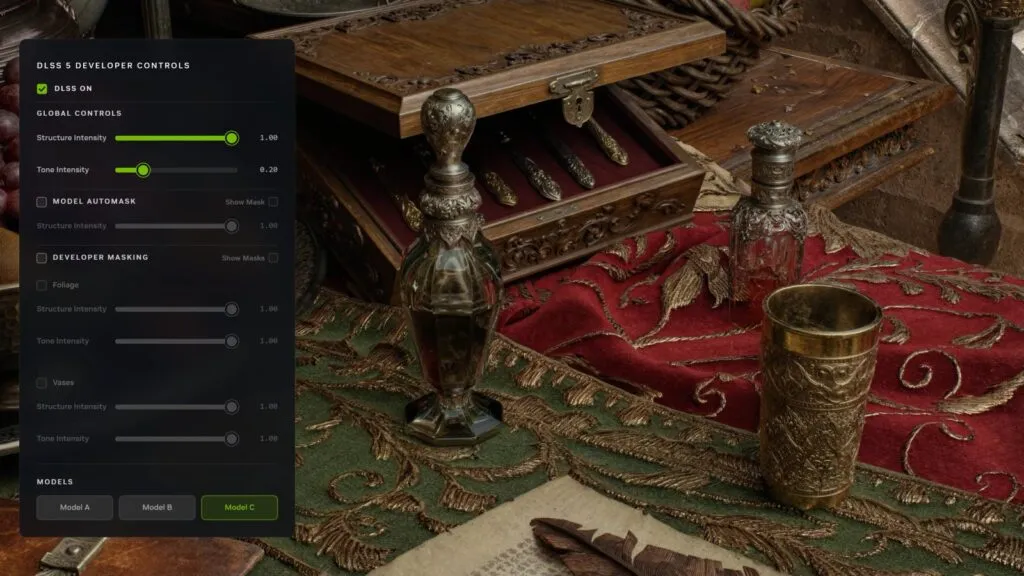
NVIDIA's answer is the developer tooling shown above: effect strength, colour grading and per-object masks, so an artist decides where and how the network steps in. The company stresses that the model is deterministic and trained to preserve artistic intent. Digital Foundry tested that in practice: in realistic NBA 2K27 the effect works best, while mods on stylised games such as Final Fantasy VII Rebirth produce overdone faces that clash with the art style.
What to avoid
- Mods in games with anti-cheat. Autopilot warns about Easy Anti-Cheat, BattlEye and Vanguard but still lets you install. There are no documented bans yet, but a ban lands on you, not on the mod's author.
- Lookalike sites and "DLSS 5 installers". Download mods only from the projects' GitHub pages.
- Illusions about legality. The library got out through a mistake by 2K, and every copy of it is distributed without NVIDIA's permission. Nobody has faced action over it so far, but there is no guarantee.
- DLSS 5 on 8 GB cards at 1440p and above. Measurements show low memory warnings and collapses to single-digit fps.
- Buying hardware for DLSS 5. One supported game is not a reason to change your card. If you are choosing one now, look at ordinary performance, as in our FSR 4 versus DLSS 4.5 comparison.
Where things stand on 8 November 2026
- DLSS 5 is real, it works and it visibly changes faces and light, but officially it is in two games, NBA 2K27 and Hogwarts Legacy, and only on RTX 50.
- The cost is a third to two thirds of your frame rate. Any RTX 50 card runs it at 1080p, 1440p wants an RTX 5070, 4K an RTX 5080 or 5090 with upscaling.
- RTX 40 has been promised it with no date, RTX 20 and 30 have not. Mods exist for everything, but they mean a leaked library and real risks.
- AMD is officially not involved. The Radeon mod is improving fast, and AMD's own equivalent is rumoured for its next generation.
- The most useful thing for an RTX owner today is not DLSS 5 but properly set up DLSS 4.5, which works on every card.
Update log
| Date | What changed |
|---|---|
| 10.11.2026 | PC Games Hardware tested DLSS 5 in Hogwarts Legacy on an RTX 5070 Ti at 1440p with DLSS Quality. Without ray tracing the game ran at about 120 frames per second, and DLSS 5 took roughly 25% of that away. With ray tracing on Ultra the game is CPU-bound: 54.5 fps without DLSS 5 and 53.7 fps with it, the card simply gets busier (average load up from 71 to 86%), so in this mode the network comes almost free. At 4K DLSS 5 runs at full resolution whatever upscaling mode you pick, and there, in the editors' view, ray tracing gives you more for the same near-half of your frame rate, real reflections included. PCGH says the in-game DLSS 5 is tuned far more gently than in NVIDIA's first trailer: faces are barely touched, but bright interiors look washed out, and backlit scenes can show a halo around the character. The War Thunder update with DLSS 5 (The Eagle's Shadow) is not out yet; Gaijin is still posting dev blogs about the new rendering. No new mod versions in the last day. |
| 09.11.2026 | AMDNR shipped build 0.3.5.8R18 (launcher 0.3.5.101): fixes for how the Mochi runtime starts and cleans up, retries when Ray Reconstruction attaches late, FidelityFX and frame generation errors; with the danielblnc 0.8.0 runtime, lowering the NR resolution (75%, for example) no longer throws away fine detail, and downloads and caches can now live on another drive. The author says plainly that none of this is confirmed in games yet, and the Witcher 3 artifacts and Spider-Man startup problems are still open. No new versions of DLSS-NR on AMD, Autopilot or the Intel port. |
| 08.11.2026 | The whole step-by-step section was checked against each project's latest release. AMDNR: build R17 of 8 November and the Mochizuki runtime. OpenNR (the renamed dlss5-neural-amd) and its new OptiScaler route. danielblnc's project is NeuralHub 0.8.0 since 17 October, with RX 6000 and DLSS, FSR or XeSS games. RX 6000: three routes after HIP SDK 7.2. RTX 20-40: DLSS 5 Autopilot 2.1.0 with nine routes instead of the removed Swapper. RTX 50: Hogwarts Legacy added to the official games. The Intel section caught up with dlss-nr-on-intel 0.0.4 and 0.0.5 (5 and 6 November): Python now ships in the archive, the network runs up to 19 percent faster, Arc A-series cards are supported experimentally, DirectX 12 games without XeSS work through OptiScaler set to XeSS, and there is a frame counter and a hogwarts profile that copies NVIDIA's tuning for Hogwarts Legacy. New numbers: 25-26 NR fps at 720p on the Arc 140V (author) and about 22 fps at 1080p on an Arc A770 (owner report on GitHub). The setup steps above are rewritten for 0.0.5. |
| 07.11.2026 | PC Games Hardware ran the first test of DLSS 5 in War Thunder, on the developer server ahead of The Eagle's Shadow update (mid-November). RTX 5070 Ti, 4K, Maximum preset, Ultra ray tracing without Ray Reconstruction: about 67 FPS without DLSS 5 and about 32 with it. DLSS Performance barely helps, 43 FPS instead of 32, because NVIDIA's pipeline runs the network after upscaling, at output resolution. At 2560x1440 with DLSS Performance and DLSS 5 it ran just under 90 FPS without frame generation. No new mod releases in the last day: AMDNR is still on build R16, the Intel port on 0.0.5. More in our news story. |
| 06.11.2026 | First independent DLSS 5 benchmark in Hogwarts Legacy: ComputerBase on an RTX 5090 (undervolted), Ryzen 9 7950X3D, driver 621.14, DLSS Quality, max settings and ray tracing. At 4K it is 75.6 FPS without DLSS 5 and 57.2 with it; at 2560x1440 95.8 and 83.8 (CPU-bound there). With 4X frame generation 226.1 and 179.1 at 4K. The image is clearly better mostly in Hogsmeade; NPCs are left alone, but the player character is redrawn completely and the face looks filtered. The verdict: leave DLSS 5 off in this game. The Intel Arc port reached 0.0.5: a hogwarts profile with the patch's gentler tuning (per the author), a frame counter in the panel (25-26 neural frames and 51-52 on screen with frame generation on an Arc 140V at 1280x720, per the author) and DirectX 12 games without XeSS through OptiScaler set to XeSS. No new AMDNR build, only a launcher 0.3.5.82 startup fix for R16. More in our news story. |
| 05.11.2026 | NVIDIA released Game Ready driver 621.14 WHQL (4 November) with DLSS 5 support for Hogwarts Legacy and War Thunder on RTX 50, plus a fix for video playback freezing on RTX 50 and RTX Spark after driver 621.01. The Hogwarts Legacy update arrived on 5 November at 16:28 UTC (build 2153883): Neural Rendering is off by default and is switched on in Display Settings with NVIDIA DLSS as the upscaler, or with Shift+Alt+B, and it needs an RTX 50 card and driver 616.64 or newer. The same patch adds XeSS multi-frame generation and Steam Deck OLED and Steam Machine support. There are no independent benchmarks yet. Once TechPowerUp, ComputerBase or PCGH publish them, the numbers will go here. The Intel Arc port moved to 0.0.4: Python now ships inside the archive, so there is nothing extra to install, and the network runs up to 19% faster at full render scale, per the author (less at low render scales, same image). AMDNR shipped 0.3.5.8 R15 and R16: the lmxxf runtime moves to 0.45 and, according to the notes, leaves less ghosting; crashes in Phantom Blade Zero (error 80004004 and on exit) are fixed, as are the gray screen in Starfield with frame generation on and the NBA 2K27 startup without a network connection, and on RDNA 2 in Cyberpunk 2077 the game's own denoiser works again when the driver refuses the danielblnc runtime. As before, the author does not confirm these fixes in games. Wccftech showed a YouTube video of the fan-made Astral Chain PC port with DLSS 5: richer environment textures, moodier lighting. PlatinumGames and NVIDIA have nothing to do with it. |
| 04.11.2026 | AMDNR moved to 0.3.5.8 R13 and R14. In R14 the author removed extra work that in R11-R13 builds could cost frames in DirectX 12 games while the FGHUDFix option is off (the default), and fixed a crash in Phantom Blade Zero and Black Myth: Wukong when RivaTuner (RTSS) runs alongside NeuralHub 0.8.0. In R13, games where the danielblnc runtime hung the driver (Red Dead Redemption 2, Gears of War: E-Day) no longer start it in inline mode. The author again says the fixes are not confirmed in games and promises no general FPS gain. Wccftech covered a Reddit user who put DLSS 5 and 3x frame generation on the GTA 6 trailer in real time through a video capture tool on an RTX 4080. Faces look filtered, frame generation ghosts a lot, and none of it says anything about the game on PC: GTA 6 has no PC version yet. |
| 03.11.2026 | NVIDIA named a third game getting official DLSS 5 in November: War Thunder adds it with the Eagle's Shadow update in mid-November. Hogwarts Legacy updates on November 5 and leaves character faces untouched, Where Winds Meet follows on November 23, and the Game Ready driver for these games lands on November 4. NVIDIA quotes 403 FPS for War Thunder on an RTX 5090 at 4K, but that is with 6X frame generation, so roughly 67 of those frames are rendered. Still no date for RTX 40. DLSS5-Autopilot 2.1.0 adds another install route through the GITC-Uplift ReShade add-on for DirectX 9-12, Vulkan and OpenGL games (off by default and never picked automatically), plus a choice of two or three model passes for OptiScaler builds, each pass costing about the network's time again. AMDNR 0.3.5.8 R12 goes after ghosting on the lmxxf runtime: model B no longer carries the previous frame into the next one, and NR pauses while a game's motion vectors are bad. The author says these fixes are not confirmed in games yet. More in our news story. |
| 02.11.2026 | The Intel port reached 0.0.3 and 0.0.3.1: the Insert settings panel now opens in DirectX 12 games too (through XeSS), and while it is open the game no longer gets your keys and mouse movement. On Arc A-series (A310-A770) the mod now installs and runs, but slowly: one player saw 1-2 frames per second on an A750, while six A770 owners sent reports showing the picture comes out right. AMDNR shipped builds 0.3.5.8 R10 and R11 with fixes for crashes in Starfield, Cyberpunk 2077, Dying Light 2, Red Dead Redemption 2 and Microsoft Flight Simulator 2024, plus the AMDNR menu under Proton; the author says none are confirmed in the games yet. Step-by-step AMDNR setup, the comparison with OptiScaler and what to do on RX 6000 are in our AMDNR Launcher guide. TechPowerUp added detail on foveation for DLSS 5: with default settings on a 4K monitor the network still processes 93% of the pixels, so the gain is small, and at 3440x1440 the mod switches itself off, so you need to shrink the centre zone by hand. On November 2 Wccftech covered a video by ChillyWillMD: Mario Kart World in a Switch 2 emulator with a DLSS 5 mod runs at 60 fps on an RTX 5060 Ti with a Core i9-13900K. |
| 31.10.2026 | The Intel Arc port now handles DirectX 12: in dlss-nr-on-intel 0.0.2 the network sits behind the game's own XeSS, so it only works in games that have XeSS and use it as the upscaler. The author tested it in Hogwarts Legacy, the game NVIDIA promises official DLSS 5 for on November 5. Vulkan and DirectX 8-11 games get an in-game panel on the Insert key, and the faster network B from the 310.9.16 library is now the default: in Mortal Kombat 11 on an Arc 140V it processes 37-38 frames per second against 19-20 for the old one, according to the author. AMDNR shipped a run of fixed 0.3.5.8 builds between October 28 and 31 (R2 to R9): crashes, frame generation and Phantom Blade Zero support; the author has not yet confirmed these fixes in actual games. Phantom Blade Zero also got a separate DLSS 5 mod on Nexus Mods a day after launch, built on ReShade and RenoDX, with no benchmarks (Wccftech, October 29). |
| 27.10.2026 | NVIDIA shipped RTX Remix 1.6 on October 23: remaster makers now get DLSS 5 with a choice of model A, B or C, highlight and volumetric controls, the faster Frame Generation mode (Preset C) and a beta of RTX Remix for Minecraft Java 1.21.1. Modders came up with foveation for DLSS 5: the network works at full strength only in the centre of the frame and less towards the edges. The author of the Foveated DLSS5 add-on for ReShade reports 48 to 80 FPS in The Witcher 3 on an RTX 4090 at 7680x2160 with two passes (as summarised by Tom's Hardware on October 20). On Radeon, AMDNR 0.3.5.8 downloads its runtimes by itself, adds a simple menu with one to three network passes and a third runtime, mochizuki; in the author's test peak VRAM with the danielblnc runtime dropped from 9.0 to 3.2 GB. The dlss5-neural-amd add-on is now called OpenNR and uses NVIDIA's new 310.9.16 model by default, about a third faster than the old one according to the author. More in our news story. |
| 18.10.2026 | DLSS-NR on AMD 0.8.0 (Oct 17) brings almost all of DLSS to RX 9000 and RX 7000: Super Resolution 4.5 upscaling, Ray Reconstruction, frame generation up to 4X and DLSS 5; RX 6000 gets neural rendering only for now. The installer is replaced by the NeuralHub manager, and the author quotes 90-100 FPS at 1080p on an RX 9070 XT without naming the game or settings. Details in our news story. NVIDIA's new 310.9.16 model from the NBA 2K27 update is already in mods: in tests collected by Wccftech an RTX 4080 SUPER at 4K with path tracing went from 108 to 150 FPS, Intel port 0.0.1.3 runs it in half the time on an Arc 140V, the Borderless Gaming effect 0.7.0 needs 36-40% less GPU time, and Aeon SR 1.3 uses it too and adds experimental frame generation. AMDNR 0.3.5.6: less ghosting, a one step smaller network by default on RX 7000, experimental HelixSR and d4r upscalers (RX 9070 and 9070 XT only). The DLSS5-Swapper repository and its author's GitHub profile disappeared on Oct 18, reason unknown. |
| 13.10.2026 | NVIDIA made the DLSS 5 model itself twice as fast: about 118 million parameters instead of roughly 155 million, and 20% less VRAM at 4K. It reaches NBA 2K27 on October 16 (up to 1.4x the frame rate according to NVIDIA, no test conditions given) along with RTX Spark laptops; Hogwarts Legacy gets DLSS 5 on November 5, Where Winds Meet in late November, RTX Remix on October 23. Still no date for RTX 40, but the new Frame Generation Preset C works there too. Details in our news story. On the mod side: the Borderless Gaming effect 0.5.0 (needs app version 2.0.11, faster on Intel Arc, no figures), AMDNR 0.3.5.5R3 (launch fixes for Dark Souls II and RE Requiem, flicker in AC Black Flag), Aeon SR 1.2.0 (more DLSS 5 detail at a low model resolution; DLSS upscaling on RX 7000 and 9000 is experimental and Linux only). |
| 12.10.2026 | AMDNR 0.3.5.5 and its R2 revision (October 11 and 12) are mostly about stability. The author tracked down a stall of roughly 90 ms every 3.2 seconds that hit everyone in every game, even with neural rendering and frame generation off, and it is gone. Neural rendering no longer switches itself off after a single slow frame, a loading screen or an alt-tab, and if the danielblnc runtime dies, the mod falls back to lmxxf. The 1440p network size runs 4.1% faster on RX 9000 (0.79 ms) according to the author. RX 6000 support is still planned for 0.3.6, which is not out. The DLSS5-NR effect for Borderless Gaming reached 0.4.0 (October 10): it no longer needs ONNX or Windows ML, runs on BGFX shaders under DirectX 12 and Vulkan, and the network size is adjustable again from 320 to 1920. Aeon SR 1.1.1 and 1.1.2 fix pauses when DLSS 5 is turned back on and error 87 at startup. None of the authors give in-game frame rates. |
| 09.10.2026 | The Intel port has its first ready-made Windows build: dlss-nr-on-intel 0.0.1 installs through an NR-Setup window and works in Vulkan games and in DirectX 8-11 games through DXVK. DirectX 12 is not supported yet. The author tested it on the integrated Arc 140V; discrete Arc B-series cards are untested in this release and A-series cards do not qualify. You need the NVIDIA library from a game you own, the download does not include it. No frame rate figures yet (our news story). On Radeon, AMDNR 0.3.5.3 makes the NVIDIA look the default, saves about 2 ms per frame on RX 9000 according to the author, fixes the HIP load error on RX 6000 and turns FSR 4 on there by default. |
| 08.10.2026 | Borderless Gaming 2.0.0 adds a new machine learning backend that picks the acceleration path for NVIDIA, AMD or Intel cards at install time. DLSS5-NR 0.3.0 is built for it and adds a Natural preset; after updating the app, reinstall the effect from GitHub, the old package stays in place otherwise. The author gives no speed figures and suggests capping the game's frame rate on older cards. The same release brings DLSS 4.5 Super Resolution to any game without swapping DLLs, on Radeon and Arc too according to the author. Nobody has tested that independently yet. |
| 07.10.2026 | The Intel Arc port of DLSS 5 (dlss-nr-on-intel) moved its Windows build into the main branch: a setup window in English and Russian, Steam launch that restores your old launch options, and a diagnostic report. On Intel's Windows driver the network runs 6-14% faster, according to the author. There is no ready release yet, so you have to build it from source. dlss5-neural-amd 0.7.11 and 0.7.12 remove a likely cause of Dragon Age: Inquisition quitting at launch (the author has not run the game yet), hand DLSS-NR on AMD 0.6.0 the exposure value it was missing, and no longer mistake a shadow map for the depth buffer in DirectX 11 games. |
| 06.10.2026 | Added AMDNR: an OptiScaler build with DLSS NR for Radeon plus a launcher that installs it in one click. RX 6000 is only planned for its 0.3.6. Separately, old games: the Aeon SR mod adds DLSS, FSR and XeSS to DirectX 8-12, OpenGL and Vulkan games and can switch on DLSS 5; PC Games Hardware tried it in Fallout 3. Modder Valery Kryzhanovsky ran DLSS 5 through 50 games, from the 1991 Duke Nukem to Cyberpunk 2077, at about 10 fps on a laptop RTX 5090. Full story: DLSS 5 in 1991's Duke Nukem and Fallout 3. |
| 03.10.2026 | DLSS-NR on AMD 0.6.0 adds Radeon RX 6000 on RDNA 2; those cards need the AMD HIP 7.2 runtime. For all cards, the author promises a more accurate image and fixed flickering dark areas and small lights in the pre-upscale mode. No RX 6000 numbers yet. The speed chart now runs to 0.5.1: 3.13 times faster than 0.3.1. |
| 02.10.2026 | dlss5-neural-amd 0.7.7 and 0.7.8: Direct3D 10 games (Just Cause 2) and 32-bit OpenGL games (Half-Life) now work, and the Default, Natural and Cinematic styles now change the network itself. Important for RX 9060 XT owners: some of them saw the whole PC lock up with danielblnc's runtime, so the mod now turns neural rendering off until the game restarts if the GPU is stuck on a single job for more than 2 seconds. |
| 01.10.2026 | DLSS-NR on AMD 0.5.1 is now public: according to the author, 8 percent faster in Fast mode and 6 percent in Reference on RX 9000, and 3 percent faster in Fast on RX 7000. dlss5-neural-amd 0.7.6 installs it by default, and the author's supporters already have build 0.6.0. DLSS 5 Autopilot is now on 2.0.8. |
| 30.09.2026 | Borderless Gaming got its own DLSS5-NR effect: it never calls NVIDIA's library and, the author says, holds around 30 fps even on an RTX 3090. Wccftech tested DLSS 5 in The Witcher 3 Remastered on an RTX 5090 at 4K with path tracing: 50 fps without it and 35 with it. DLSS 5 Autopilot 2.0.8 (better at explaining why DLSS 5 did not start) and dlss5-neural-amd 0.7.3 (no more crashes in DirectX 11 games) are out. Full story: DLSS 5 without NVIDIA's DLLs: Borderless Gaming. |
| 29.09.2026, evening | DLSS-NR on AMD 0.5.0 is out: according to the author, the network is up to 207 percent faster on RX 7000 and 5 percent faster on RX 9000, with better detail on skin and faces. No benchmark or test conditions came with it. Updated the speed chart and the RX 7000 row. Also new: DLSS5 Swapper 2.2.9 with the DLSS 310.9.1 library, DLSS 5 Autopilot 2.0.7 and DLSS 5 Manager 1.3.4. Full story: DLSS 5 on Radeon RX 7000: up to 3x the speed. |
| 29.09.2026 | Broke down the 0.4.3 benchmark: the 75 fps was measured with FSR 4 Performance, low textures and no ray tracing. RX 7000 is supported in Reference mode. New chart of the mod network speed and an independent test by Ancient Gameplays. Full story: DLSS 5 on Radeon: 75 FPS, and the catch. |
| 28.09.2026 | DLSS-NR on AMD reached version 0.4.3: according to the author, 75 fps in Cyberpunk 2077 at 1080p on an RX 9070 XT in Fast mode. Added versions 0.4.1 and 0.4.2 and the Fast and Reference modes. |
| 26.09.2026 | First version of the guide. ComputerBase and Tom's Hardware measurements across the RTX 50 range, mods up to DLSS 5 Autopilot 2.0.5 and DLSS-NR on AMD 0.4.0, the Intel Arc 140V experiment. |
Sources
Official: NVIDIA DLSS 5 reveal, 16.03.2026, NBA 2K27 launch, 01.09.2026, driver 616.64, driver 617.14, NVIDIA developer blog, 22.09.2026, NVIDIA research page, comparison shots and menu from NVIDIA's materials.
Statements: NVIDIA on RTX 40 to Wccftech, the briefing on the 50-60 percent cost, VideoCardz on the missing NVIDIA App switch, VGC on Huang's comments, TechRadar on the Fridman podcast, Shacknews on Capcom's position.
Measurements: ComputerBase, 04.09.2026, Tom's Hardware, 05.09.2026, Tom's Hardware on RTX 5090 power, Digital Foundry, PC Gamer on the AMD mod.
Mods and projects: DLSS5 Swapper (repository removed on Oct 18, 2026), DLSS5 Autopilot, DLSS5-Patcher, OptiScaler_DLSSNR, DLSS-NR on AMD, dlss-nr-on-intel, VideoCardz on the early pass, Wccftech on PreSR, Tom's Hardware on RTX 30, PC Gamer on the second GPU, Tom's Hardware on Intel. AMD rumour: TechPowerUp, 16.09.2026. The PS5 Pro run: gamegpu only.
Game screenshots from the official Steam galleries, videos from the official NVIDIA GeForce channel.